
How to Use Text Clippings in macOS - MacRumors
Skip to Content

How to Use Text Clippings in macOS

by

In macOS, a Text Clipping is a selection of text that you've dragged from an application to another location on your Mac, where it becomes a unique kind of standalone file.

The relatively little-known feature has been around since at least Mac OS 9, and it offers a convenient way to save out pieces of text from pretty much anywhere for later use in another app or document.
how to use text clippings mac 1
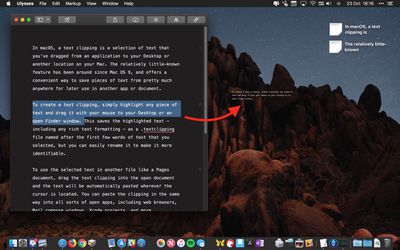
To create a Text Clipping, simply highlight any piece of text and drag it with your mouse to your Desktop or an open Finder window.

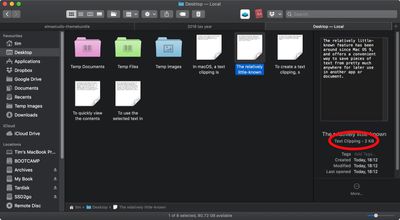
This saves the highlighted text – including any rich text formatting – as a .textclipping file named after the first few words of text that you selected, but you can easily rename it to make it more identifiable.
how to use text clippings macos 1b
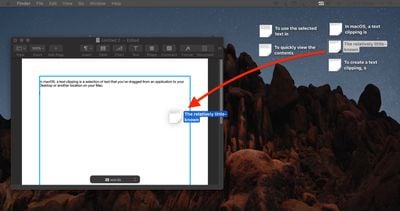
To use the selected text in another file like a Pages document, drag the Text Clipping into the open document and the text will be automatically pasted wherever the cursor is located.

You can paste the clipping in the same way into all sorts of open files and apps, including browser search engines, Mail compose windows, Xcode projects, and more.
how to use text clippings 2
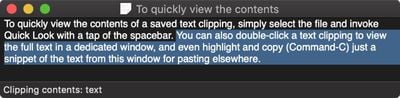
To quickly view the contents of a Text Clipping, simply select the file and invoke Quick Look with a tap of the spacebar.

You can also double-click a Text Clipping to view the text in a dedicated window, and even highlight and copy (Command-C) just a snippet of the text from this window for pasting elsewhere.
text clipping macos 1
Text clippings can speed up many repetitive tasks, making things like reusing email/letter templates and code snippets a cinch. If clippings become indispensable to your workflow, consider creating a dedicated folder to store them, otherwise they can quickly clutter up your desktop.


Top Rated Comments

roguedaemon Avatar
104 months ago
Can I just say I absolutely love this series of how to’s. Really sets MacRumors apart, and stands out from the crowd of copy past “news” sites.

While most of this stuff I know, I always read them because I invariably get at least a little tidbit out of it, like how this feature’s been around since OS 9.

Great stuff guys, keep it up!!
Score: 14 Votes (Like | Disagree)
104 months ago
Im a mac user since 2007, but this is actually new for me. Thanks!
Score: 4 Votes (Like | Disagree)
woefi Avatar
104 months ago
You have to wait (hover) above the text for about 5 seconds before dragging
You don't have to hover 5 seconds – you can immediately click - but you have to hold there a second - then drag.

And yes, I use this great feature since classic MacOS days. Unfortunately at the start of iCloud (maybe yosemite idk) this .textclipping files were destroyed when synced to iCloud and you could never rely on it. I thought they were about to abandon it...

But now (I'm on Sierra) it works again well in the cloud.
Score: 3 Votes (Like | Disagree)
104 months ago
Ah, we‘re so dark mode now.

Looks pretty in these small pics but I really only missed it for Xcode and other „lab“ environments that usually already came with a dark mode.

Any way to set dark mode per app?
Score: 2 Votes (Like | Disagree)
Deedolito Avatar
104 months ago
A big thank you for the 'how to'

Wasn't aware the function was there, and will implement it into my work flow.
Score: 2 Votes (Like | Disagree)
104 months ago
There was a thread here about problems with losing formatting of styled text when using cut and paste. I found that text clippings don’t have this problem. They preserved the format of styled text.
Score: 1 Votes (Like | Disagree)

Popular Stories

M5 MacBook Pro

RIP, MacBook Ultra

Monday October 19, 2026 9:37 am PDT by
Apple today sent out invites for an experience in Los Angeles on Wednesday, October 28, and the "Pro and tell" tagline on the invitation likely means that the rumored MacBook models with touch-enabled OLED displays will stick with MacBook Pro branding instead of the once-rumored "MacBook Ultra" name. The long-rumored "iPhone Ultra" ended up being named iPhone Duo, so speculation that Apple...
iPhone Duo Trio

Here's What Apple's Apps Look Like on the iPhone Duo

Tuesday October 20, 2026 11:12 am PDT by
With just three days to go until the iPhone Duo is released, Apple is getting ready for the launch. Behind the scenes, the App Store now has screenshots of Apple's built-in apps running on the Duo. We've seen some apps in marketing materials, but images of the ones we haven't seen give us an idea of what it will be like using the iPhone Duo day to day. Many apps are shown in landscape...
apple pro tell logo

Apple Announcing New Products Next Week: 'Pro and Tell'

Monday October 19, 2026 9:05 am PDT by
Apple's Greg Joswiak today hinted at new product announcements coming next week, sharing a social media post that says "Can't wait to pro and tell next week." Rumors suggest Apple is planning to debut the new MacBook Pro with an OLED touchscreen display, an M6 entry-level MacBook Pro, an M6 iMac, an iPad mini with an OLED display. Can't wait to pro and tell next week....
Latest Stories
Apple Reveals More Than 50 Apps That Will Be Updated for iPhone Duo
26 minutes ago
Apple Blocks Certificates That Could Help Attackers Fake Websites
2 hours ago
Giant iPhone Duo Installations Spotted at Apple Fifth Avenue
2 hours ago
iPhone Duo 2 Prototypes Include Under-Display Face ID
3 hours ago
Tesla App Gains iPad and iPhone Duo Support
7 hours ago
Apple Reportedly Boosts iPhone Duo Orders by 44%
7 hours ago
Fortnite Returning to Australian App Store After Court Ruling
8 hours ago
Apple Ordered to Open iPhone to Rival App Stores in Australia
8 hours ago
Apple Suppliers Face Hurdles Cutting Circuit Board Emissions
8 hours ago
Things Updated for iPhone Duo With Adaptive Layout
9 hours ago
Simplicity and Siri AI Are HomeView's Killer Features, Apple Says
9 hours ago
iPhone Duo Reviewers Really Miss Face ID
14 hours ago
Does the iPhone Duo Run Hot? Here's What Reviews Found
15 hours ago
Apple Music's New Look is Now Live on Apple's Website
16 hours ago
Anthropic Launches Claude Duet, a Proactive AI Agent
17 hours ago
What 32,000 Folds Did to the iPhone Duo's Hinge
17 hours ago
iPhone Duo's Hidden FaceTime Camera Takes 'Trash' Photos
19 hours ago
iPhone Duo Has 'Edge Light' Feature That Debuted on Macs Last Year
20 hours ago
Apple Support App Updated for iPhone Duo's Larger Display
20 hours ago
Amazon Sweetens the Deal on Entry-Level 16-Inch MacBook Pro With $570 Off
20 hours ago
iPhone Duo Tips Over on MagSafe Stands When Unfolded
20 hours ago
Apple Music's New Look Officially Announced
21 hours ago
iPhone Duo Supports Apple Pencil Starting With iOS 27.2
22 hours ago
iPhone Duo Accessories Roundup: Cases and Screen Protectors From OtterBox, ZAGG, and More
23 hours ago
Apple Stores Will Have 'Limited' Availability of iPhone Duo for Walk-In Customers
23 hours ago
iPhone Duo Reviews Explain Why Device is Both 'Fun' and 'Frustrating'
1 day ago
Apple Says 'Reachability' Feature Coming to iPhone Duo Later This Year
1 day ago
Loop Capital Cuts Apple Rating Over iPhone Sales Outlook
1 day ago
Apple Stores in Bordeaux and Lille Looted During French Protests
1 day ago
Bluesound Adds Native Apple Music Support
1 day ago








































