

In iOS 15.1 and iPadOS 15.1, FaceTime received some major enhancements, including the ability for you to share your screen with other people on a video call.

Officially called SharePlay, this screen sharing feature also lets you watch streamed movies and TV shows together. When you're on a FaceTime call, everyone on the call will see the same synced playback and video controls.
The following steps explain how it's done. Note that both parties need to be using FaceTime on an Apple device that supports iOS 15.1 or iPadOS 15.1 for SharePlay to work. SharePlay is not compatible with the browser version of FaceTime available to non-Apple device users, and isn't yet available for macOS Monterey.
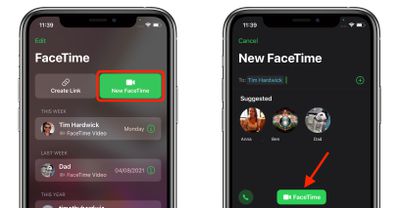
- Launch the FaceTime app on your iPhone or iPad and initiate a call.

- When the call has connected, tap the SharePlay button at the top-right corner of the screen in the new control panel.
- Tap Share My Screen in the dropdown. After a three-second countdown, screen sharing will initialize.
- Now navigate to the TV app or another streaming app, select something to watch, then press Play.
- Select SharePlay when the prompt asks you if you want to SharePlay content. Other people on the call will also be asked whether they want to join SharePlay with you.

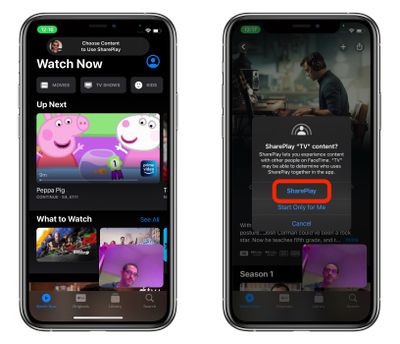
That's all there is to it. The video will stream to other people on the call. As you chat and watch the stream together in sync, the volume will automatically adjust so that you can hear everyone talking without missing the show, and if you fast forward or rewind the video, other people on the call will be notified.
Did you know that you can also listen to music together using SharePlay? Simply launch Apple Music and choose a song for everyone to hear it at the same time.
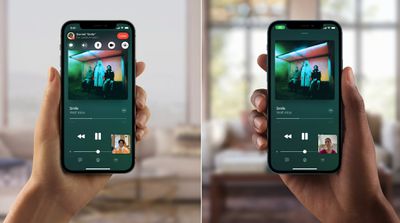
Anyone on the call can contribute to the shared music queue. The SharePlay music interface will display synced playback controls, and everyone will be able to see what's coming up next.




















