

iOS 14 brings Picture in Picture mode to the iPhone, allowing movies, TV shows, and videos to be watched in a small window while you do other things on your iPhone.

Picture in Picture Mode won't be compatible with the YouTube app until YouTube updates it with support, but for now, you can watch YouTube videos in Picture in Picture Mode through Safari.
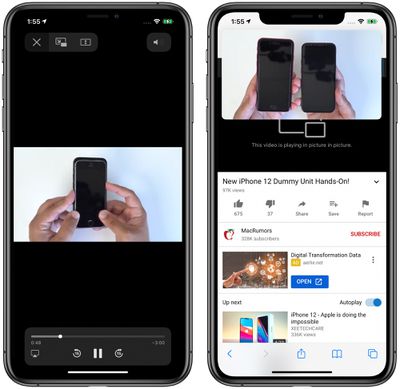
Activating Picture in Picture Mode
- Open Safari.
- Navigate to the YouTube website.
- Find a video that you want to watch.

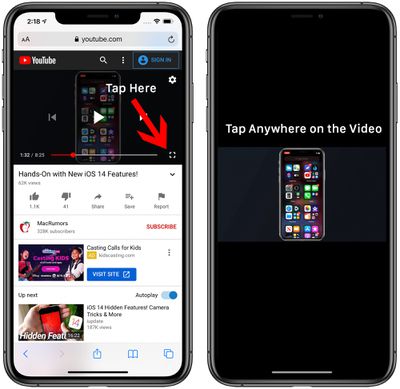
- Tap on the square icon at the bottom to put the YouTube media player in full screen mode.
- Tap on the video to display the controls.
- Tap on the Picture in Picture icon that looks like a larger screen with an arrow going to a smaller screen. Alternatively, double tap with two fingers on the screen or swipe upwards from the bottom of the iPhone to activate Picture in Picture.
- To continue browsing Safari while watching your video, just open another Safari tab, or swipe to get to the Home Screen to open another app.
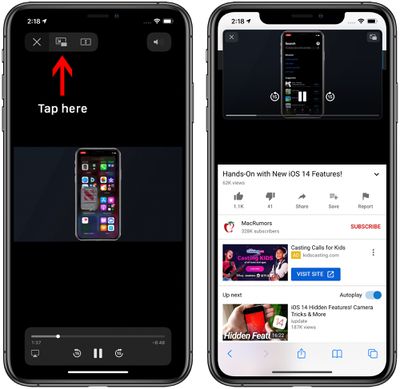
Once Picture in Picture mode is activated, you can swipe out of Safari to do other things on your iPhone. You can move Picture in Picture windows anywhere on the display and double tap to change the size to small, medium, or large. If you need to use your iPhone's full display but still want to hear the video, you can even drag the Picture in Picture window all the way off the screen.
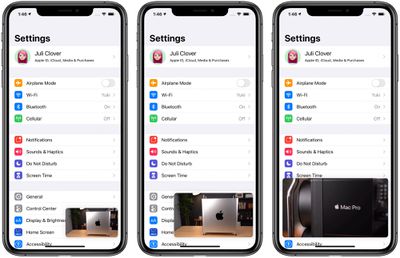
Exiting Picture in Picture Mode
- Tap anywhere on the video to bring up the video controls.
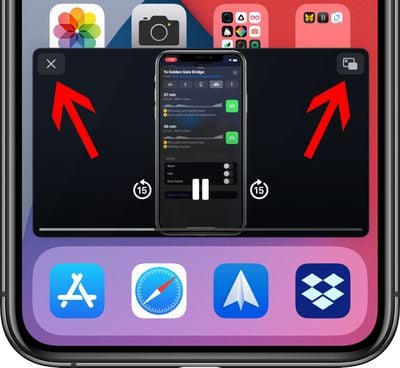
- Tap on the Picture in Picture icon in the upper right side of the window. You can also double tap on the video with two fingers.
- Alternatively, if you're done watching the video, tap on the "X" to close it entirely.
For more on how Picture in Picture mode works with apps, the web, and FaceTime, make sure to check out our Picture in Picture guide.




















