
iOS 14: How to Use Picture in Picture Mode on iPhone - MacRumors
Skip to Content

iOS 14: How to Use Picture in Picture Mode on iPhone

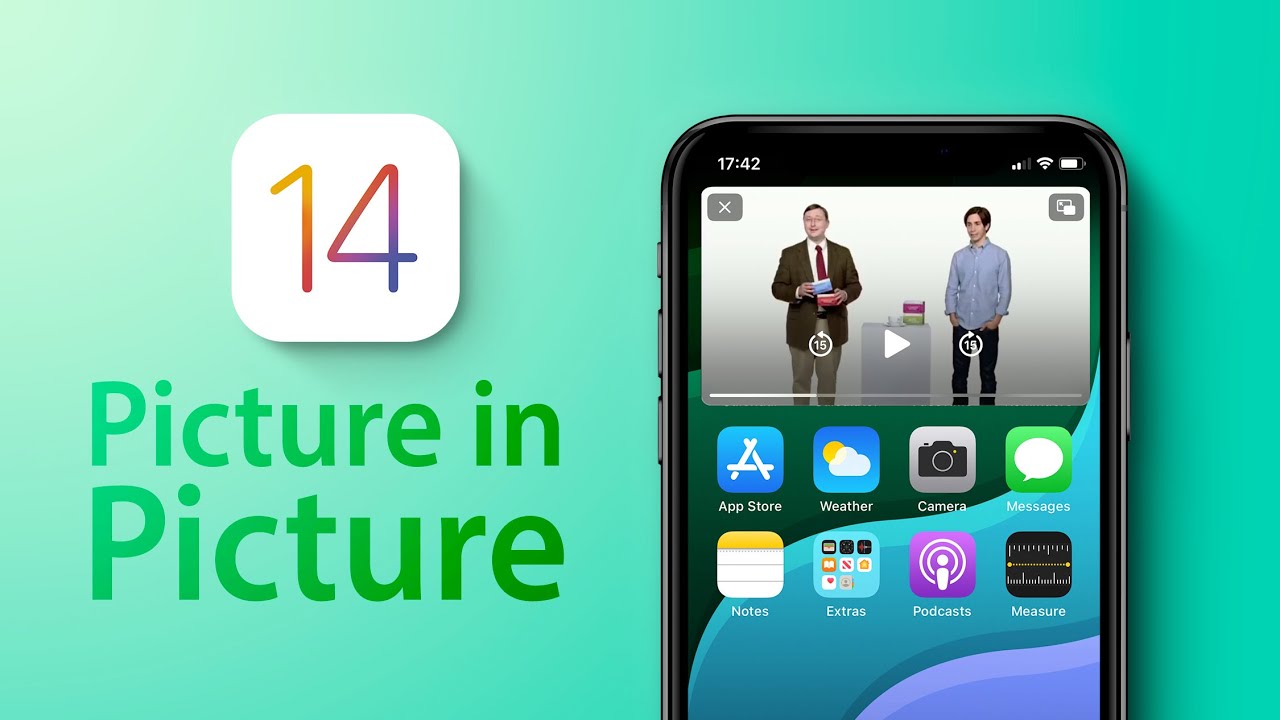
With iOS 13, Apple added a Picture in Picture Mode to the iPad, and with iOS 14, that Picture in Picture functionality is available for the iPhone too, letting users do things like watch videos and take FaceTime calls while doing other things on their device.

This guide covers everything that you need to know about using Picture in Picture on the iPhone.

Using Picture in Picture With Apps

Picture in Picture works with apps that play video content, but when it comes to third-party apps, app developers have to implement support for the feature.
pictureinpictureappletv

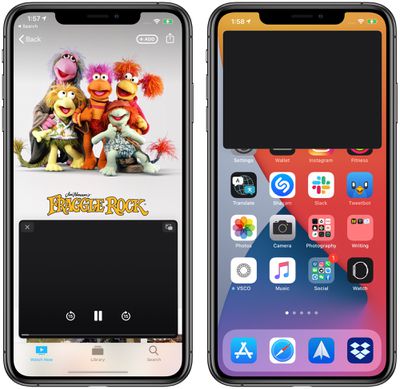
Picture in Picture in the Apple TV app. Content is black because Apple does not allow screenshots of movies and TV shows.

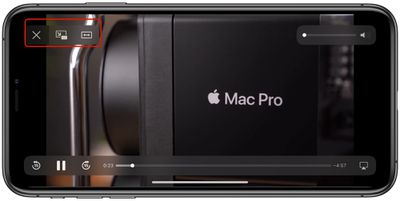
In a compatible app, which includes Apple's apps such as ‌Apple TV‌, you can tap on the Picture in Picture icon available at the top of the app to activate Picture in Picture mode, double tap on the video with two fingers, or swipe upward from the bottom of the iPhone's display to activate Picture in Picture mode.

Exiting out of Picture in Picture Mode and returning to full screen mode with the app reopened can be done by tapping on the same icon in the upper right corner of the Picture in Picture window or double tapping with two fingers. Closing the Picture in Picture window and existing out of the app can be done by tapping on the X in the left corner.
pictureinpicturecontrols
Picture in Picture mode controls for apps that play television and movie content include play/pause and an option to tap to skip 15 seconds forward and 15 seconds back.

Apple's apps that work with Picture in Picture include anything with a video feed, such as ‌Apple TV‌+ or video footage from HomeKit-enabled cameras in the Home app.

YouTube Picture in Picture

YouTube, unfortunately, has not implemented Picture in Picture support yet, so the YouTube app doesn't work with the feature. There are some doubts that YouTube will ever support this feature, but YouTube has been testing it on the ‌iPad‌. Fortunately, there is a workaround for now, using YouTube on the web.

Using Picture in Picture on the Web

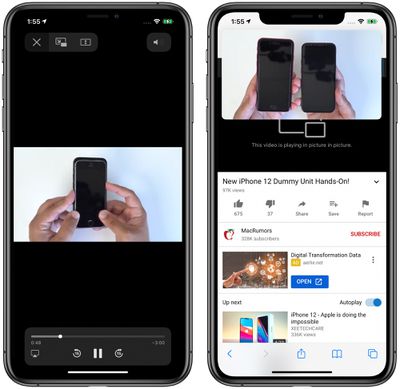
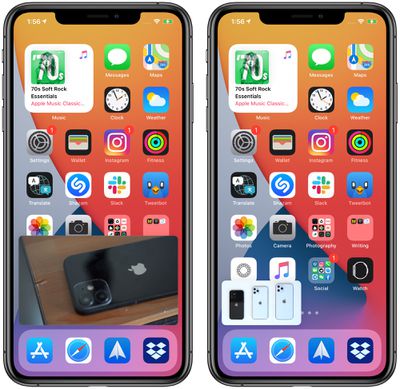
Picture in Picture with the Safari app works with almost any video and website developers don't need to implement support. On a site with a video, tap to play the video and then tap the Picture in Picture icon or do a two finger double tap on the video. You can also swipe upwards from the bottom of the iPhone to activate Picture in Picture.
pictureinpicturesafari2
There are some video types that don't work, such as the videos that some sites embed in webpages, so there may need to be some tweaks to some websites before those kinds of videos can be used in Picture in Picture mode. It is compatible with videos from sites like YouTube and Vimeo, however, so websites that use these embeds will have content compatible with Picture in Picture.
pictureinpicturesafari
Note that to use Picture in Picture mode with Safari, if you want to continue browsing another website while a video plays, you need to open a new Safari tab.

Using Picture in Picture with FaceTime

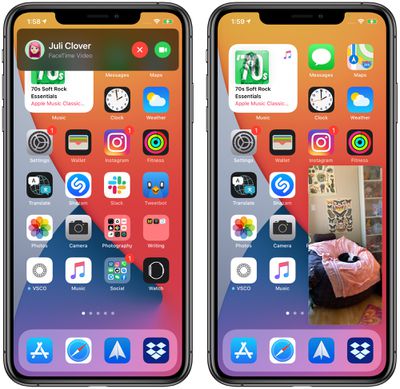
Picture in Picture works with ‌FaceTime‌ in iOS 14, and that's perhaps the most useful way to take advantage of it. In iOS 13, if you need to do something on your phone, you have to swipe out of the ‌FaceTime‌ window, which pauses your video for the person you're speaking with.
pictureinpicturefacetime
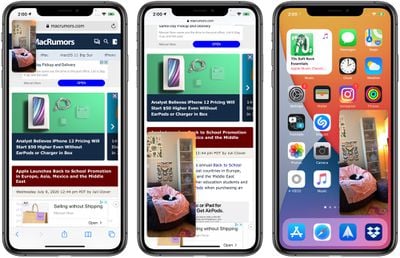
In iOS 14, if you swipe out of a ‌FaceTime‌ call it automatically minimizes into a Picture in Picture window that continues to be visible even while you access other apps so you and the other person you're talking to can continue your conversation without the iPhone being otherwise unusable.

You can double tap on the ‌FaceTime‌ window to change its size from large to medium or small and then back again, and if you just single tap the Picture in Picture window expands back to the full size of the iPhone's display. You can also move the Picture in Picture window to the optimal spot on the screen.
pictureinpicturefacetime2

Customizing Picture in Picture Window Size and Position

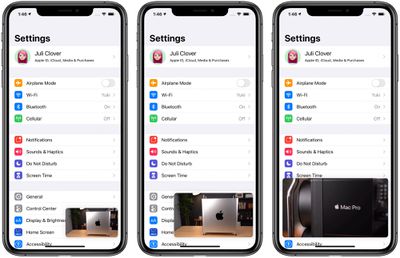
You can double tap on any Picture in Picture window or use pinch gestures to change the Picture in Picture window size. There are three sizes to choose from: small, medium, and large.
pictureinpicturesizes
The small window is about the size of two app icons, the medium is as wide as about three app icons and as tall as one and a half, while the largest window is the size of eight app icons.

All of the windows are shown in a landscape orientation on the iPhone's Home Screen with the exception of ‌FaceTime‌, which is shown in portrait mode.

Picture in Picture windows can be used with almost any app or while on the ‌Home Screen‌. The small and medium windows can be moved to any corner of the iPhone's display, while the large Picture in Picture window can be placed at the top or the bottom of the screen.

Moving the Picture in Picture Window Off Screen

You can pull a Picture in Picture window of any size over to the side of the iPhone with drag and drop gestures, moving it off of the screen.
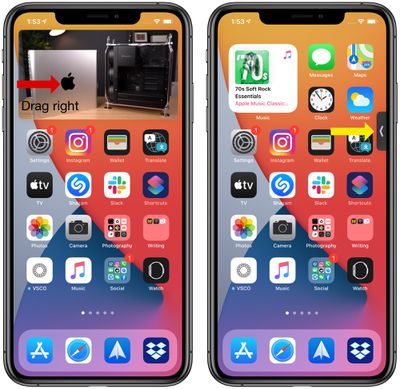
pictureinpicturecollapse
With the Picture in Picture window off screen, you will continue to hear the audio from the video or ‌FaceTime‌ call, but it won't be visible on the iPhone's display.

Guide Feedback

Have questions about the Picture in Picture mode on the iPhone, know of a feature we left out, or want to offer feedback on this guide? Send us an email here.


Related Forum: iOS 14

Popular Stories

M5 MacBook Pro

RIP, MacBook Ultra

Monday October 19, 2026 9:37 am PDT by
Apple today sent out invites for an experience in Los Angeles on Wednesday, October 28, and the "Pro and tell" tagline on the invitation likely means that the rumored MacBook models with touch-enabled OLED displays will stick with MacBook Pro branding instead of the once-rumored "MacBook Ultra" name. The long-rumored "iPhone Ultra" ended up being named iPhone Duo, so speculation that Apple...


iPhone Duo Trio

Here's What Apple's Apps Look Like on the iPhone Duo

Tuesday October 20, 2026 11:12 am PDT by
With just three days to go until the iPhone Duo is released, Apple is getting ready for the launch. Behind the scenes, the App Store now has screenshots of Apple's built-in apps running on the Duo. We've seen some apps in marketing materials, but images of the ones we haven't seen give us an idea of what it will be like using the iPhone Duo day to day. Many apps are shown in landscape...
apple pro tell logo

Apple Announcing New Products Next Week: 'Pro and Tell'

Monday October 19, 2026 9:05 am PDT by
Apple's Greg Joswiak today hinted at new product announcements coming next week, sharing a social media post that says "Can't wait to pro and tell next week." Rumors suggest Apple is planning to debut the new MacBook Pro with an OLED touchscreen display, an M6 entry-level MacBook Pro, an M6 iMac, an iPad mini with an OLED display. Can't wait to pro and tell next week....

Top Rated Comments

BulkSlash Avatar
82 months ago
Not to be that guy, but picture-in-picture has been available on the iPad since iOS 9 not iOS 13. I‘m pleased we’re finally getting it on iPhone.

I’ve now deleted the YouTube app and am just using the website because you can do picture-in-picture with that. It even seems to support auto-playing the next video so you don’t have to keep switching back to Safari to start the next video, which is really good.
Score: 10 Votes (Like | Disagree)
Rogifan Avatar
82 months ago
Apple needs to mandate that video apps support PIP. It’s ridiculous that Google doesn’t have to support an OS feature because they want to charge you for it.
Score: 9 Votes (Like | Disagree)
Apple_Robert Avatar
82 months ago

Hope they introduce the corresponding feature for people on the other end -- Auto Disconnect if more than one thing is showing on the other person's phone!

Just what we need. Calling someone up and they're watching a video, playing a game, and saying "Uh-huh", "uh-huh" every now and then!

No, thank you! It'll be as bad as people who put you on hold to take the other call!
All of the responders to your post are busy assisting other forum members. Your post is very important to us. Please remain on MacRumors constantly refreshing the page and someone will be with you shortly. We appreciate your patience and thank you for choosing MacRumors.
Score: 6 Votes (Like | Disagree)
arn Avatar
82 months ago

Actually Video overlay, can two videos be played at once?
In some situations yes. YouTube safari and YouTube app didn’t work. But YouTube video and Instagram video with both audio works!

[Click to view video attachment]
Score: 6 Votes (Like | Disagree)
Apple_Robert Avatar
82 months ago
This works the same on iPadOS. I have used the feature more than I thought I would on my iPad Pro. My SE is too small for such a feature to be practical.
Score: 5 Votes (Like | Disagree)
jclo Avatar
82 months ago

This works the same on iPadOS. I have used the feature more than I thought I would on my iPad Pro. My SE is too small for such a feature to be practical.
Yeah, makes more sense on the iPad's larger display, but it's especially handy for FaceTime on all devices.
Score: 4 Votes (Like | Disagree)
Latest Stories
Apple Updates More Apps With iPhone Duo Support
22 minutes ago
Apple Will Label Apps 'Made for iPhone Duo' in App Store
3 hours ago
Amazon Takes $49 Off iPad With Prices Starting at $399.99
4 hours ago
F1 on Apple TV Now Available in Dolby Atmos
4 hours ago
Apple Reveals More Than 50 Apps That Will Be Updated for iPhone Duo
5 hours ago
Apple Blocks Certificates That Could Help Attackers Fake Websites
6 hours ago
Giant iPhone Duo Installations Spotted at Apple Fifth Avenue
7 hours ago
iPhone Duo 2 Prototypes Include Under-Display Face ID
7 hours ago
Tesla App Gains iPad and iPhone Duo Support
11 hours ago
Apple Reportedly Boosts iPhone Duo Orders by 44%
12 hours ago
Fortnite Returning to Australian App Store After Court Ruling
12 hours ago
Apple Ordered to Open iPhone to Rival App Stores in Australia
12 hours ago
Apple Suppliers Face Hurdles Cutting Circuit Board Emissions
13 hours ago
Things Updated for iPhone Duo With Adaptive Layout
13 hours ago
Simplicity and Siri AI Are HomeView's Killer Features, Apple Says
13 hours ago
iPhone Duo Reviewers Really Miss Face ID
18 hours ago
Does the iPhone Duo Run Hot? Here's What Reviews Found
20 hours ago
Apple Music's New Look is Now Live on Apple's Website
20 hours ago
Anthropic Launches Claude Duet, a Proactive AI Agent
21 hours ago
What 32,000 Folds Did to the iPhone Duo's Hinge
22 hours ago
iPhone Duo's Hidden FaceTime Camera Takes 'Trash' Photos
23 hours ago
iPhone Duo Has 'Edge Light' Feature That Debuted on Macs Last Year
1 day ago
Apple Support App Updated for iPhone Duo's Larger Display
1 day ago
Amazon Sweetens the Deal on Entry-Level 16-Inch MacBook Pro With $570 Off
1 day ago
iPhone Duo Tips Over on MagSafe Stands When Unfolded
1 day ago
Apple Music's New Look Officially Announced
1 day ago
iPhone Duo Supports Apple Pencil Starting With iOS 27.2
1 day ago
iPhone Duo Accessories Roundup: Cases and Screen Protectors From OtterBox, ZAGG, and More
1 day ago
Apple Stores Will Have 'Limited' Availability of iPhone Duo for Walk-In Customers
1 day ago
iPhone Duo Reviews Explain Why Device is Both 'Fun' and 'Frustrating'
1 day ago









































