

I've taken a look at several of Alogic's 4K displays over the past couple of years, but the company has taken things to the next level with its new 27-inch Clarity 5K Touch display. Announced nearly a year ago, the Clarity 5K Touch recently began shipping to deliver not only a high-quality display experience with sufficient pixel density of 218 pixels per inch for full Retina support, but also touchscreen functionality via both stylus and fingers.
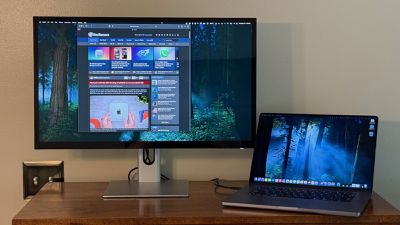
I've been testing out the Clarity 5K Touch for a few weeks, and I've come away impressed with the display quality and overall functionality, though the regular $1,600 price tag may give some potential customers pause when weighing it against other non-Apple 5K display options.
Alogic's Clarity 5K Touch offers a resolution of 5120 × 2880, and packing that many pixels into a 27-inch display means it can show a 2560 × 1440 HiDPI desktop in excellent true Retina quality at typical viewing distances. This yields crisp text and graphics without potential performance penalties and visual artifacts that can result from non-pixel-perfect scaling at lower pixel densities.
Display quality on the Clarity 5K Touch was excellent in my testing, essentially indistinguishable from my MacBook Pro (aside from ProMotion support) or my usual LG UltraFine 5K external displays running in Retina mode. Text and images appear super-sharp on the display, with individual pixels not visible until I get quite close to the display, as you'd expect at this pixel density. The display offers a 1,000:1 contrast ratio and up to 400 nits of typical brightness, which is a bit lower than Apple's notebooks and the Studio Display which can offer 500–600 nits of typical SDR brightness indoors, but the Clarity 5K Touch was plenty bright enough in my workspace.
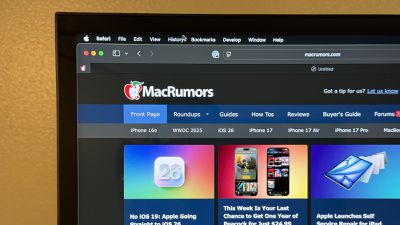
Color calibration appeared excellent out of the box, with everything looking vibrant yet natural and closely matching the other displays in my setup. The Clarity 5K Touch supports 100% of the sRGB gamut and 99% of the Adobe RGB and DCI-P3 gamuts, and it features HDR400 support.
The Clarity 5K Touch is a glossy display, and while Alogic says it features an anti-reflective finish, the glossiness is very evident if you use it in an environment where there is any significant amount of glare such as direct lighting or nearby windows. Depending on the relative locations and angles of those lighting sources and your seating position, the glare can interfere with visibility at times, so that's something to be aware of as you consider where you're planning to use the display.
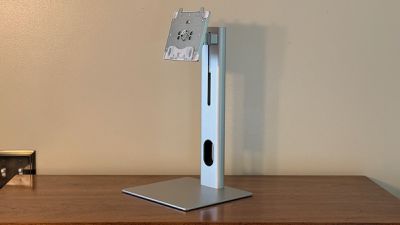
The display's construction feels solid, with the stand made primarily of silver aluminum for good heft and stability. A hole in the stand neck helps route cables to minimize their visibility. In addition to adjustable height over a range of 145 mm, the Clarity 5K Touch also supports tilt (5º forward to 20º back), swivel (up to 25º left or right), and pivot adjustments for maximum flexibility. You can pivot the display all the way to 90 degrees if you prefer to use the display in portrait orientation, while tilt and swivel help you get the display in just the right position, which is especially helpful in trying to mitigate glare. Support for 100×100 VESA mounts is also included if you prefer a different mounting solution.
The display body features a silver plastic enclosure on the rear with ventilation holes toward the top and bottom, which is perfectly adequate in my opinion considering I'm hardly ever going to look at the rear of it. Even so, it's a simple and clean design, just without the high-quality aluminum you'd find on an Apple display.
Around the screen itself, the black bezels aren't the thinnest I've encountered, with uniform size around the top and sides and a slightly chunkier bottom bezel, some of which no doubt going toward housing the touchscreen hardware. The bezels are essentially entirely underneath the display glass aside from a very narrow plastic strip around the perimeter, which does help hide them a bit, especially if using a dark desktop and/or dark mode.
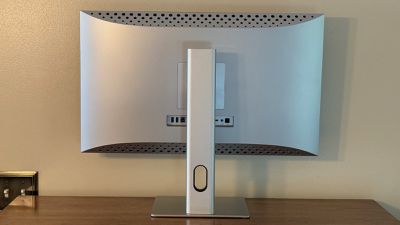
One area where the Clarity 5K Touch tops the Apple Studio Display is in the connectivity department, with Alogic's display offering not only a USB-C connection option but also a pair of HDMI 2.0 ports and a DisplayPort 1.4 port, allowing you to hook up multiple devices and easily switch the display between them or even show multiple sources simultaneously with picture-in-picture modes. The USB-C and DisplayPort ports support up to 5K resolution at 60 Hz, while the HDMI ports support up to 5K resolution at 30 Hz, so while you're not going to get the sharpest gaming response out of this display, I've found it to be perfectly acceptable for less demanding daily work.
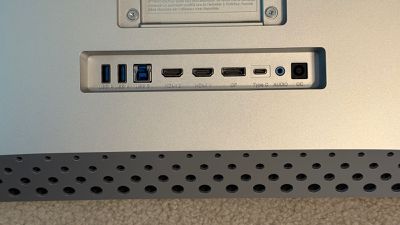
Other than some resolution and orientation options managed through the Settings app on your Mac, the various inputs and other display settings are handled through an on-screen display menu system, which is a bit lacking in the visuals department as is par for the course on these types of controls. Buttons hidden along the bottom right edge of the display allow you to move through the various settings, and you'll need to use these buttons to adjust speaker volume and display brightness, as native Mac keyboard control for these is not supported.
In addition to those various connectivity options for display sources, the Clarity 5K Touch also includes a USB-B 3.0 port for upstream data, and the display includes a pair of USB-A 3.0 ports (5 Gbps data, 7.5W charging) to serve as a hub for connecting wired accessories as long as there is either a USB-C or USB-B connection to the computer to facilitate data transfer. There's also a 3.5mm audio jack for connecting headphones or a speaker system, though it is output-only, so microphone input is not supported.
When connected over USB-C, the Clarity 5K Touch can support up to 65 watts of charging to a connected computer, but this drops to 45 watts when the display is in HDR mode. That's enough to keep something like a MacBook Air, or potentially even a 14-inch MacBook Pro, charged up, but it may not be able to keep up if you start getting into demanding workflows on more powerful machines, especially on a 16-inch MacBook Pro. And you certainly won't be able to fast charge a depleted MacBook Pro battery via the display. That said, it was able to keep up with my 16- inch MacBook Pro just fine in daily work.
Then there are the unique touchscreen capabilities of the Clarity 5K Touch, as Alogic claims it's the world's first 5K touchscreen display and we've yet to see anything to dispute this among the small number of 27-inch 5K displays on the market. I've already covered much of this functionality in my reviews of Alogic's earlier 4K touchscreen display, and the idea remains essentially the same here.
Install a Mac driver from the Alogic product page (Windows machines should support the functionality out of the box) and grant the appropriate permissions, and you'll be able to interact with macOS via up to 5-point multitouch or any active stylus supporting Microsoft Pen Protocol (MPP) 2.0, such as Alogic's Clarity Active Stylus Pen.
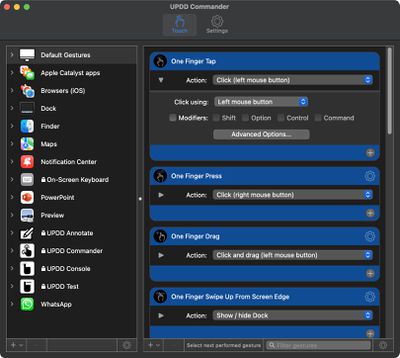
The UPDD Commander app provided as part of the driver installation isn't the prettiest Mac app you'll ever see, but it offers an array of customization settings to help optimize the touchscreen experience, including setting up functions for a wide variety of tap, press, swipe, and drag gestures with varying numbers of fingers. For example, you can set up a one-finger tap as a traditional mouse click and a two-finger tap as a right click, swipes in various locations can do things like show or hide the Dock, invoke Mission Control, or minimize windows. Two-finger rotation and pinch gestures can also be configured to manipulate on-screen content, and you can even set up different actions for gestures depending on which app you're in.
As with my previous reviews of this family of displays, I still find the touch functionality to be more appropriately used as a secondary input method, as it is not very efficient (not to mention tiring on the arm) to try to use touch input as a full-time control and it is a bit clunky to be constantly shifting from mouse to keyboard to touch. So if you're looking to turn your Mac, into a full touch experience, you'll likely be disappointed.
That's not to say the functionality doesn't come in handy though, and the most useful scenario for touch input in my opinion is in a multi-display setup where the Clarity 5K Touch serves as a secondary monitor. I keep Mail, Slack, and a few other apps perpetually open on a display off to the side of my main display, and it's nice to be able to reach over and quickly tap or swipe to look at emails or scroll through my feeds without having to move my mouse cursor back and forth across multiple displays. Everyone's situation is different, however, so consider how you might use a touch-capable display in both your workflow and your physical setup.
The glossy display will pick up fingerprints over time as you touch it, but it's generally not a big deal as you long as you keep the glare of bright lighting away from the screen. Otherwise, an occasional wipe down with a microfiber cloth cleans it right up.
The built-in 5-watt speakers provide a good amount of volume and provide a surprisingly immersive sound that I think comes from their rearward-firing orientation reflecting off the wall behind my desk, though overall the sound is a bit hollow as is common with integrated display speakers housed in plastic enclosures.
The Clarity 5K Touch does not include a built-in webcam, but Alogic does sell an illuminated light bar with 12-megapixel 4K autofocus webcam that connects via USB-C and features touch controls and a magnetic remote control dial to help light up your workspace.
The Clarity 5K Touch is normally priced at $1,599.99, though it's currently on sale for 10% off, bringing the price down to $1,439.99. That's just a bit cheaper than the starting price of Apple's Studio Display, though Alogic does give you a much more adjustable stand at no additional charge.
And while Alogic's display lacks the tight macOS integration and built-in webcam found on the Apple Studio Display, Alogic of course delivers the unique touchscreen functionality, so that will likely be a major consideration for potential customers. If you think the touchscreen functionality might be useful, then the Clarity 5K Touch is your only option currently on the market. If not, you might want to consider the Apple Studio Display or potentially one of the few other 27-inch 5K displays that are currently available at sometimes significantly lower prices.
Note: Alogic provided MacRumors with the Clarity 5K Touch display for the purposes of this review. No other compensation was received. MacRumors is an affiliate partner with Alogic. When you click a link and make a purchase, we may receive a small payment, which helps us keep the site running.





















Top Rated Comments
That said, I agree. Using it on a regular "office" standing screen that's farther away is much, much less appealing. POS systems and kiosks are fine, though.