
Review: Elgato's $300 Thunderbolt 3 Dock Offers a Solid Set of Ports in a Slim Design - MacRumors
Skip to Content

Review: Elgato's $300 Thunderbolt 3 Dock Offers a Solid Set of Ports in a Slim Design

by

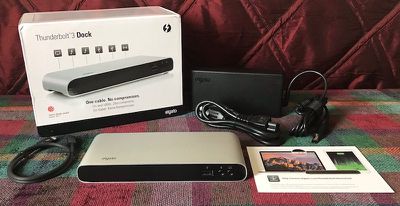
Over the past few months, I've taken a look at a number of Thunderbolt 3 docks that all hit the market around the same time, including models from OWC, CalDigit, Belkin, and Kensington. There's at least one more major player in the market, so today I'm sharing my thoughts on Elgato's $300 Thunderbolt 3 Dock. Elgato's dock has a lot in common with many of its competitors, including a slim horizontal design of brushed aluminum and plastic, an array of ports for expanding the capabilities of your Thunderbolt 3-equipped Mac, and more.
elgato tb3 dock
The dock looks nice on a desk, with a black matte plastic front and back wrapped by a brushed aluminum enclosure that's rounded around the sides. A small Elgato wordmark is printed in the front left corner of the dock's top, but it doesn't mar the overall look of the accessory, which remains rather unobtrusive. Measuring just under 8 inches wide, Elgato's dock is slightly narrower than some of the other docks, which to my eye makes it look a bit better sitting on the foot of my LG UltraFine 5K display. Belkin's dock at a little over 8 inches also fits pretty well, but wider docks like OWC's and Kensington's overhang a bit.

Of course, everyone's desk setup is different so variations of around an inch in the width of all of these docks may not be a deal-breaker, but it's worth noting this is the narrowest of the horizontal designs I've tested. At about 3.15 inches deep and an inch high, Elgato's dock is otherwise pretty much on par with competing docks in terms of size.

While the dock itself is slim and weighs just over two thirds of a pound, as with competing docks it has a large external power brick. In fact, it's the exact same power brick used by Belkin and Kensington, but with a small Elgato mark stamped into the top. A 0.5-meter Thunderbolt 3 cable is also included in the box.

Unlike most other docks, Elgato's does not include any LEDs to show whether or not it has an active connection to power or a computer. It's not really an issue, as for the most part a dock is meant to just work when it's plugged in and it's easy to tell whether or not that's the case.

Matching what is becoming standard for the latest docks, Elgato's Thunderbolt 3 Dock supports up to 85 watts of charging power, letting you power even a 15-inch MacBook Pro over the same cable used to transfer data and eliminating the need for a separate power adapter while connected to the dock. Docks such as OWC's at 60 watts may be unable to keep up with the power demands of a 15-inch MacBook Pro under heavy load.
elgato tb3 dock front
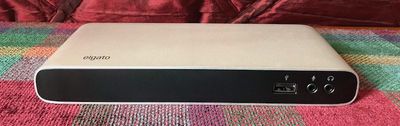
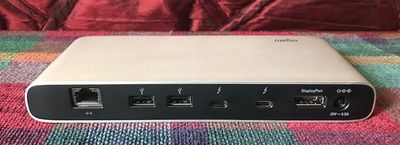
Elgato's dock also has roughly a standard set of ports, with a single USB 3.0 (5 Mbps) Type-A port and a pair of 3.5 mm audio jacks (one mono mic input and one amplified analog stereo output) on the front for easy access. The rear of the dock includes a Gigabit Ethernet port, two more USB 3.0 Type-A ports, a pair of Thunderbolt 3 ports, and a DisplayPort port. My usual complaint of wanting more USB ports such as the five offered on OWC's dock still stands here, but three is the number just about every other manufacturer is going with.
elgato tb3 dock rear
Unlike many other docks, Elgato's supports standalone USB charging, so an iPhone, Apple Watch, or other accessory connected via USB will continue to charge even if the dock isn't connected to a computer or a connected computer is turned off.

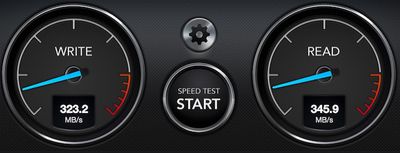
I ran a few speed tests using Elgato's dock paired with CalDigit's 10 Gbps USB 3.1 Gen 2 Tuff external SSD and found speeds of around 345 MB/s read and 325 MB/s write through the Type-A USB 3.0 port, which is pretty typical for docks like this but a bit slower than connecting directly to a computer via USB 3.0.
elgato tb3 dock usb a
Connecting the drive to one of the dock's Thunderbolt 3 ports using USB-C yielded read and write speeds of around 500 MB/s and 460 MB/s respectively, which is pretty close to the 505/485 MB/s speeds seen connecting directly to a 10 Gbps MacBook Pro. Of course, connecting a drive this way means you no longer have a Thunderbolt 3/USB-C port available for an external display if your setup requires it.

Using a combination of Thunderbolt 3/USB-C, DisplayPort, and appropriate adapters, Elgato's dock can support a single 5K display at 60 Hz or a pair of up to 4K displays at 60 Hz. Elgato has a support document outlining the various display configurations that can be used with the dock.

While Elgato's Thunderbolt 3 Dock works out of the box without the need for any drivers or other software, Elgato does offer a Thunderbolt Dock Utility to add some additional functionality. The utility runs as a simple menu bar app that makes it easy to eject any drives connected to the dock before manually disconnecting them or the dock.

elgato tb3 utility
The utility also enables high-power USB support that bumps all USB 3.0 ports to 1.5 A for faster charging while also adding support for Apple's external USB SuperDrive. Once enabled by the utility, high-speed charging does not require the utility to be running and also works if the host computer is sleeping.

At a list price of $300, Elgato's Thunderbolt 3 Dock is competitive with other docks such as CalDigit's TS3 and OWC's dock. Belkin and Kensington come in at $50 more for their docks. At the $300 price point, it would be nice to see some additional features such as more USB ports or an SD card slot. Certain customers might also appreciate eSATA or FireWire ports that are offered by some competitors, although usage of these interfaces continues to shrink.

Elgato's Thunderbolt 3 Dock is available now from Amazon.

Note: Elgato provided the Thunderbolt 3 Dock to MacRumors free of charge for the purposes of this review. No other compensation was received. MacRumors is an affiliate partner with Amazon and may earn commissions on purchases made through links in this article.


Top Rated Comments

BornAgainMac Avatar
121 months ago
Every thunderbolt dock ever released by mankind from planet earth has some missing feature or flaw including high price.
Score: 21 Votes (Like | Disagree)
markram Avatar
121 months ago
$300 and no HDMI port? mbp-style. pass

Score: 8 Votes (Like | Disagree)
CmdrLaForge Avatar
121 months ago
Wow - those are expensive for what you get.
Score: 5 Votes (Like | Disagree)
121 months ago
Why not just build these ports into the computer in the first place?
Score: 4 Votes (Like | Disagree)
121 months ago
So now that you have reviewed all the major docks, which one is best?
Score: 4 Votes (Like | Disagree)
Jimmy James Avatar
121 months ago
Ports. $300.
Score: 3 Votes (Like | Disagree)

Popular Stories

M5 MacBook Pro

RIP, MacBook Ultra

Monday October 19, 2026 9:37 am PDT by
Apple today sent out invites for an experience in Los Angeles on Wednesday, October 28, and the "Pro and tell" tagline on the invitation likely means that the rumored MacBook models with touch-enabled OLED displays will stick with MacBook Pro branding instead of the once-rumored "MacBook Ultra" name. The long-rumored "iPhone Ultra" ended up being named iPhone Duo, so speculation that Apple...


iPhone Duo Trio

Here's What Apple's Apps Look Like on the iPhone Duo

Tuesday October 20, 2026 11:12 am PDT by
With just three days to go until the iPhone Duo is released, Apple is getting ready for the launch. Behind the scenes, the App Store now has screenshots of Apple's built-in apps running on the Duo. We've seen some apps in marketing materials, but images of the ones we haven't seen give us an idea of what it will be like using the iPhone Duo day to day. Many apps are shown in landscape...
apple pro tell logo

Apple Announcing New Products Next Week: 'Pro and Tell'

Monday October 19, 2026 9:05 am PDT by
Apple's Greg Joswiak today hinted at new product announcements coming next week, sharing a social media post that says "Can't wait to pro and tell next week." Rumors suggest Apple is planning to debut the new MacBook Pro with an OLED touchscreen display, an M6 entry-level MacBook Pro, an M6 iMac, an iPad mini with an OLED display. Can't wait to pro and tell next week....
Latest Stories
Apple Blocks Certificates That Could Help Attackers Fake Websites
42 minutes ago
Giant iPhone Duo Installations Spotted at Apple Fifth Avenue
1 hour ago
iPhone Duo 2 Prototypes Include Under-Display Face ID
2 hours ago
Tesla App Gains iPad and iPhone Duo Support
6 hours ago
Apple Reportedly Boosts iPhone Duo Orders by 44%
6 hours ago
Fortnite Returning to Australian App Store After Court Ruling
7 hours ago
Apple Ordered to Open iPhone to Rival App Stores in Australia
7 hours ago
Apple Suppliers Face Hurdles Cutting Circuit Board Emissions
7 hours ago
Things Updated for iPhone Duo With Adaptive Layout
8 hours ago
Simplicity and Siri AI Are HomeView's Killer Features, Apple Says
8 hours ago
iPhone Duo Reviewers Really Miss Face ID
13 hours ago
Does the iPhone Duo Run Hot? Here's What Reviews Found
14 hours ago
Apple Music's New Look is Now Live on Apple's Website
15 hours ago
Anthropic Launches Claude Duet, a Proactive AI Agent
16 hours ago
What 32,000 Folds Did to the iPhone Duo's Hinge
16 hours ago
iPhone Duo's Hidden FaceTime Camera Takes 'Trash' Photos
18 hours ago
iPhone Duo Has 'Edge Light' Feature That Debuted on Macs Last Year
18 hours ago
Apple Support App Updated for iPhone Duo's Larger Display
19 hours ago
Amazon Sweetens the Deal on Entry-Level 16-Inch MacBook Pro With $570 Off
19 hours ago
iPhone Duo Tips Over on MagSafe Stands When Unfolded
19 hours ago
Apple Music's New Look Officially Announced
20 hours ago
iPhone Duo Supports Apple Pencil Starting With iOS 27.2
21 hours ago
iPhone Duo Accessories Roundup: Cases and Screen Protectors From OtterBox, ZAGG, and More
22 hours ago
Apple Stores Will Have 'Limited' Availability of iPhone Duo for Walk-In Customers
22 hours ago
iPhone Duo Reviews Explain Why Device is Both 'Fun' and 'Frustrating'
23 hours ago
Apple Says 'Reachability' Feature Coming to iPhone Duo Later This Year
1 day ago
Loop Capital Cuts Apple Rating Over iPhone Sales Outlook
1 day ago
Apple Stores in Bordeaux and Lille Looted During French Protests
1 day ago
Bluesound Adds Native Apple Music Support
1 day ago
Apple CEO John Ternus Explains What Makes Good Product Design
1 day ago






































