

A couple of years ago, I reviewed iVANKY's FusionDock Max 1, a powerful Mac dock utilizing dual Thunderbolt chips and dual-cable connectivity to drive 20 ports of various types for extreme versatility. Since that time, iVANKY has taken things further with the 23-port FusionDock Max 2 and now the 26-port FusionDock Ultra, and I've spent the past few weeks testing out the top-of-the-line FusionDock Ultra to see how it performs.
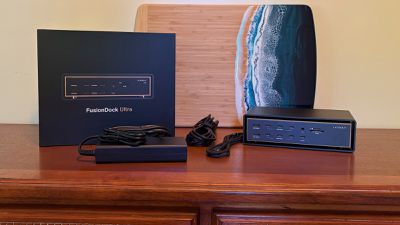
Similar to the FusionDock Max 1, the FusionDock Ultra features a dual Thunderbolt chip architecture that supports an impressive set of ports for power users. You'll find a huge array of USB ports, plus 10 Gigabit Ethernet, SD/TF card slots, and more.
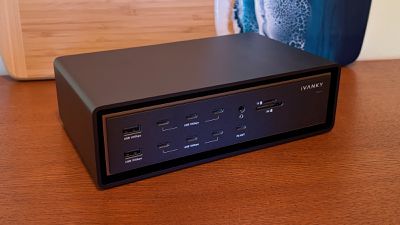
The FusionDock Ultra offers an appealing and practical design, although the front of the dock is littered with ports. That's a positive for ease of access if you need to connect and disconnect things, but it results in a less clean look and can make it harder to keep cables out of sight. But with this many ports, it more or less requires using the full front and rear panels of the dock just to fit them all in, so it's an understandable compromise.
The main body of the dock appears to float within a larger enclosure, only sitting on a few small pegs within the extruded black aluminum exterior shell. This design offers visual appeal while also providing room for airflow and a hefty amount of aluminum for heat dissipation via the copper-alloy midframe. In my testing, I found the exterior shell to get a bit warm with use, but not uncomfortable to touch at any point.
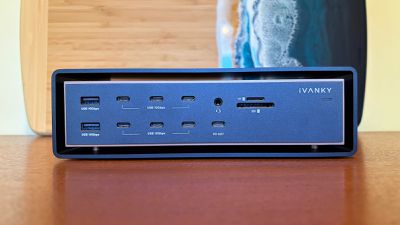
On the front of the FusionDock Ultra, you'll find a whopping six 10 Gbps USB-C ports, an additional 10 Gbps USB-C port with Power Delivery support up to 45 watts, two 10 Gbps USB-A ports, a 3.5mm combo audio port, UHS-II SD and TF/microSD 4.0 card slots, and an LED power light that's bright enough to let you know it's on while remaining dim enough to not be a distraction, even in a dark room when your screens are sleeping.
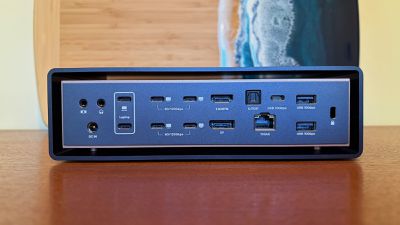
The rear of the dock features more than a dozen additional ports, including a pair of Thunderbolt/USB-C ports for the upstream connection to the Mac, four downstream Thunderbolt/USB-C ports for displays with the ability to support up to 80 Gbps or even 120 Gbps of data connection, an HDMI 4K port, a DisplayPort 2.1 port, one additional 10 Gbps USB-C port, two 10 Gbps USB-A ports, a 10 Gb Ethernet port, an S/PDIF optical port, and separate 3.5mm audio in and out ports, plus a Kensington lock slot to help secure the dock if used in a public environment.
There are dual fans inside the dock to help move air for heat dissipation, and they are audible when they kick on in a quiet environment, but I have not found them to be distractingly loud. Adaptive fan control modulates the speed depending on the heat being generated, and they will turn off or run very quietly at low speed under light to moderate workloads before ramping up under more demanding conditions. iVANKY says the fans register at 44–46 dBA when measured at a 1 cm distance, and that sounds about right: audible but more of a low white noise in a quiet environment and becoming nearly unnoticeable in busier environments.
As mentioned, the FusionDock Ultra connects to a Mac over a double Thunderbolt cable, and iVANKY has a clever cable design to help keep things neat. The two Thunderbolt connectors at the Mac end of the cable attach to each other magnetically, creating what amounts to a single connector for machines such as the MacBook Pro that have standard horizontal spacing between Thunderbolt ports.

If you're using something like a Mac Studio or Mac mini with a different alignment of the ports, the cable connectors can be separated. iVANKY's solution also includes a pair of slidable clips to help keep the two cables together and organized.
Notably, the FusionDock Ultra can provide up to 140 watts of upstream power to a connected Mac over this Thunderbolt connection, delivering quick charging to even Apple's most power-hungry portable Macs. In order to drive all of this, the dock comes with a fairly large 240-watt external power brick, but most users shouldn't find it too hard to tuck it away on the floor or behind other equipment.
Turning to display connectivity, while the FusionDock Ultra can drive four 6K displays natively, support ultimately depends on the Mac you're connecting it to. For full quad-display support, you'll need to be using a Mac with a Max or Ultra flavor of chip, anywhere from M1 up to M5. The latest MacBook Pro with an M5 Pro chip supports up to three displays, as does the latest Mac mini with either the M4 or M4 Pro chip. Machines with most other chips can support two external displays, while some older base chips like the M1 or M2 in a MacBook Pro or MacBook Air can only support a single external display.
Simply put, go off Apple's published specs for your model to see how many external displays you can use, as iVANKY's dock won't supersede those limits by using tricks like DisplayLink compression. This ensures optimal performance without degraded image quality or lag.
Users of the LG UltraFine 5K or Samsung ViewFinity S9 5K displays should note that the FusionDock Ultra only supports up to two of these being connected simultaneously. Apple Studio Displays are fully supported up to the maximum number specified for your machine. Generally speaking, I've been regularly using the FusionDock Ultra with two external displays throughout my testing and had a brief opportunity to test it with four displays, and I've seen no hiccups in performance with everything working seamlessly through the dock.
10Gb Ethernet connectivity is a major selling point for power users, as most docks deliver Ethernet at lower speeds as they seek to balance demands on the overall connection bandwidth, but the FusionDock Ultra's dual-chip and dual-cable design gives it the headroom to support the higher data speed.
There aren't a whole lot of Intel Macs left at this point, but it's worth noting that the FusionDock Ultra is only compatible with Apple silicon Macs, so it won't work with Intel Macs or PCs.
All of this doesn't come cheaply, with the FusionDock Ultra normally priced at $749.99, although iVANKY is currently discounting it to $649.99 on the iVANKY website and at Amazon. But for power users looking to connect a boatload of accessories to their Macs with minimal fuss, the FusionDock Ultra is an excellent companion. And if your needs aren't quite as high as what the FusionDock Ultra supports, iVANKY also offers the FusionDock Max 2 currently discounted to $399.99 or the original FusionDock Max 1 on sale for $299.99.
Note: iVANKY provided GeekWebGuides with the FusionDock Ultra for the purposes of this review. No other compensation was received. GeekWebGuides is an affiliate partner with Amazon. When you click a link and make a purchase, we may receive a small payment, which helps us keep the site running.















































Top Rated Comments
As long as it's whopping I'm good with that.
"This design offers visual appeal while also providing room for airflow and a hefty amount of aluminum for heat dissipation via the copper-alloy midframe. In my testing, I found the exterior shell to get a bit warm with use, but not uncomfortable to touch at any point."