

Redesigning an input device is a risky business. When Apple introduced its latest MacBooks, some users complained that the new butterfly mechanism in the keys was a turnoff. They criticized the keyboard for its lack of travel, and said the experience of typing was not much different to tapping on a touch screen. Other users felt okay with the change. Whichever side people fell on the debate, everyone could agree that how a keyboard actually feels beneath the fingers matters a great deal.
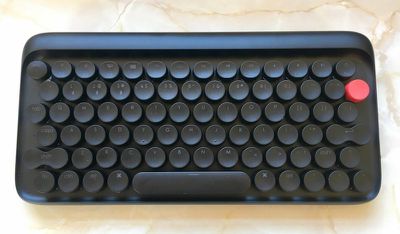
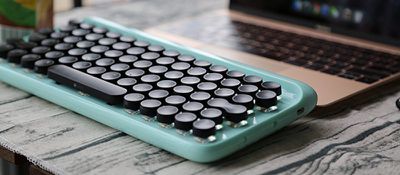
With the lofree Bluetooth keyboard, the designers have tried to re-imagine the typing process in a more radical way, by recreating the experience of operating a traditional typewriter, but in an elegant retro-modern design. The desirability of such a product is in no doubt – lofree's Indiegogo campaign set out to raise $10,000 over 30 days, but has already garnered $364,443 from over 4,000 backers, with several weeks to spare. We got a hold of a finished unit to see if the lofree keyboard can live up to expectations.
Design and Features
The first thing that struck me about the lofree was its sheer heft. At 800 grams, it's pretty heavy – the Apple Magic Keyboard is just 321 grams – but the extra weight has a stabilizing influence and adds to the retro feel. It features a sturdy rounded plastic base, with two rubber legs at the back that raise the keys high off the desk at a six degree angle.
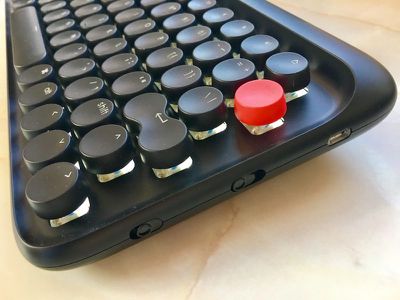
On the right-hand side of the keyboard is a micro-USB port for charging as well as for connecting in wired mode using the included cable. There's a switch next to the port to turn Bluetooth on/off. The second switch sets the keyboard for use on Mac/iOS or Windows/Android, but a quick look at the layout shows the lofree has been designed primarily with Apple users in mind.
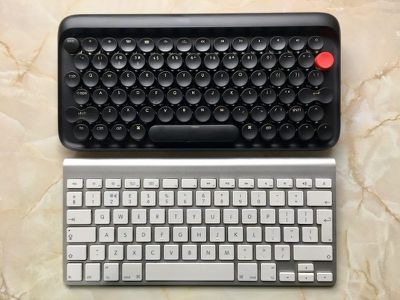
The functional layout on the top row houses the usual controls you'd expect of an Apple keyboard, like Mission Control, Launchpad, volume, and so on. However, overall the keys are more crowded, and there are some changes to the layout, the main one being the fact that the number key row lines up differently, so 1 is slightly right of Q, 2 is right of W, and so on. Eagle-eyed readers may have noticed key numbers 1, 2, and 3 all have Bluetooth symbols. These are used in combination with the fn key to quickly switch between up to three paired devices.
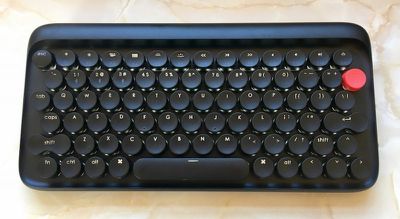
The keycaps are raised off the base in pseudo-typewriter fashion, which makes the backlight one of the signature features of the keyboard's design. I found that in a dimly lit room, it gave each key a lovely muted corona, but if you find the bed of light too glaring you can dial down the intensity by choosing from three levels of brightness, or simply switch off the backlight altogether. To save battery, the light also sleeps if you don't use the keyboard for a few minutes, but they snap back on just as quickly with a tap.
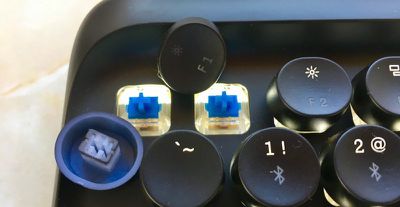
Instead of the squishy rubber membrane you'd find under most notebook keycaps, lofree has chosen to use Gateron Blue mechanical switches. The decision reflects lofree's attempt to mimic not only the look of a typewriter as closely as possible, but also the sound and the tactile sensation of hitting traditional typewriter keys.
In practice, this means there's a slight bump when the key is actuated, more force is required, and there's a lot more travel when the key is fully depressed. The replaceable keycaps also have a concave shape to fit your fingers.


Performance
I had no trouble pairing the keyboard with my MacBook Pro, iPad, or iPhone. The lofree appeared in Bluetooth preferences as soon as I switched it on, and the LED beside the caps lock key flashed to confirm the connection. The ability to switch between devices worked well too, and I didn't experience any dropouts when testing the keyboard within a reasonable range.
I type heavy-handed at the best of times, but tapping at the lofree's keys was enough to create an echo in the hallway leading to my office room. Gateron switches are loud and "clicky" compared to Apple keyboards, which is obviously why they were chosen. Whether you (or anyone within earshot) can get on with the sound will depend on taste as well as circumstance.
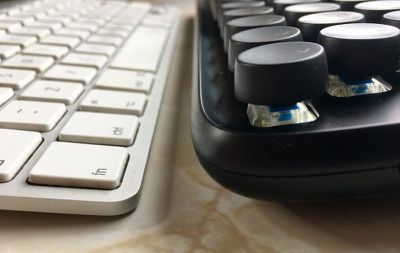
Some people feel the continual clackety-clack has a focusing influence on the mind. Others are likely to find the din positively off-putting. As such, it's probably a bad idea to use the lofree in an open plan office, unless you really want to annoy your co-workers. The best place to use this keyboard is probably at home in a personal office or study with the door firmly closed.
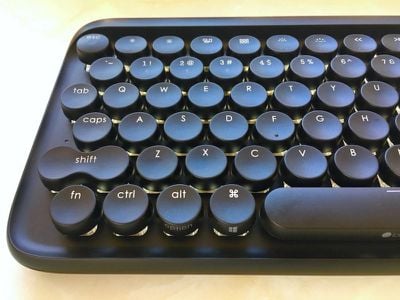
That said, such precautions are unlikely to muffle the volley of verbal abuse you may find yourself hurling at the lofree during your first few days together. The oddly aligned number keys certainly take some getting used to, but personally they were the least of my worries.
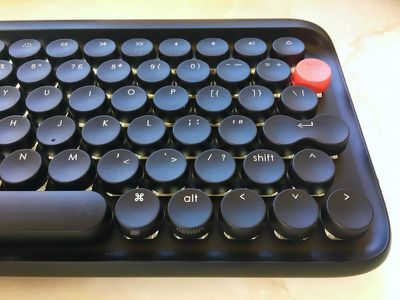
On an Apple keyboard, the right shift key is a large oblong target in both US and UK layouts, but on the lofree, the right portion of this area is home to the up arrow key. This seemingly small change meant my little finger kept hitting the up arrow and taking me up a line instead of capping the next letter, which was incredibly frustrating. I kept having to look down at the keys to orient my fingers, making touch typing pretty impossible. Despite the early irritation though, I stuck with it, and within a week I was able to type up a few paragraphs without error.
At the moment, the lofree is still sitting pretty, albeit connected to my iPad on a separate desk in another room. I've been using it to journal, reply to emails and tap out quick notes, but I continue to prefer a wireless Apple keyboard to do the majority of my work on my Mac. Typing on the lofree after a couple of hours started to fatigue my fingers a bit, which could be an RSI harbinger for some users.
I didn't manage to drain the battery over seven days of use, but lofree claims that with the backlight set at low, the Bluetooth working time is around three weeks on a single charge, and that extends to around six months with the backlight off. (To compare, I've gotten about two months of real-world use out of a single charge on an Apple Magic Keyboard with no backlight).
Bottom Line
There's no denying the lofree's inviting looks – its retro aesthetic is an immediate eye-catcher that's sure to brighten up any computer desk or study space. As for invoking the bygone spirit of typewriting, it broadly accomplishes what it sets out to achieve. It's just a shame the tweaked layout distracts from your creative flow and forces you to relearn where certain keys are located. For those with nostalgia and patience in abundance, however, the lofree should prove a delightful keyboard to use in the long term.
Pros
- Impressive retro design
- Beautiful adjustable backlight
- Supports switching between up to three paired devices
- Decent battery life
Cons
- Some odd layout decisions
- More fatiguing on fingers
- Not great for touch typing
- Noisy compared to Apple keyboards
How to Buy
The lofree typewriter-inspired mechanical keyboard is available in pure white, turquoise blue, or sandstone black, and costs $79 for Indiegogo early adopters. According to lofree, the keyboard will retail for $129 and pre-order shipping will start immediately after the Indiegogo campaign ends.
Note: lofree supplied the keyboard to MacRumors for the purposes of this review. No other compensation was received.
















































Top Rated Comments
That would probably be a deal-killer for me.
+ best mouse
very affordable too ('https://datamancer.com/product-category/?catid=/keyboards/') :D:eek: