
Thunderbolt 4 Dock Review - MacRumors
Skip to Content

Review: Satechi's Thunderbolt 4 Dock Expands Mac Connectivity

by

Satechi's Thunderbolt 4 Dock provides a multitude of ports, including three Thunderbolt 4 ports, four USB-A ports, Gigabit Ethernet, a UHS-II card reader, and a 3.5mm audio jack, to increase your Mac setup's versatility for a price of $299.
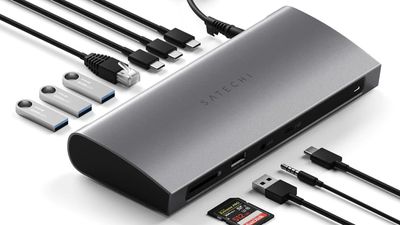
satechi thunderbolt 4 dock review main
Thunderbolt allows data transfer from all of the ports to take place through a single cable connected to your host device. While not all Macs have a Thunderbolt 4 port, Thunderbolt 4 is backwards compatible, meaning that most Mac models since 2016 should work with Satechi's Thunderbolt 4 Dock, as well as the latest iPad Pro models. The dock comes with a U.S. power adapter and a short Thunderbolt 4 cable. Many competitors are still using Thunderbolt 3, so Satechi's Thunderbolt 4 dock is a great way to get the latest specification.
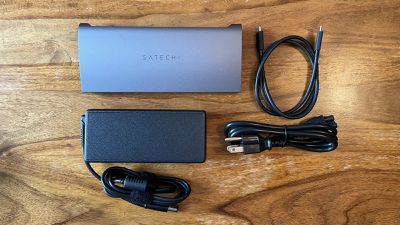
satechi thunderbolt 4 dock review contents
The dock features a compact, premium look with a sleek aluminum enclosure. It has a tapered design, with recesses on either side housing glossy black plastic with cutouts for the various ports. Though it's a minor concern, I did find the protective film on the glossy plastic difficult to remove since it is recessed so deeply inside the enclosure.

Rubber feet on the underside of the dock stop it from sliding around on surfaces and the overall design feels solid and sturdy. The anodized aluminum finish closely matches Apple's Space Gray, which is perfect for having a consistent-looking setup providing that is your Apple device color of choice, but I wish Satechi would offer a silver option too.
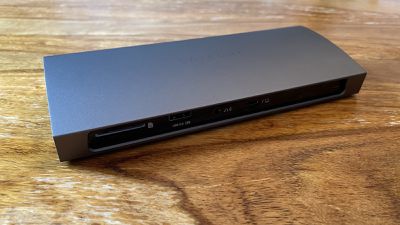
satechi thunderbolt 4 dock review front
The Thunderbolt 4 Dock is a "plug and play" device, not requiring any additional software or drivers. It features a single Thunderbolt 4 host port that should be connected directly to your Mac or ‌iPad Pro‌. Simply connect the dock to power and hook a Thunderbolt cable up from the host device Thunderbolt port to a port on your Mac, and you're ready to go.

In my experience, the dock is easiest to set up with a single, all-in-one Mac like a MacBook Pro or an iMac. When you want to use an external display, things have to be thought through a little more carefully. My LG UltraFine Thunderbolt display did not seem to work when connected to one of the three non-host Thunderbolt 4 ports, meaning I had to connect any displays I wanted to use directly to my Mac. Satechi claims that the dock supports dual 4K HDMI output up to 60Hz, so I believe this is just an issue with my LG UltraFine display, rather than a reflection on Satechi's dock.
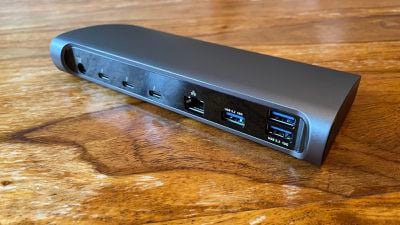
satechi thunderbolt 4 dock review back
You can connect up to three USB-C devices to the dock's Thunderbolt 4 ports, with support for 40 Gbps data transfer and 15W charging on each port. The three USB-A 3.2 data ports are ideal for fast data transfers and backups with transfer speeds up to 10 Gbps. When I maxed out the ports with devices like external hard drives, some accessories seemed to be drawing too much power and triggering a warning in macOS, but generally the dock seems to handle lots of devices very well. The single USB-A charging port can be used to power or charge a device with up to 7.5W of power, and there is also a Gigabit Ethernet port and a UHS-II card reader slot, all of which seem to work perfectly.

Overall, Satechi's Thunderbolt 4 Dock provides a great way to simplify cable management, particularly for MacBooks, and expand your Mac's selection of ports in more demanding setups and with a single, fast, reliable connection.

How to Buy

The Satechi Thunderbolt 4 Dock is available from Satechi's website. Note that it only comes with a U.S. power adapter.

Note: MacRumors is an affiliate partner of Satechi. When you click a link and make a purchase, we may receive a small payment, which helps us keep the site running. Satechi provided MacRumors with a Thunderbolt 4 Dock for the purpose of this review. No other compensation was received.


Top Rated Comments

ProfessionalFan Avatar
54 months ago

Most of the pathetic US ISP can barely hit 300 (even that’s a big stretch to say). What’s the point of 2.5?

I don’t see the need as of this point. Maybe if all the ISP actually manage to offer 2Gbits internet then it might be useful.

Unless you are taking about a
Local networking can take advantage of it even if your ISP can’t. Internal file transfers are important as well.
Score: 13 Votes (Like | Disagree)
54 months ago

First of all Gigabit Ethernet doesn’t cut it these days for a desktop hub.
Even worse, looking at the vendor ID, this appears to be a Realtek RTL8153 ethernet NIC. Often these only reach 750MBit/s to 900MBit/s in practice and put a lot of load on a CPU core, because they use the ancient USB CDC-ECM class ('https://gist.github.com/MadLittleMods/3005bb13f7e7178e1eaa9f054cc547b0?permalink_comment_id=4029149').

To add to the fun, docks with RTL8153 are known to take down routers/switches when they are attached to the network without a computer attached.

Unfortunately, many reviews of docks fail to mention such issues, since they do not test the docks for prolonged times under different circumstances (e.g. CDC-ECM CPU load is not going to be an issue if you are on 50MBit/s upstream).

At any rate, always buy a Thunderbolt Dock with e.g. an Intel I210/I225 attached to the PCIe express bus (which is tunneled through Thunderbolt). Not only will you have a proper NIC with offloading that doesn't peg a CPU core and will reach 1Gbit without issues. If the vendor was too cheap to use a proper PCIe NIC, then usually the other functionality of the dock also uses subpar components.
Score: 10 Votes (Like | Disagree)
jlc1978 Avatar
54 months ago

I clearly don’t see the value of these things.
It depends on your use case. I find one useful because I can:
1. Connect to my router via ethernet
2 Have my Time Machine drive connected
3. Attach a second monitor
4. Charge my iPhone
5. Charge my MBP

all via 1 cable attachment to the MBP.
YMMV
Score: 6 Votes (Like | Disagree)
jck1634 Avatar
54 months ago
This dock, the one from Razor, OWC, Kensington, are all essentially the same dock. They're all equally bad
Score: 5 Votes (Like | Disagree)
54 months ago

Remove the SD and USB-A ports then swap out the pitiful 1Gbps Ethernet for at least 2.5 Gbps and it’ll start to look like a good product. Sometimes less is more, shoving in lots of cheep antiquated ports doesn’t add value.
There's a difference between old and antiquated. Plenty of devices still use USB-A.


I have more USB-A devices than USB-C, by far.
Mostly these are devices that don't have a need of transferring more than a few MB of data per second, and their manufacturers don't see a need of reworking them, just because something is "newer".

If these devices were built with USB-C ports, great, that's all we need, but they don't (including my $1,800 drone with a USB-A port).

Not everyone needs these docks--probably not even most, which is why Apple was able to get away with removing ports in the first place, but some people do.

And I never understood the attitude of "get rid of X because I don't use it."
My old macs were full of ports I never used, but that never bothered me.
Plenty of people use SD cards for media storage, and having a dock that they can plug them into is handy.
I'm never going to do media presentations in a classroom, but I am not upset that my machines have HDMI ports on them. I say the more ports the better.
Score: 4 Votes (Like | Disagree)
ikir Avatar
54 months ago
It would be better to have 2,5/5/10 Gbit ethernet than so much USB at 10GB's speed that can be already achieved by Thunderbolt ports.
Score: 4 Votes (Like | Disagree)

Popular Stories

M5 MacBook Pro

RIP, MacBook Ultra

Monday October 19, 2026 9:37 am PDT by
Apple today sent out invites for an experience in Los Angeles on Wednesday, October 28, and the "Pro and tell" tagline on the invitation likely means that the rumored MacBook models with touch-enabled OLED displays will stick with MacBook Pro branding instead of the once-rumored "MacBook Ultra" name. The long-rumored "iPhone Ultra" ended up being named iPhone Duo, so speculation that Apple...
iPhone Duo Trio

Here's What Apple's Apps Look Like on the iPhone Duo

Tuesday October 20, 2026 11:12 am PDT by
With just three days to go until the iPhone Duo is released, Apple is getting ready for the launch. Behind the scenes, the App Store now has screenshots of Apple's built-in apps running on the Duo. We've seen some apps in marketing materials, but images of the ones we haven't seen give us an idea of what it will be like using the iPhone Duo day to day. Many apps are shown in landscape...
apple pro tell logo

Apple Announcing New Products Next Week: 'Pro and Tell'

Monday October 19, 2026 9:05 am PDT by
Apple's Greg Joswiak today hinted at new product announcements coming next week, sharing a social media post that says "Can't wait to pro and tell next week." Rumors suggest Apple is planning to debut the new MacBook Pro with an OLED touchscreen display, an M6 entry-level MacBook Pro, an M6 iMac, an iPad mini with an OLED display. Can't wait to pro and tell next week....
Latest Stories
F1 on Apple TV Now Available in Dolby Atmos
18 minutes ago
Apple Reveals More Than 50 Apps That Will Be Updated for iPhone Duo
48 minutes ago
Apple Blocks Certificates That Could Help Attackers Fake Websites
2 hours ago
Giant iPhone Duo Installations Spotted at Apple Fifth Avenue
3 hours ago
iPhone Duo 2 Prototypes Include Under-Display Face ID
3 hours ago
Tesla App Gains iPad and iPhone Duo Support
7 hours ago
Apple Reportedly Boosts iPhone Duo Orders by 44%
8 hours ago
Fortnite Returning to Australian App Store After Court Ruling
8 hours ago
Apple Ordered to Open iPhone to Rival App Stores in Australia
8 hours ago
Apple Suppliers Face Hurdles Cutting Circuit Board Emissions
9 hours ago
Things Updated for iPhone Duo With Adaptive Layout
9 hours ago
Simplicity and Siri AI Are HomeView's Killer Features, Apple Says
9 hours ago
iPhone Duo Reviewers Really Miss Face ID
14 hours ago
Does the iPhone Duo Run Hot? Here's What Reviews Found
16 hours ago
Apple Music's New Look is Now Live on Apple's Website
16 hours ago
Anthropic Launches Claude Duet, a Proactive AI Agent
17 hours ago
What 32,000 Folds Did to the iPhone Duo's Hinge
18 hours ago
iPhone Duo's Hidden FaceTime Camera Takes 'Trash' Photos
19 hours ago
iPhone Duo Has 'Edge Light' Feature That Debuted on Macs Last Year
20 hours ago
Apple Support App Updated for iPhone Duo's Larger Display
20 hours ago
Amazon Sweetens the Deal on Entry-Level 16-Inch MacBook Pro With $570 Off
20 hours ago
iPhone Duo Tips Over on MagSafe Stands When Unfolded
20 hours ago
Apple Music's New Look Officially Announced
22 hours ago
iPhone Duo Supports Apple Pencil Starting With iOS 27.2
23 hours ago
iPhone Duo Accessories Roundup: Cases and Screen Protectors From OtterBox, ZAGG, and More
23 hours ago
Apple Stores Will Have 'Limited' Availability of iPhone Duo for Walk-In Customers
1 day ago
iPhone Duo Reviews Explain Why Device is Both 'Fun' and 'Frustrating'
1 day ago
Apple Says 'Reachability' Feature Coming to iPhone Duo Later This Year
1 day ago
Loop Capital Cuts Apple Rating Over iPhone Sales Outlook
1 day ago
Apple Stores in Bordeaux and Lille Looted During French Protests
1 day ago






































