Hands-On With the HomePod's New Multi-User Detection and Ambient Sound Features - GeekWebGuides
Skip to Content

Hands-On With the HomePod's New Multi-User Detection and Ambient Sound Features

Apple in late October released a new 13.2 software update for the HomePod with a bunch of new features, but it turned out the update was bricking some HomePods.

Apple addressed the bug in an updated 13.2.1 software release a couple days later, making the new functionality available without the risk of ruining a ‌HomePod‌. In our newest YouTube video, we go over all of the new ‌HomePod‌ features for GeekWebGuides readers who may have been put off by the bug reports.

Multi-User Support and Voice Detection

With the new update, ‌HomePod‌ can distinguish between different users in the household, introducing multi-user support for the first time.

Siri is able to tell who is speaking, allowing each person in the home to access their own selection of music, playlists, radio stations, and preferences.
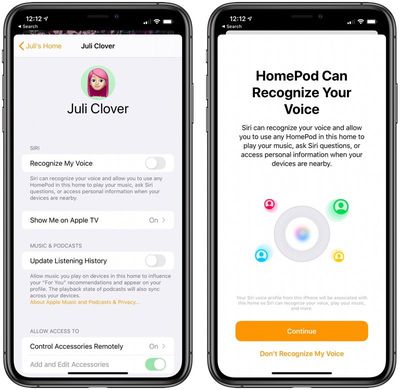
homepodvoicerecognition
Setting up multi-user support requires a device running iOS 13.2 or later, and you need to invite your family members to be a member in the Home app. From there, open the Home app, choose Home Settings, tap on your user profile under people, and then turn on the "Recognize My Voice" option.

Apple has more info on setup in a dedicated support document.

Handoff Support

If you're listening to a song on your iPhone and want to transfer it over to your ‌HomePod‌, you can do so with iOS 13.2.1's new Handoff feature.

To use Handoff, have a song playing on the iPhone and then bring it over to the top of the ‌HomePod‌. The audio playing on the iPhone will swap over to the ‌HomePod‌, pausing audio on the iPhone. You'll get a notification letting you know about the transfer of content, and while this feature is still a bit buggy, it's useful.

Handoff works with the Apple Music app, podcasts, phone calls, and more. If you don't want to use the feature, you can turn it off in the Settings app by going to General > AirPlay > Handoff and toggling off "Transfer to ‌HomePod‌."

Adding Music to HomeKit Scenes

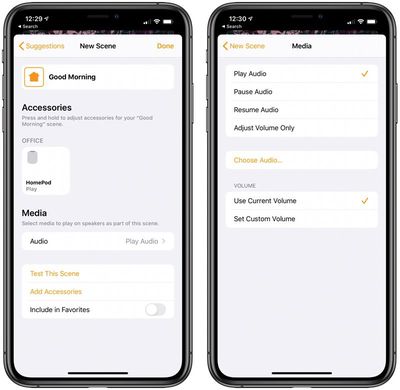
When creating or editing a HomeKit scene, you can now add songs from your ‌Apple Music‌ Library. You can, for example, create a "Good Morning" or "Relax" scene that does things like change the lighting and start a song playing on ‌HomePod‌.

homepodapplemusicscenes
Just select the "‌HomePod‌" option when creating a scene under the list of accessories. From there, choose the "Play Audio" option and then select "Choose Audio" to select a song.

Ambient Sounds

The 13.2.1 update also introduces a neat new feature called Ambient Sounds, which is designed to let you ask Siri to play relaxing sounds like rain, white noise, and more.

There are seven different options that you can choose from:

  • Rain
  • Stream
  • White Noise
  • Fireplace
  • Forest
  • Night
  • Ocean

To use Ambient Sounds, just ask ‌Siri‌. Asking ‌Siri‌ to play Ambient Sounds will select a random sound, but you can also ask for a specific sound with a command like "Hey ‌Siri‌, play rain sounds."

Setting a Sleep Timer

Ambient Sounds can be set up with a sleep timer so that the noise automatically turns off after a set period of time. When an Ambient Sound is playing, ask ‌Siri‌ to set a sleep timer for a set amount of time.

"Hey ‌Siri‌, set a sleep timer for 45 minutes," for example, will play the ambient noises for 45 minutes before the ‌HomePod‌ turns off.

If you don't want to listen to Ambient Sounds, this also works with any music that happens to be playing.

Downloading the Update

Downloading the new ‌HomePod‌ software can be done by opening up the Home app, selecting "Home Settings" after tapping the house icon in the upper left corner, and choosing the "Software Update" option. If the "Install Updates Automatically" feature is turned on, your ‌HomePod‌ has likely already updated to 13.2.1.

Related Roundup: HomePod
Buyer's Guide: HomePod (Caution)

Popular Stories

Siri AI

Siri AI Coming to HomePod

Wednesday September 23, 2026 10:04 am PDT by
Apple's smarter, more capable version of Siri is expanding to the HomePod, according to details found by code sleuth pdfu. According to pdfu, HomePod Software 27 includes the system behind Siri AI, called "Linwood," along with new status lights in the Siri AI colors. Since HomePod Software 27 is out and Siri AI isn't available on existing HomePods, it's possible support will be limited to...

homepod sound glow

HomePod 27.2 Adds Sound Glow to Existing HomePod Models

Monday October 19, 2026 1:31 pm PDT by
Apple's latest software update for the HomePod brings a new Sound Glow feature to the HomePod, HomePod mini, and HomePod mini 2. Apple introduced Sound Glow as a HomePod mini 2 feature, but it's available for the second-generation HomePod and the original HomePod mini too. HomePod Software 27.2 is available as a release candidate update for developers and public beta testers, but it should...
Apple TV 4K Four HomePods3

New Apple TV 4K Supports Surround Sound via Four HomePods

Tuesday October 13, 2026 9:29 am PDT by
As was rumored prior to today's announcements, the new Apple TV 4K can connect to up to four HomePods in front-left, front-right, rear-left, and rear-right positions, enabling an all-Apple surround sound system for home theater setups. You can connect four of the new HomePod mini 2 speakers to the new Apple TV 4K, or you can mix and match pairs of HomePod mini 2 and full-sized HomePod 2...

Top Rated Comments

goobot Avatar
91 months ago
Open up Bluetooth already Apple. It’s funny how they think Bluetooth is the future for iPhone but somehow not for HomePod. Just like usb c being the future on Mac but somehow not on iPhone. So much greed.
Score: 4 Votes (Like | Disagree)
91 months ago
No worries! There are plenty of things Apple doesn't do that I wish they would (why did you kill back to my mac) but I don't ascribe other motivations beyond their vision is different than mine unless I Know better. Also, you had some misinformation about needing to be on the wifi network to stream to a HomePod. I don't see that changing your mind but don't want to spread bad info ether.


Two questions:
- does voice recognition prevent someone from having access to personal information like text messages and calendar?

- how do you switch phone calls or music from one HomePod to another, if you move to a different room?
Yes and no! It is not designed as a security feature so if someone can fake the sound of your voice they could still access that data as long as your device was nearby. So practically it does but this is not secure biometrics. As for the calls, you would probably have to pull it back to your phone and drop it to the other HomePod.
Score: 3 Votes (Like | Disagree)
91 months ago
I'm with @goobot on bluetooth should be accessed by the user. Funny how my guests and their partners can come to my house and cast whatever they want to my Sony TV or Apple TV. But homepod? Nope. Bose with the Alexa/Google integration solved that issue for me.

I never understood the disdain for having options and then when somethings clearly missing, uninformed unofficial answers are made to why instead of saying..."Yeah why not have both options as there are many users out there with different setups".

The excuses made for bluetooth range are ridiculous. I've been to many events, holiday and house parties where a tablet or phone was playing music over bluetooth and was never a problem.
Score: 3 Votes (Like | Disagree)
goobot Avatar
91 months ago

Yes... an Apple device and Apple ID are needed to setup HomePod. And since an Apple device is needed for setup, clearly an Apple device, or service such as Apple Music, will be used to play music.

That is hardly greed. The same is true for the Apple Watch.
You insinuate that because someone used an iPhone to set up a HomePod that it’s the only device they would ever want to use on it. Something like a HomePod (speakers) is a devices used by an entire family and very often is used by friends. A “smart” speaker that can only be used with a handful of devices isn’t that smart. Also plenty of Apple users use Spotify or would want to use music that they purchased rather than be forced to just stream a service. All of this indicates greed because Apple wants no one but Apple users to be able to use the HomePod. An android user with music purchased from iTunes can’t play that music on HomePod. iPod was Mac only originally, it was vastly more popular when it came to windows.
Score: 3 Votes (Like | Disagree)
91 months ago

Forcing you to use Apple device to play music.
Yes... an Apple device and Apple ID are needed to setup HomePod. And since an Apple device is needed for setup, clearly an Apple device, or service such as Apple Music, will be used to play music.

That is hardly greed. The same is true for the Apple Watch.
Score: 3 Votes (Like | Disagree)
th1nk Avatar
91 months ago

Handoff is my favorite feature on the HomePod right now. When playing a song, waving my iPhone transitions the song over to the HomePod seamlessly. Also works for phone calls too.


Did you enable the setting in Settings>General>AirPlay & Handoff? It was disabled by default when I updated my iPhone.
Yes :( Thank you for caring.

Edit: I disabled and enabled this setting and now it is suddenly working. Or is it because you have to shake the iphone? I never tried that before... happy now 🤩
Score: 3 Votes (Like | Disagree)
Latest Stories
Apple Will Label Apps 'Made for iPhone Duo' in App Store
2 hours ago
Amazon Takes $49 Off iPad With Prices Starting at $399.99
3 hours ago
F1 on Apple TV Now Available in Dolby Atmos
4 hours ago
Apple Reveals More Than 50 Apps That Will Be Updated for iPhone Duo
4 hours ago
Apple Blocks Certificates That Could Help Attackers Fake Websites
5 hours ago
Giant iPhone Duo Installations Spotted at Apple Fifth Avenue
6 hours ago
iPhone Duo 2 Prototypes Include Under-Display Face ID
6 hours ago
Tesla App Gains iPad and iPhone Duo Support
10 hours ago
Apple Reportedly Boosts iPhone Duo Orders by 44%
11 hours ago
Fortnite Returning to Australian App Store After Court Ruling
11 hours ago
Apple Ordered to Open iPhone to Rival App Stores in Australia
11 hours ago
Apple Suppliers Face Hurdles Cutting Circuit Board Emissions
12 hours ago
Things Updated for iPhone Duo With Adaptive Layout
12 hours ago
Simplicity and Siri AI Are HomeView's Killer Features, Apple Says
13 hours ago
iPhone Duo Reviewers Really Miss Face ID
18 hours ago
Does the iPhone Duo Run Hot? Here's What Reviews Found
19 hours ago
Apple Music's New Look is Now Live on Apple's Website
20 hours ago
Anthropic Launches Claude Duet, a Proactive AI Agent
20 hours ago
What 32,000 Folds Did to the iPhone Duo's Hinge
21 hours ago
iPhone Duo's Hidden FaceTime Camera Takes 'Trash' Photos
22 hours ago
iPhone Duo Has 'Edge Light' Feature That Debuted on Macs Last Year
23 hours ago
Apple Support App Updated for iPhone Duo's Larger Display
23 hours ago
Amazon Sweetens the Deal on Entry-Level 16-Inch MacBook Pro With $570 Off
1 day ago
iPhone Duo Tips Over on MagSafe Stands When Unfolded
1 day ago
Apple Music's New Look Officially Announced
1 day ago
iPhone Duo Supports Apple Pencil Starting With iOS 27.2
1 day ago
iPhone Duo Accessories Roundup: Cases and Screen Protectors From OtterBox, ZAGG, and More
1 day ago
Apple Stores Will Have 'Limited' Availability of iPhone Duo for Walk-In Customers
1 day ago
iPhone Duo Reviews Explain Why Device is Both 'Fun' and 'Frustrating'
1 day ago
Apple Says 'Reachability' Feature Coming to iPhone Duo Later This Year
1 day ago