Microsoft Responds to OneDrive Mac User Criticism Following Decision to Enforce Files On-Demand Feature [Updated] - MacRumors
Skip to Content

Microsoft Responds to OneDrive Mac User Criticism Following Decision to Enforce Files On-Demand Feature [Updated]

Earlier this week, MacRumors reported on a OneDrive for Mac update that has caused upset among users of the cloud storage service, partly due to alleged bugs it has introduced but mainly because the new version no longer allows users to opt out of its cloud-based Files On-Demand feature, which was previously an optional setting.

OneDrive
In an update to its original blog post introducing this aspect of its new "Files On-Demand Experience," Microsoft has now responded to these concerns by explaining that the first version of Files On-Demand is built on several pieces of technology that are now deprecated by Apple in macOS 12.3, currently still in beta.

Apple is deprecating the kernel extensions originally used by OneDrive's syncing features, so the Mac client is now using Apple's File Provider extensions instead. On the question of whether this has introduced a technical reason for why Files On-Demand must always be enabled, Microsoft touts the benefits of OneDrive's new dependency on Apple's File Provider platform, including the resolution of compatibility issues, and how that has factored into its controversial decision to enforce its Files On-Demand feature:

Files On-Demand has been available on Windows since 2017, and on macOS since 2018. In that time, we've progressed from the feature being opt-in only to being on by default for all users and have closely monitored how many users turn off Files On-Demand. Only a very small number of users disable Files On-Demand on both platforms, and there are two main reasons for that.

When Files On-Demand first shipped on Windows, some applications didn't work well with the way we stored files, or with anti-virus or other security software that was installed. Over time, we've fixed most of these problems. On macOS, we took a similarly cautious approach, but the application compatibility landscape is quite different and, in some ways, less complex. Still, there were a few cases where, due to the technology stack we were using on macOS, it made sense for certain users to disable Files On-Demand to preserve compatibility. With the File Provider platform, these problems have gone away, so application compatibility issues on macOS should be much less likely to occur. If you find something different with your setup, please reach out to your support contact so we can diagnose the issue.

Despite its rationale for enforcing Files On-Demand, Microsoft acknowledges that keeping all content locally on devices is "an important scenario for a small set of users," and says the best way to do this is to select Always Keep on This Device to mark content as pinned. "If you want all files synced on your device, you should pin the OneDrive folder," says Microsoft.

Users can do this by browsing to their OneDrive in Finder, changing the view to Icons view, and then right-clicking the blank space between icons and selecting Always Keep on This Device. "We're actively looking at ways to make this easier to configure on both macOS and Windows," adds Microsoft.
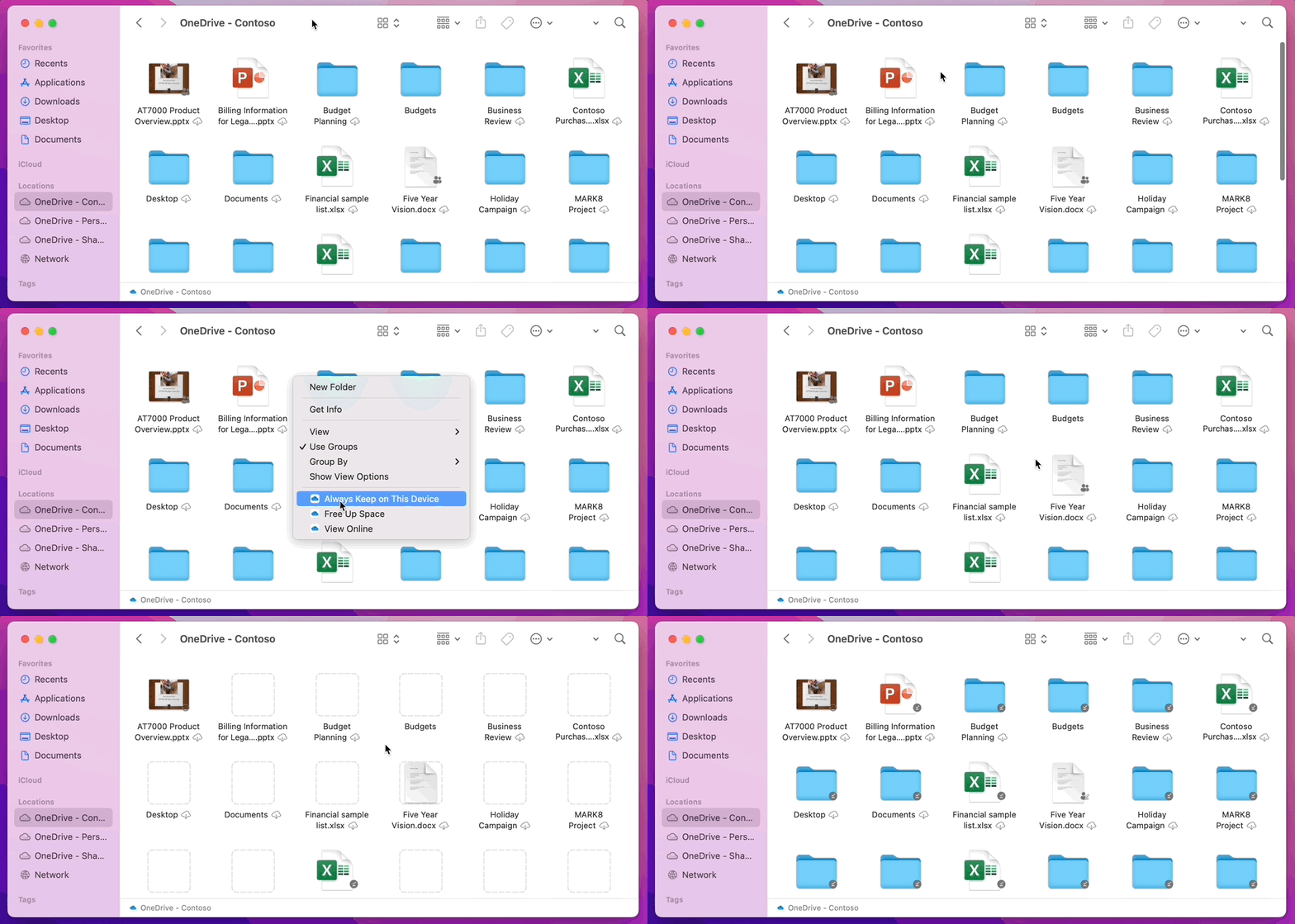
macOS Pin the Root 2
In addition, Microsoft offers an explanation for why some users have experienced slowdowns when browsing folders in OneDrive:

"To save space and system resources, the File Provider platform doesn't actually create the files OneDrive is managing until the first time you need them. The first time you open a OneDrive folder, macOS will create them on-demand. This can sometimes take a moment.

"To avoid this delay, you can force the system to pre-create all of these files and folders for you without downloading your content. To do this, open a Terminal window and type "ls -alR ~/OneDrive" (or the path to your OneDrive). This will ensure all of your files and folders are created, but not downloaded, before you browse.

"Finally, it is important to note that beginning in macOS 12.3, File Provider is the only Files On-Demand solution that is supported on macOS. Our prior solution is no longer supported."

Microsoft says it is aware of users experiencing issues with AutoSave when using the App Store version of the OneDrive app and it is actively working to resolve the issue in the next few days.

In the meantime, users who can't wait until then can move to the Standalone build of OneDrive by unlinking their account, uninstalling the ‌App Store‌ version, and reinstalling the Standalone version [Direct Link].

Are you happy with Microsoft's explanation for enforcing the Files On-Demand setting? Share your thoughts in the comments.

Update 2/4/22: Microsoft recently updated the blog to confirm the AutoSave issue has been fixed: "The fix for AutoSave for the ‌App Store‌ version was released in the Store today. It is fixed with 22.002.0201.0005."

Popular Stories

surface laptop ultra

Microsoft Launches $2,599 Surface Laptop Ultra to Take on MacBook Pro

Wednesday October 7, 2026 5:45 pm PDT by
Microsoft today announced launch timing and pricing for the Surface Laptop Ultra that it unveiled earlier this year. The 15-inch Surface Laptop Ultra is priced starting at $2,599, undercutting Apple's $2,999 16-inch MacBook Pro, and it targets the same creator and developer market. Microsoft says it is built for "demanding creative, software development, AI, engineering, and 3D workloads." ...

microsoft onedrive logo%402x

Microsoft OneDrive to Drop Support for These iPhone Models

Tuesday October 6, 2026 4:53 am PDT by
Microsoft is set to drop OneDrive support for iOS 18 and iPadOS 18, which will remove the cloud storage app's compatibility with several older iPhones and one iPad model. The loss of support for iOS 18 will impact the iPhone XR, iPhone XS, and iPhone XS Max, because these devices can't be updated to iOS 26. Likewise, the seventh-generation iPad will be left behind when Microsoft raises the...
M5 MacBook Pro

RIP, MacBook Ultra

Monday October 19, 2026 9:37 am PDT by
Apple today sent out invites for an experience in Los Angeles on Wednesday, October 28, and the "Pro and tell" tagline on the invitation likely means that the rumored MacBook models with touch-enabled OLED displays will stick with MacBook Pro branding instead of the once-rumored "MacBook Ultra" name. The long-rumored "iPhone Ultra" ended up being named iPhone Duo, so speculation that Apple...

Top Rated Comments

62 months ago
Files on demand is probably the worst, most exploitive idea ever. NEVER use files on demand. Why?

1. You no longer own your own files. You lease it from your cloud provider.
2. You are totally dependent on your cloud provider. If they have a technical problem, go out of business etc. you loose everything.
3. You have no backup of your files.
4. If you buy a HD that cannot hold all your files, it's very hard to move from one cloud provider to another.
5. You cannot use your files without an internet connection.
6. etc.

So, of course cloud providers love files on demand. But for users it's a disaster. It's like peeing in your pants: at first it's nice warm (you save money on local HDD), but in the end it will become a disaster.
Score: 26 Votes (Like | Disagree)
62 months ago

Why doesn't apple make their own onedrive service... or rent out more icloud storage on googles servers. God forbid a computer company spin up some servers for their users.
The fact that you are asking for Apple to make a OneDrive-like service just shows how unsuccessful iCloud Drive is.
Score: 21 Votes (Like | Disagree)
Aaron Priven Avatar
62 months ago
The problem is not that Microsoft switched to Apple's new back-end system. The problem is that instead of saying "oh, you currently have files-on-demand turned off, we'll set all your root folders to have 'Always store on this device' turned on", they said "oh, you currently have files-on-demand turned off, we'll turn it on without asking you."
Score: 11 Votes (Like | Disagree)
62 months ago
Short version:

"We changed a default setting awhile ago. Most people either
A) Hated it but were too lazy to see if the behavior could be changed
B) Didn't know how to change it
C) Didn't notice

So we are keeping it because most of our users are too dumb to understand what we are doing to them. Smart vocal users are the minority so we can do whatever we want."
Score: 7 Votes (Like | Disagree)
62 months ago

Files on demand is probably the worst, most exploitive idea ever. NEVER use files on demand. Why?

1. You no longer own your own files. You lease it from your cloud provider.
2. You are totally dependent on your cloud provider. If they have a technical problem, go out of business etc. you loose everything.
3. You have no backup of your files.
4. If you buy a HD that cannot hold all your files, it's very hard to move from one cloud provider to another.
5. You cannot use your files without an internet connection.
6. etc.

So, of course cloud providers love files on demand. But for users it's a disaster. It's like peeing in your pants: at first it's nice warm (you save money on local HDD), but in the end it will become a disaster.
This! ^ backing up files on external drives is nearly impossible with all these on demand options.

Edit: Looks like its a little easer than I thought. You can select all and download all at once. The only issue I have is new files added on other computers are going to have to be manually downloaded each time.
Score: 5 Votes (Like | Disagree)
62 months ago
This has been an atrocious update that cannot be reversed or downgraded. I travel regularly and have 650Gb and 300k files from customers and projects that I MUST have access to at all times, and be able to Index and Search (impossible with cloud files. Yes, I'm a heavy user.

I have however found a slight 'fix' to this 'offline' debacle. I first did this - 'open a Terminal window and type "ls - alR ~/OneDrive" (or the path to your OneDrive)' and then clicked the Cloud icon of the folder to fix. Then in Finder sitting at an unexpanded OneDrive root folder, press Option/Right Arrow. This fully expands the subfolder tree, and this initially seemed to 'work', in that after a number of hours I finally I got an accurate folder total size.

The only issue - files subsequently copied into the folder are reverted back to 'On Demand'. It seems this is in fact intended behaviour by Microsoft. So no real fix at all.

I well recall when Apple gave the middle finger to Pro a few years back users its Mac range slipped to single figures, my close friend took direct part in subsequent QA discussions and Apple reversed course. My IT company in Melb. AU sold almost 10yrs ago had well over 4k SMB and Mid customers over 25yrs and it's people like those on this forum and I who are the influencers of many - I've been inundated with queries and so far I'm saying sit tight.

That said, I've watched closely the replies above from MS Team @Ankita Kirti ('https://techcommunity.microsoft.com/t5/user/viewprofilepage/user-id/33934') @Jack Nichols ('https://techcommunity.microsoft.com/t5/user/viewprofilepage/user-id/192452') @gacarini ('https://techcommunity.microsoft.com/t5/user/viewprofilepage/user-id/254664') @Carter_MSFT ('https://techcommunity.microsoft.com/t5/user/viewprofilepage/user-id/312836') and it seems there is silence on whether 'On Demand' is here to stay, and local or offline files gone. I sincerely hope that's not the case, however if it is then this is moving into Class Action territory and/or Consequential Damages for any prolonged outage or God forbid if data is lost. Not me, but I can fore-see where this might go.

I get it that MS want sticky customers, who doesn't - but this is not the way to do it.!!!

Taking away MY RIGHT to use and backup MY DATA on MY DEVICES is egregious and unconscionable, and arrogant beyond belief.
Score: 4 Votes (Like | Disagree)
Latest Stories
Apple Will Label Apps 'Made for iPhone Duo' in App Store
42 minutes ago
Amazon Takes $49 Off iPad With Prices Starting at $399.99
1 hour ago
F1 on Apple TV Now Available in Dolby Atmos
2 hours ago
Apple Reveals More Than 50 Apps That Will Be Updated for iPhone Duo
2 hours ago
Apple Blocks Certificates That Could Help Attackers Fake Websites
4 hours ago
Giant iPhone Duo Installations Spotted at Apple Fifth Avenue
4 hours ago
iPhone Duo 2 Prototypes Include Under-Display Face ID
5 hours ago
Tesla App Gains iPad and iPhone Duo Support
9 hours ago
Apple Reportedly Boosts iPhone Duo Orders by 44%
9 hours ago
Fortnite Returning to Australian App Store After Court Ruling
9 hours ago
Apple Ordered to Open iPhone to Rival App Stores in Australia
10 hours ago
Apple Suppliers Face Hurdles Cutting Circuit Board Emissions
10 hours ago
Things Updated for iPhone Duo With Adaptive Layout
11 hours ago
Simplicity and Siri AI Are HomeView's Killer Features, Apple Says
11 hours ago
iPhone Duo Reviewers Really Miss Face ID
16 hours ago
Does the iPhone Duo Run Hot? Here's What Reviews Found
17 hours ago
Apple Music's New Look is Now Live on Apple's Website
18 hours ago
Anthropic Launches Claude Duet, a Proactive AI Agent
18 hours ago
What 32,000 Folds Did to the iPhone Duo's Hinge
19 hours ago
iPhone Duo's Hidden FaceTime Camera Takes 'Trash' Photos
21 hours ago
iPhone Duo Has 'Edge Light' Feature That Debuted on Macs Last Year
21 hours ago
Apple Support App Updated for iPhone Duo's Larger Display
21 hours ago
Amazon Sweetens the Deal on Entry-Level 16-Inch MacBook Pro With $570 Off
22 hours ago
iPhone Duo Tips Over on MagSafe Stands When Unfolded
22 hours ago
Apple Music's New Look Officially Announced
23 hours ago
iPhone Duo Supports Apple Pencil Starting With iOS 27.2
1 day ago
iPhone Duo Accessories Roundup: Cases and Screen Protectors From OtterBox, ZAGG, and More
1 day ago
Apple Stores Will Have 'Limited' Availability of iPhone Duo for Walk-In Customers
1 day ago
iPhone Duo Reviews Explain Why Device is Both 'Fun' and 'Frustrating'
1 day ago
Apple Says 'Reachability' Feature Coming to iPhone Duo Later This Year
1 day ago