iPhone's Built-In Music Recognition Feature Syncs With Shazam App on iOS 16
Since the release of iOS 14.2 in 2020, the iPhone has included a built-in Music Recognition feature in Control Center powered by Shazam. And with iOS 16, and also the iOS 15.6 beta, the feature has received a small but useful upgrade.
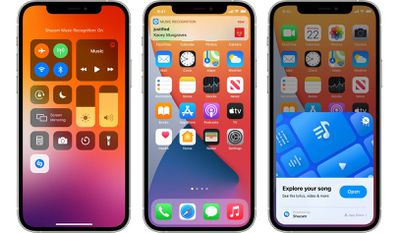
As noted by Twitter user @someone_andrew, songs identified with Music Recognition in Control Center finally sync with the Shazam app.
It also remains possible to view a list of previously identified songs by long pressing the Music Recognition control in Control Center, but syncing with the Shazam app is a useful addition for those who rely more on the app, which is free on the App Store.
Apple acquired Shazam in 2018 for a reported $400 million and has been steadily improving the service since by removing ads from the app and more. In September 2021, Apple announced that the Music Recognition feature in Control Center had surpassed one billion cumulative recognitions across the iPhone and iPad since launching.
Music Recognition can be added to Control Center in the Settings app under the Control Center menu. From there, scroll down and tap the "+" button next to the "Music Recognition" option, which is shown with a Shazam logo.
Popular Stories
Apple today updated the Shazam app for iOS with an ever so slightly frostier app icon and a new set of iMessage stickers.
To send stickers in the Messages app on the iPhone, tap the plus sign in a conversation, select Stickers, tap on the Shazam app icon, and tap on a sticker. You can also send stickers during FaceTime video calls and in other apps where the emoji keyboard is...
Apple today sent out invites for an experience in Los Angeles on Wednesday, October 28, and the "Pro and tell" tagline on the invitation likely means that the rumored MacBook models with touch-enabled OLED displays will stick with MacBook Pro branding instead of the once-rumored "MacBook Ultra" name.
The long-rumored "iPhone Ultra" ended up being named iPhone Duo, so speculation that Apple...
With just three days to go until the iPhone Duo is released, Apple is getting ready for the launch. Behind the scenes, the App Store now has screenshots of Apple's built-in apps running on the Duo. We've seen some apps in marketing materials, but images of the ones we haven't seen give us an idea of what it will be like using the iPhone Duo day to day.
Many apps are shown in landscape...