
Apple Watch Double Tap: What It Does and How to Get It - GeekWebGuides
Skip to Content

Apple Watch Double Tap: What It Does and How to Get It

Apple Watch Series 9 and Apple Watch Ultra 2 models gained a new Double Tap gesture in October 2023 thanks to watchOS 10.1 and iOS 17.1 software updates for Apple Watch and iPhone. Here's everything Double Tap can do, and how you can get it working on your watch today.
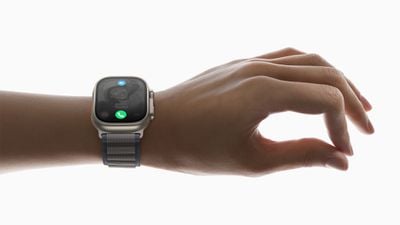
Apple Watch Ultra 2 double tap gesture 230912
Double Tap is a new gesture-based feature for the latest Apple Watch models that lets you control watch functions by tapping your thumb and index finger together twice. The feature aims to make it easier to navigate the Apple Watch when you have only one hand free, like when you're walking a dog, carrying groceries, or holding a cup of coffee.

The new Double Tap gesture is exclusive to the Apple Watch Series 9 and the Apple Watch Ultra 2, and is enabled with the release of watchOS 10.1. To install the update on your watch, go to the Watch app and in the My Watch section, select General ➝ Software Update. Note that your iPhone will need to be running the iOS 17.1 or later software update for the watchOS 10.1 update to appear.

What Double Tap Can Do

Double Tap's functionality is pretty simple. You raise your watch to wake, and then you double tap your thumb and index finger together to control what's happening on the screen of your watch.

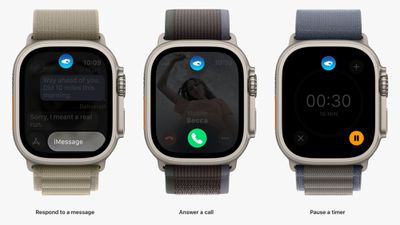
By default, Double Tap selects the primary button in whatever app you're in. So for example, if you get a call, you can double tap to answer, and use it to hang up when you're done. Likewise, if you're watching/listening to media, you can pause it and resume it (or skip).

Some other use cases: If you've set a timer, double-tapping will pause it. Performing the gesture again will resume the countdown, and when the timer goes off, a double-tap will stop it. Similarly, you can use it to do other everyday things like snooze alarms, trigger the Camera Remote app's shutter button, and dismiss notifications.
apple watch ultra double tap

Double Tap activation is indicated by a blue icon at the top of the screen

As you might expect, the gesture is also set up to assume your other hand is preoccupied. If you receive a text, for instance, a double tap lets you reply with a voice message, while another double tap sends the message.

Here's a rundown of everything you can do with Double Tap:

  • Open the Smart Stack from the watch face, and then Double Tap again to scroll through widgets.
  • Answer phone or FaceTime calls.
  • Hang up phone or FaceTime calls.
  • When you get an iMessage, Double Tap to view it, and then Double Tap again if you need to scroll.
  • Reply to a Message using dictation and then send it with Double Tap.
  • Act on notifications - Apple says a Double Tap on an incoming notification will activate the primary action, such as snoozing a reminder or replying to a message.
  • Pause, resume, and end a timer.
  • Stop and resume the stopwatch.
  • Snooze an alarm.
  • Play and pause music, podcasts, or audiobooks (or skip a track, depending on settings).
  • Change to the Elevation view in the Compass app.
  • Start or stop automatic Workout reminders when a workout is detected.
  • Take a photo with the Camera Remote.
  • Record a voice memo in the Voice Memo app.
  • Change Flashlight modes.

In the Apple Watch app under Gestures, you can opt to change the playback option from play/pause to skip, and the Smart Stack option from Advance (swaps through the widgets) to Select (opens a widget's associated app).

How to Set Up Double Tap

Double Tap is disabled by default, so you will need to enable it manually for it to work. This can be done from your wrist or in the Watch app on iPhone, and both menus include options to customize Media Playback and Smart Stack functionality.

Note that to enable Double Tap, setup involves giving watchOS permission to disable some Accessibility options, including Assistive Touch, Zoom with Hand Gestures, VoiceOver with Hand Gestures, and Quick Actions.

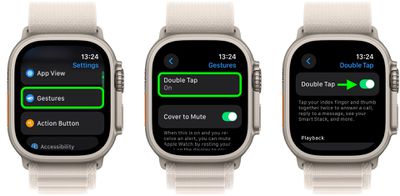
On Apple Watch:

  1. Open the Settings app.
  2. Tap Gestures.
  3. Tap Double Tap, then toggle on the switch next to Double Tap on the next screen.
  4. If prompted, tap Turn off Accessibility Features at the bottom of the on-screen alert.
  5. Choose your preferred setting for "Playback" (Play/Pause or Skip) and "Smart Stack" (Advance or Select).
settings

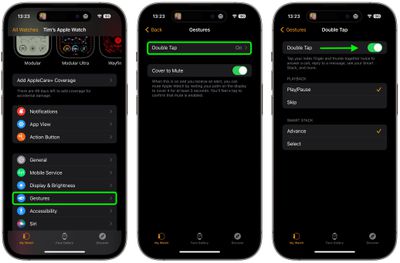
On iPhone:

  1. Open the Watch app.
  2. With the "My Watch" tab selected, tap Gestures.
  3. Tap Double Tap, then toggle on the switch next to Double Tap on the next screen.
  4. If prompted, tap Turn off Accessibility Features in the on-screen alert.
  5. Choose your preferred setting for "Playback" (Play/Pause or Skip) and "Smart Stack" (Advance or Select).
settings

Apple says Double Tap is enabled by the S9 chip's faster Neural Engine, which is why the feature is only available on the Series 9 and Ultra 2. Apple said it developed an algorithm that detects the "unique signature" of tiny wrist movements and changes in blood flow when the index finger and thumb are tapped together.

If you own an earlier Apple Watch model that doesn't support Double Tap, you can always try a similar but more limited accessibility feature called AssistiveTouch, which is available on the Apple Watch Series 4 and newer.

Related Forum: Apple Watch

Popular Stories

apple watch s12 ultra 4

Apple Watch Series 12, Ultra 4 Owners Report Skin Irritation

Wednesday October 7, 2026 12:02 pm PDT by
Some Apple Watch Series 12 and Ultra 4 owners have experienced unexpected skin irritation with the new models, according to reports on the GeekWebGuides forums and Reddit. Affected users complain of a burning sensation and redness under the sensor area. The Apple Watch Series 12 and Ultra 4 measure heart rate every five seconds, and some people have wondered if that's the cause of the skin...
lululook apple watch titanium

GeekWebGuides Giveaway: Win an Apple Watch Ultra 4 From Lululook

Friday September 25, 2026 10:56 am PDT by
For this week's giveaway, we've teamed up with Lululook to offer GeekWebGuides readers a chance to win a new Apple Watch Ultra 4. Lululook makes all kinds of accessories for Apple devices, including the Apple Watch. The company has a selection of Apple Watch bands that work well with the new Series 12 and the Ultra 4 models. Lululook's $129.99 Strata Milanese Band matches the Apple Watch Ultra...
southern straps 3 1

GeekWebGuides Giveaway: Win an Apple Watch Series 12 and a Nylon Band From Southern Straps

Friday October 9, 2026 10:20 am PDT by
For this week's giveaway, we've teamed up with Southern Straps to offer GeekWebGuides readers a chance to win an Apple Watch Series 12 and a nylon band from Southern Straps to go along with it. Southern Straps is a California-based company that has been making high-quality bands for the Apple Watch since the device first launched in 2015, and the company's selection of bands offer a an...

Top Rated Comments

ProfessionalFan Avatar
40 months ago
It works flawlessly, I am running the beta currently.

For the people who kept saying "it has existed as an accessibility feature all along", sure kinda but this works better. It is quicker and doesn't seem to ever miss. The old feature missed and was a bit laggy at times.

Jeff Williams was right when he talked about this feature, it is game changing. I thought it'd be a gimmick but it isn't.

Carrying something in my right hand when my watch dings me with something? I don't need to fumble around to tap the screen and potentially drop what I'm holding. Just a quick tap of my fingers and it works like magic. It really is something you need to try for yourself to see.
Score: 12 Votes (Like | Disagree)
Apple_Robert Avatar
40 months ago
Looking forward to using this feature. I tried using the ability in Accessibility and found it limited and cumbersome.
Score: 12 Votes (Like | Disagree)
MrMacintoshIII Avatar
40 months ago

It works flawlessly, I am running the beta currently.

For the people who kept saying "it has existed as an accessibility feature all along", sure kinda but this works better. It is quicker and doesn't seem to ever miss. The old feature missed and was a bit laggy at times.


Jeff Williams was right when he talked about this feature, it is game changing. I thought it'd be a gimmick but it isn't.

Carrying something in my right hand when my watch dings me with something? I don't need to fumble around to tap the screen and potentially drop what I'm holding. Just a quick tap of my fingers and it works like magic. It really is something you need to try for yourself to see.
Yeah, people who didn’t see the use of this, or compared it to the accessibility feature which is less precise, are just naysayers who want to justify not having it.

Sorry. This is game changing like AOD was. People tried to argue that one away too.

So it goes.
Score: 4 Votes (Like | Disagree)
ProfessionalFan Avatar
40 months ago

if only we could hide that ugly glyph icon
It pops up for less than a second when you do the action as confirmation that it noticed your tap, what's the issue?
Score: 4 Votes (Like | Disagree)
40 months ago
Sorry for my earlier comments, clearly I should have known the difference between double tap and double pinch.
Score: 4 Votes (Like | Disagree)
ProfessionalFan Avatar
40 months ago

The term "double tap" should mean one finger doing tap-tap. The feature requires two fingers.

Phrased differently, if you said "To do this, double tap" I would take one finger and go tap-tap on the screen, and that would not be what Apple's looking for.
This seems like the pedant's fallacy to me personally.
Score: 3 Votes (Like | Disagree)
Latest Stories
Amazon Takes $49 Off iPad With Prices Starting at $399.99
9 minutes ago
F1 on Apple TV Now Available in Dolby Atmos
39 minutes ago
Apple Reveals More Than 50 Apps That Will Be Updated for iPhone Duo
1 hour ago
Apple Blocks Certificates That Could Help Attackers Fake Websites
3 hours ago
Giant iPhone Duo Installations Spotted at Apple Fifth Avenue
3 hours ago
iPhone Duo 2 Prototypes Include Under-Display Face ID
3 hours ago
Tesla App Gains iPad and iPhone Duo Support
7 hours ago
Apple Reportedly Boosts iPhone Duo Orders by 44%
8 hours ago
Fortnite Returning to Australian App Store After Court Ruling
8 hours ago
Apple Ordered to Open iPhone to Rival App Stores in Australia
9 hours ago
Apple Suppliers Face Hurdles Cutting Circuit Board Emissions
9 hours ago
Things Updated for iPhone Duo With Adaptive Layout
9 hours ago
Simplicity and Siri AI Are HomeView's Killer Features, Apple Says
10 hours ago
iPhone Duo Reviewers Really Miss Face ID
15 hours ago
Does the iPhone Duo Run Hot? Here's What Reviews Found
16 hours ago
Apple Music's New Look is Now Live on Apple's Website
17 hours ago
Anthropic Launches Claude Duet, a Proactive AI Agent
17 hours ago
What 32,000 Folds Did to the iPhone Duo's Hinge
18 hours ago
iPhone Duo's Hidden FaceTime Camera Takes 'Trash' Photos
20 hours ago
iPhone Duo Has 'Edge Light' Feature That Debuted on Macs Last Year
20 hours ago
Apple Support App Updated for iPhone Duo's Larger Display
20 hours ago
Amazon Sweetens the Deal on Entry-Level 16-Inch MacBook Pro With $570 Off
21 hours ago
iPhone Duo Tips Over on MagSafe Stands When Unfolded
21 hours ago
Apple Music's New Look Officially Announced
22 hours ago
iPhone Duo Supports Apple Pencil Starting With iOS 27.2
23 hours ago
iPhone Duo Accessories Roundup: Cases and Screen Protectors From OtterBox, ZAGG, and More
1 day ago
Apple Stores Will Have 'Limited' Availability of iPhone Duo for Walk-In Customers
1 day ago
iPhone Duo Reviews Explain Why Device is Both 'Fun' and 'Frustrating'
1 day ago
Apple Says 'Reachability' Feature Coming to iPhone Duo Later This Year
1 day ago
Loop Capital Cuts Apple Rating Over iPhone Sales Outlook
1 day ago






































