
Here's What You Can Do With the iOS 26 Apple Intelligence Shortcuts App - MacRumors
Skip to Content

Here's What You Can Do With the iOS 26 Apple Intelligence Shortcuts App

Apple overhauled the Shortcuts app in iOS 26, iPadOS 26, and macOS Tahoe, and there are now Apple Intelligence options that users can take advantage of. The app supports ‌Apple Intelligence‌ models for things like summarizing PDFs, generating recipes, answering questions, and more.
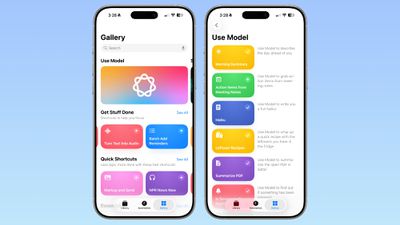
ios 26 shortcuts app examples
There are several pre-programmed Shortcuts in the Gallery that you can select in ‌iOS 26‌. Here's what Apple offers, along with the descriptions:

  • Morning Summary - Use Model to describe the day ahead of you.
  • Action Items From Meeting Notes - Use Model to grab action items from meeting notes.
  • Haiku - Use Model to write a you a fun haiku.
  • Leftover Recipes - Use Model to whip up a quick recipe with leftovers you have in the fridge.
  • Summarize PDF - Use Model to summarize the open PDF in Safari.
  • Is Severance Season 3 Out? - Use Model to find out if something has been released.
  • ASCII Art - Use Model to draw you some ASCII art.
  • Document Review - Use Mode to help you compare and contrast documents.
  • Reminders Roulette - Use Model to punt an unimportant reminder to tomorrow.
  • Get Started With Language Models - A tutorial for Use Model with examples.

As the last pre-made Shortcut suggests, you can create your own shortcuts that incorporate Apple's AI model, and Apple's offerings serve as examples.

When you go to create a Shortcut, there's a new ‌Apple Intelligence‌ section. You can opt to use an on-device model, a cloud model that takes advantage of Private Cloud Compute, or ChatGPT. There are some pre-determined options, so you can do things like open Visual Intelligence or generate an image with Image Playground.
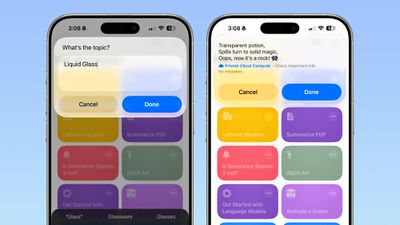
ios 26 shortcuts app haiku
There are several Writing Tools features for adjusting the tone of text, proofreading, creating a list from text, summarizing text, or rewriting text.

When you tap on Cloud, On-Device Model, or ChatGPT, there's an open-ended prompt where you can write in what you want to do. You need to work within the confines of the model that Apple provides, pairing it with other functionality in Shortcuts. You can pull in data from the Weather app, your Calendar, and Reminders, then ask the model to prepare a summary, for example. AI models can be incorporated into any Shortcut.
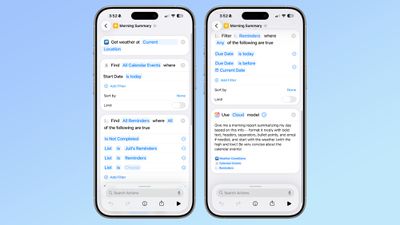
ios 26 shortcuts app ai
‌iOS 26‌, ‌iPadOS 26‌, and ‌macOS Tahoe‌ are in the early stages of beta testing, so the work on Shortcuts has just started, and Apple will be refining the app over the course of the beta testing period.


Related Roundups: iOS 26, iPadOS 26
Related Forum: iOS 26

Popular Stories

iOS 27 Feature Dark

Apple Now Pushing iPhone Users Still on iOS 26 to Install iOS 27

Thursday October 8, 2026 1:17 pm PDT by
Starting today, iPhone users still running iOS 26 will see iOS 27.0.1 as the prominent software update in the Settings app under General → Software Update, with iOS 26.7.1 now relegated to a smaller "Also Available" section at the bottom. iOS 27 was released on September 14, but until now that update and later iOS 27.0.1 were shown under the "Also Available" section, with iOS 26.7 and...

apple lock security bug vulnerability fix privacy

iOS 26.7.1 Fixes Vulnerability Used in Targeted Attacks

Monday September 28, 2026 11:45 am PDT by
iOS 26.7.1, iPadOS 26.7.1, macOS Tahoe 26.7.1, and macOS Sequoia 15.8.1 address a major vulnerability that Apple believes was used against a small number of people. Apple's security support pages say there was a CoreGraphics out-of-bounds write issue that could be exploited with a maliciously crafted file, allowing for arbitrary code execution. It has been fixed with improved bounds...
M5 MacBook Pro

RIP, MacBook Ultra

Monday October 19, 2026 9:37 am PDT by
Apple today sent out invites for an experience in Los Angeles on Wednesday, October 28, and the "Pro and tell" tagline on the invitation likely means that the rumored MacBook models with touch-enabled OLED displays will stick with MacBook Pro branding instead of the once-rumored "MacBook Ultra" name. The long-rumored "iPhone Ultra" ended up being named iPhone Duo, so speculation that Apple...

Top Rated Comments

211 Avatar
18 months ago
I still don’t understand Shortcuts. Can I just tell it what I want now and it will create it?
Score: 6 Votes (Like | Disagree)
gaximus Avatar
18 months ago
I love shortcuts, and use them for everything. But most of these new things, Siri should just be able to handle. I shouldn’t have to create a shortcut to find out if a move has been released, Siri should just know if I ask.
Score: 5 Votes (Like | Disagree)
LordArchie Avatar
18 months ago
Loving this.. waiting for some really cool shortcuts. Great list to start from
Score: 3 Votes (Like | Disagree)
tomtad Avatar
18 months ago
What's model?

Also isn't this essentially saved prompts for a chatbot? All of these I should be able to do by just asking Siri.
Score: 1 Votes (Like | Disagree)
18 months ago
This is making the shortcuts app even better. Waiting to try out the various possibilities soon.
Score: 1 Votes (Like | Disagree)
adrianlondon Avatar
18 months ago

I still don’t understand Shortcuts. Can I just tell it what I want now and it will create it?
No. It seems, from the screenshot above, you use existing shortcut actions to feed into an AI prompt.

I'm not sure what it offers that I'm not currently doing in iOS 18. I'm assuming a difference is that it can be done on device.

If you're interested to play in iOS 18, here's a shortcut that grabs weather info and asks Gemini to read it out to you.
https://routinehub.co/shortcut/17674/ (requires https://routinehub.co/shortcut/18664/)
Score: 1 Votes (Like | Disagree)
Latest Stories
Apple Blocks Certificates That Could Help Attackers Fake Websites
1 hour ago
Giant iPhone Duo Installations Spotted at Apple Fifth Avenue
2 hours ago
iPhone Duo 2 Prototypes Include Under-Display Face ID
2 hours ago
Tesla App Gains iPad and iPhone Duo Support
6 hours ago
Apple Reportedly Boosts iPhone Duo Orders by 44%
7 hours ago
Fortnite Returning to Australian App Store After Court Ruling
7 hours ago
Apple Ordered to Open iPhone to Rival App Stores in Australia
7 hours ago
Apple Suppliers Face Hurdles Cutting Circuit Board Emissions
8 hours ago
Things Updated for iPhone Duo With Adaptive Layout
8 hours ago
Simplicity and Siri AI Are HomeView's Killer Features, Apple Says
9 hours ago
iPhone Duo Reviewers Really Miss Face ID
14 hours ago
Does the iPhone Duo Run Hot? Here's What Reviews Found
15 hours ago
Apple Music's New Look is Now Live on Apple's Website
16 hours ago
Anthropic Launches Claude Duet, a Proactive AI Agent
16 hours ago
What 32,000 Folds Did to the iPhone Duo's Hinge
17 hours ago
iPhone Duo's Hidden FaceTime Camera Takes 'Trash' Photos
18 hours ago
iPhone Duo Has 'Edge Light' Feature That Debuted on Macs Last Year
19 hours ago
Apple Support App Updated for iPhone Duo's Larger Display
19 hours ago
Amazon Sweetens the Deal on Entry-Level 16-Inch MacBook Pro With $570 Off
19 hours ago
iPhone Duo Tips Over on MagSafe Stands When Unfolded
20 hours ago
Apple Music's New Look Officially Announced
21 hours ago
iPhone Duo Supports Apple Pencil Starting With iOS 27.2
22 hours ago
iPhone Duo Accessories Roundup: Cases and Screen Protectors From OtterBox, ZAGG, and More
23 hours ago
Apple Stores Will Have 'Limited' Availability of iPhone Duo for Walk-In Customers
23 hours ago
iPhone Duo Reviews Explain Why Device is Both 'Fun' and 'Frustrating'
23 hours ago
Apple Says 'Reachability' Feature Coming to iPhone Duo Later This Year
1 day ago
Loop Capital Cuts Apple Rating Over iPhone Sales Outlook
1 day ago
Apple Stores in Bordeaux and Lille Looted During French Protests
1 day ago
Bluesound Adds Native Apple Music Support
1 day ago
Apple CEO John Ternus Explains What Makes Good Product Design
1 day ago








































