
Apple Releases Fifth Public Betas of iOS 26 and More - GeekWebGuides
Skip to Content

Apple Releases Fifth Public Betas of iOS 26 and More

Apple today released the fifth public betas of iOS 26, iPadOS 26, macOS 26, and tvOS 26, allowing the public to test the updates ahead of their September launch. The fifth public betas come a week after the fourth public betas, and the updates correspond with the eighth developer betas that were released earlier today.
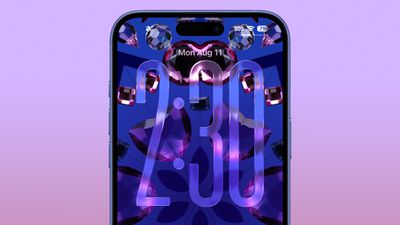
ios 26 liquid glass lock screen beta 6
Public beta testers that have registered on Apple's website can download the latest ‌iOS 26‌, ‌iPadOS 26‌, and macOS 26 public betas by opening the Settings or System Settings app, going to the General section, tapping on Software Update, and choosing the ‌iOS 26‌, ‌iPadOS 26‌, or macOS 26 Public Beta options.

‌iOS 26‌ and ‌iPadOS 26‌ feature Apple's Liquid Glass design, with a visual aesthetic that focuses on transparency. Icons, menu buttons, navigation bars, and more reflect and refract light with subtle animations. There are pop-out menus in some areas, tab bars shrink down, and everything has a more rounded look.
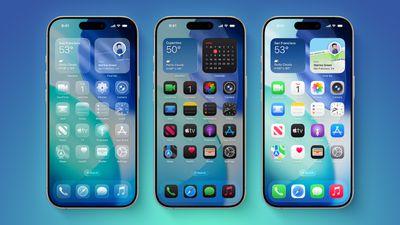
iOS 26 on Three iPhones
There are new Apple Intelligence features like Visual Intelligence for screenshots, updated order tracking in the Wallet app, new features in Reminders, and Live Translation for the Messages, Phone, and FaceTime apps. Image Playground has ChatGPT style options, and Genmoji supports mixing two or more emoji characters to make something new.
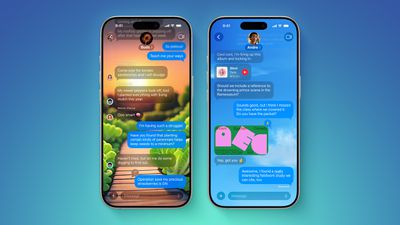
ten messages features
2D photos have a more 3D look with a Spatial Scene feature, and Safari has updated navigation. In the Phone app, there are new Call Screening and Hold Assist features that will save you time, while the Messages app supports customizable backgrounds and polls. Apple Music has a DJ-like AutoMix feature, CarPlay has an overhauled interface, there's a new Apple Games app, and Preview has come to the iPhone for the first time.
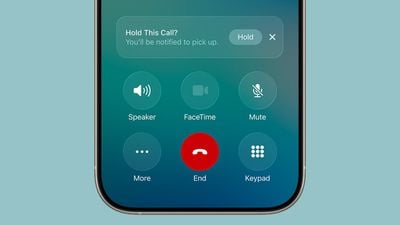
ios 26 call holding
macOS Tahoe has the same Liquid Glass design as ‌iOS 26‌, and it extends to app icons, folders, the Dock, in-app navigation, menus, the Control Center, and the Menu Bar. The Control Center and the Menu Bar are customizable, and you're also able to customize folders, app icons, and widgets.
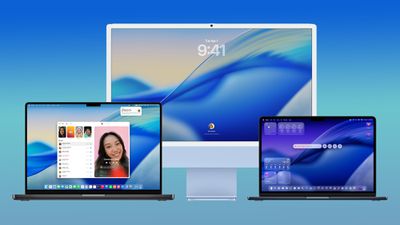
macos tahoe design
Safari has an updated tab design and a redesigned sidebar, and Apple has brought the Phone app to the Mac for making phone calls through Wi-Fi Calling. The Phone app supports the new Call Screening and Hold Assist features.

Spotlight has been overhauled with improved search and the ability to execute hundreds of actions without opening up an app. There's a new Games app with a Game Overlay feature, and developers have access to Metal 4.

More on what's new can be found in our iOS 26, iPadOS 26, and macOS Tahoe roundups. This is likely to be the final public beta of ‌iOS 26‌ before the release candidate and the launch version.

Related Roundups: iOS 26, iPadOS 26
Related Forum: iOS 26

Popular Stories

iOS 27 Feature Dark

Apple Now Pushing iPhone Users Still on iOS 26 to Install iOS 27

Thursday October 8, 2026 1:17 pm PDT by
Starting today, iPhone users still running iOS 26 will see iOS 27.0.1 as the prominent software update in the Settings app under General → Software Update, with iOS 26.7.1 now relegated to a smaller "Also Available" section at the bottom. iOS 27 was released on September 14, but until now that update and later iOS 27.0.1 were shown under the "Also Available" section, with iOS 26.7 and...
apple lock security bug vulnerability fix privacy

iOS 26.7.1 Fixes Vulnerability Used in Targeted Attacks

Monday September 28, 2026 11:45 am PDT by
iOS 26.7.1, iPadOS 26.7.1, macOS Tahoe 26.7.1, and macOS Sequoia 15.8.1 address a major vulnerability that Apple believes was used against a small number of people. Apple's security support pages say there was a CoreGraphics out-of-bounds write issue that could be exploited with a maliciously crafted file, allowing for arbitrary code execution. It has been fixed with improved bounds...


M5 MacBook Pro

RIP, MacBook Ultra

Monday October 19, 2026 9:37 am PDT by
Apple today sent out invites for an experience in Los Angeles on Wednesday, October 28, and the "Pro and tell" tagline on the invitation likely means that the rumored MacBook models with touch-enabled OLED displays will stick with MacBook Pro branding instead of the once-rumored "MacBook Ultra" name. The long-rumored "iPhone Ultra" ended up being named iPhone Duo, so speculation that Apple...

Top Rated Comments

iBreatheApple Avatar
15 months ago

Just updated to the beta for the first time. The first thing I noticed was you can't easily change safari tabs.

You need to press the 3 dots then swap tabs. Please tell me there's a quicker way of swapping tabs.
Swipe up on the address bar. I didn’t like it either but it’ll become second nature after a while. I don’t mind now.
Score: 5 Votes (Like | Disagree)
mblm85 Avatar
15 months ago

Please tell me there's a quicker way of swapping tabs.
You can go into Settings > Safari and change the view from Compact to either Bottom or Top.
Score: 5 Votes (Like | Disagree)
15 months ago

Holy smokes, this just made "compact" usable. I was using "bottom" just for the tab switcher. Thanks!
You can also use the pinch gesture anywhere on the screen while in safari to show all tabs. I have found this the easiest way.
I didn’t know about the swiping up option!
Score: 3 Votes (Like | Disagree)
Robert.Walter Avatar
15 months ago

Just updated to the beta for the first time. The first thing I noticed was you can't easily change safari tabs.

You need to press the 3 dots then swap tabs. Please tell me there's a quicker way of swapping tabs.
This alone is terrible, perhaps the thing that has grated me into swearing at my iPhone for the first time ever since 2010.

Update: Thanks to iBreatheApple in #18 above, this is done by swiping the address hotdog upwards. Thank you sir!
Score: 3 Votes (Like | Disagree)
iBreatheApple Avatar
15 months ago

This has been the thing for me. The new features in the software (mainly those in the phone app) have outweighed my mild dislike of Liquid Glass.
It’s just the ICONS! I hate the “white outline”. Please remove it from them, Tim Apple, and all will be good!
Score: 3 Votes (Like | Disagree)
15 months ago
Thanks mate.worked a treat.
Score: 3 Votes (Like | Disagree)
Latest Stories
Apple Blocks Certificates That Could Help Attackers Fake Websites
1 hour ago
Giant iPhone Duo Installations Spotted at Apple Fifth Avenue
2 hours ago
iPhone Duo 2 Prototypes Include Under-Display Face ID
2 hours ago
Tesla App Gains iPad and iPhone Duo Support
6 hours ago
Apple Reportedly Boosts iPhone Duo Orders by 44%
7 hours ago
Fortnite Returning to Australian App Store After Court Ruling
7 hours ago
Apple Ordered to Open iPhone to Rival App Stores in Australia
7 hours ago
Apple Suppliers Face Hurdles Cutting Circuit Board Emissions
8 hours ago
Things Updated for iPhone Duo With Adaptive Layout
8 hours ago
Simplicity and Siri AI Are HomeView's Killer Features, Apple Says
8 hours ago
iPhone Duo Reviewers Really Miss Face ID
13 hours ago
Does the iPhone Duo Run Hot? Here's What Reviews Found
15 hours ago
Apple Music's New Look is Now Live on Apple's Website
16 hours ago
Anthropic Launches Claude Duet, a Proactive AI Agent
16 hours ago
What 32,000 Folds Did to the iPhone Duo's Hinge
17 hours ago
iPhone Duo's Hidden FaceTime Camera Takes 'Trash' Photos
18 hours ago
iPhone Duo Has 'Edge Light' Feature That Debuted on Macs Last Year
19 hours ago
Apple Support App Updated for iPhone Duo's Larger Display
19 hours ago
Amazon Sweetens the Deal on Entry-Level 16-Inch MacBook Pro With $570 Off
19 hours ago
iPhone Duo Tips Over on MagSafe Stands When Unfolded
19 hours ago
Apple Music's New Look Officially Announced
21 hours ago
iPhone Duo Supports Apple Pencil Starting With iOS 27.2
22 hours ago
iPhone Duo Accessories Roundup: Cases and Screen Protectors From OtterBox, ZAGG, and More
22 hours ago
Apple Stores Will Have 'Limited' Availability of iPhone Duo for Walk-In Customers
23 hours ago
iPhone Duo Reviews Explain Why Device is Both 'Fun' and 'Frustrating'
23 hours ago
Apple Says 'Reachability' Feature Coming to iPhone Duo Later This Year
1 day ago
Loop Capital Cuts Apple Rating Over iPhone Sales Outlook
1 day ago
Apple Stores in Bordeaux and Lille Looted During French Protests
1 day ago
Bluesound Adds Native Apple Music Support
1 day ago
Apple CEO John Ternus Explains What Makes Good Product Design
1 day ago








































