

There are hundreds of new features in iOS 14, many of which are immediately obvious like the new Home Screen widgets, the App Library, pinned conversations and mentions in Messages, a compact UI for Siri and Phone calls, and more, but there are also tons of features that are less immediately obvious.
In this guide and accompanying video, we've rounded up some of the most useful hidden features you'll find in the iOS 14 update. Note that some of these features are limited to Apple's newer iPhones and do not work with older models.
Sound Recognition
Sound Recognition is a useful Accessibility feature created for those who need help listening to their surroundings. When enabled, Sound Recognition allows the iPhone to listen for sounds like running water, a fire alarm, a dog barking, a baby crying, shouting, car horns, doorbells, and other related sounds.
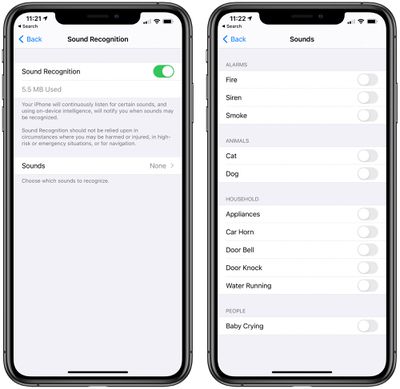
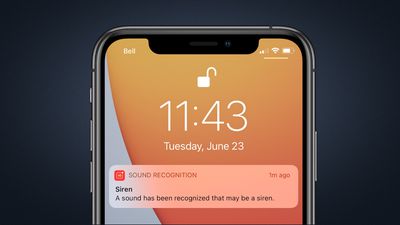
When the iPhone detects one of these sounds, it sends a notification so you're immediately alerted when something is wrong. In our testing, Sound Recognition has been accurate, making it a useful option for anyone who needs it. Note that when Sound Recognition is turned on, the iPhone is not able to listen for "Hey Siri" commands.
4K Videos on YouTube
With iOS 14, you can watch 4K YouTube videos on the iPhone, iPad, and most notably, the Apple TV. The iPhone and the iPad don't have 4K displays, but do offer video that's higher than the prior 1080p resolution limit.
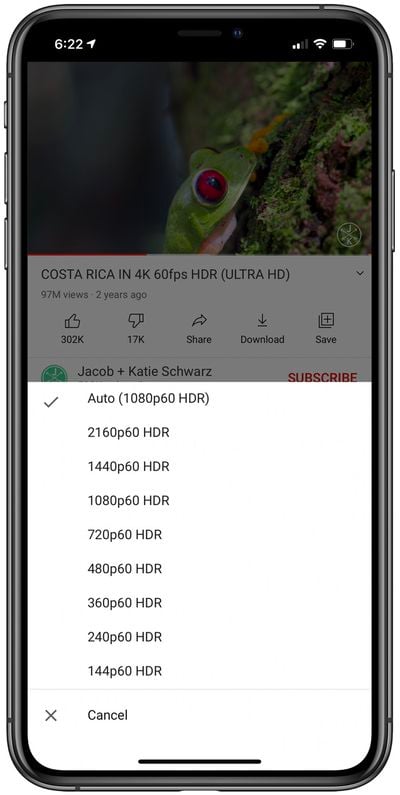
Content on iPhone and iPad can be viewed in 1440p HDR or 2160p HDR, while the Apple TV supports full 4K video. You can choose quality when watching a YouTube video in the YouTube app by tapping on the cog-shaped wheel to adjust the settings.
Private WiFi Address
When you're connected to a WiFi network in iOS 14, you can tap into the settings of that network and make sure "Private Address" is toggled on. Private Address is a privacy feature that helps to prevent the tracking of your iPhone across different WiFi networks.
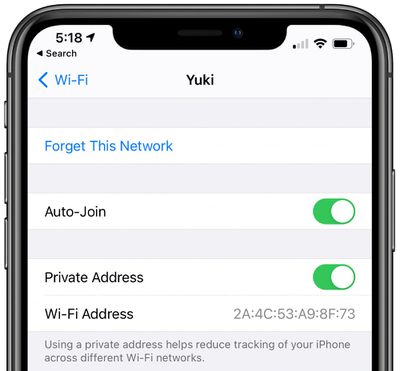
This is a feature that's enabled by default, and it's one that's particularly useful if you're using open WiFi sources frequently. Apple will also provide a warning if Private Address functionality is not available, so you can know if a WiFi network has greater access to tracking capabilities.
Get to the Private Address settings by opening up the Settings app, tapping on WiFi, and tapping the "i" button next to the WiFi network that you're connected to or that you want to connect to. From there, make sure Private Address is toggled on.
Mirror Front Camera
When you take a selfie with an iPhone with the standard Camera app, it flips the image so that it's the opposite of the mirror image that's shown in the preview (aka not a mirror image of you).
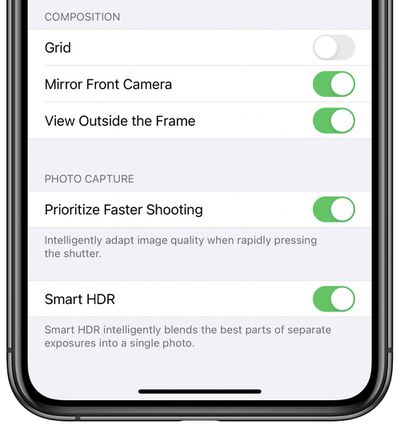
In iOS 14, you can choose to force the camera to capture mirror image selfies by opening up the Settings app, selecting Camera, and toggling on the "Mirror Front Camera" option. A lot of social networking apps use mirrored selfies so many people are more accustomed to mirroring functionality than the flipped selfies that the iPhone uses.
Toggling on Mirror Front Camera can provide a more unified selfie taking experience across multiple platforms.
FaceTime Eye Contact
Apple in an iOS 13 beta added an "Attention Aware" feature that tweaks your FaceTime video to make it look like you're making eye contact with the person you're chatting with even though you're looking at the iPhone or iPad's display.
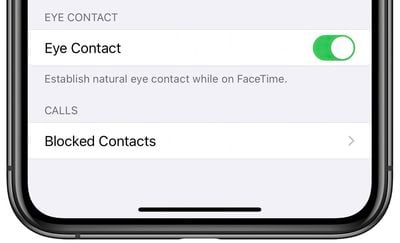
The feature was ultimately pulled, but it made its way into iOS 14 as an "Eye Contact" option, which can be toggled on in the FaceTime section of the Settings app. Eye Contact lets you "establish natural eye contact" while using FaceTime by changing the appearance of where you're focusing.
Navigation History Stack
If you're deep into an app's settings and want to quickly get back to where you were, there's a new history stack feature that you can access with a long press.
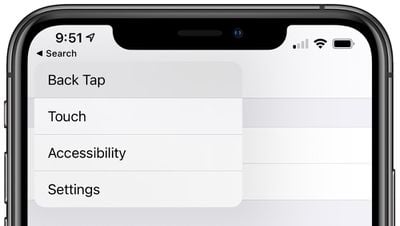
Just long press on any back button and then use a finger to select the prior screen you want to get back to. This feature works in Settings, the Files app, and anywhere else that you might get lost in different menus and options.
Photo Captions
There has long been an option to add captions to photos in the macOS Photos app to make specific images easier to find, and in iOS 14, that feature is also available on the iPhone and the iPad.
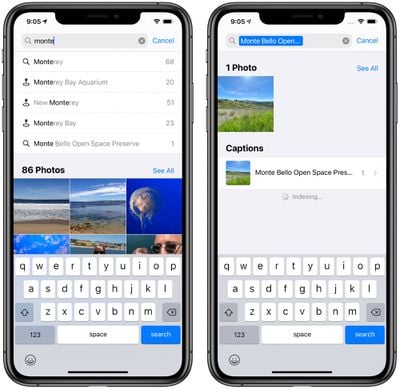
In the Photos app, just swipe up on any single photo you're looking at to see additional details and then tap on "Add a Caption" and type in whatever you want.
Volume Up/Down Camera Controls
There are some useful new volume button camera controls in iOS 14, which expand on the camera button as shutter functionality. If you press and hold the Volume Up button while the Camera app is open, you can take a series of burst mode photos (a bunch of photos in quick succession).
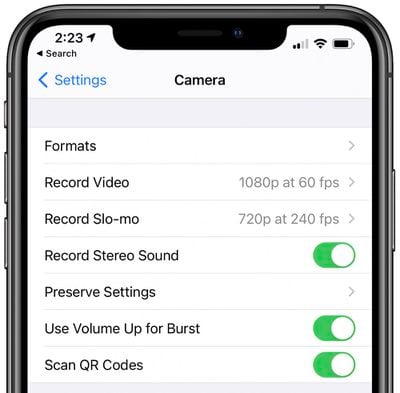
If you hold down the Volume Down button with the Camera app open, you can capture a QuickTake video, which lets you capture video without having to take the time to swap out of photo mode. Volume Up for Burst needs to be enabled in the Camera section of the Settings app, but QuickTake with the Volume Down button is enabled by default.
Prevent Apps From Downloading to Home Screen
Since there's now an App Library feature on the iPhone that lets you get to all of your installed apps, there's no longer a need for apps to be downloaded to the Home Screen.
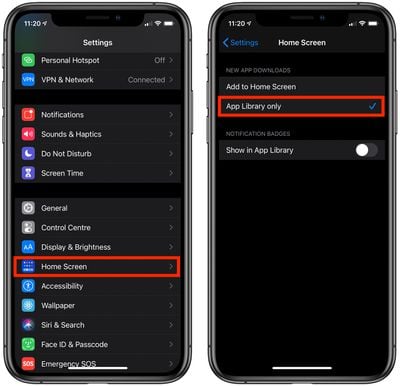
If you choose to, you can prevent newly downloaded apps from showing up on the Home Screen by opting to download them solely to the App Library. There's a toggle for enabling App Library only downloads in the Home Screen section of the Settings app.
Hide App Pages
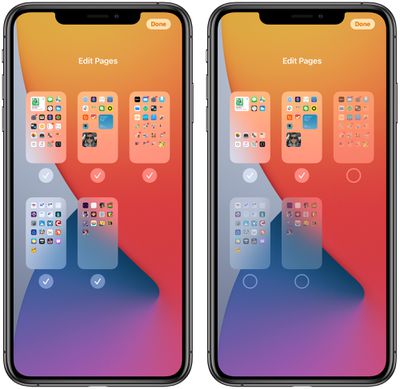
Again, with the App Library, there's less need for specific app pages for organizing apps. If you want to get rid of a page of apps for a cleaner Home Screen and usage experience, long press on the Home Screen, tap on the series of dots at the bottom, and then uncheck whichever app pages you don't want to see.
Picture in Picture Collapsed Window
In the iPhone's new Picture in Picture mode, which works with videos on the web, FaceTime, and more, if you pull a Picture in Picture window over to the side of the display, you can hide the video while the audio continues to play.
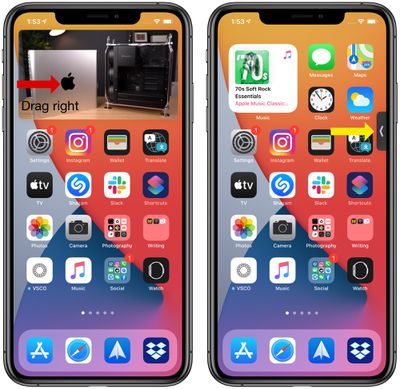
The hidden video feature lets you continue to chat on FaceTime or listen to a video while giving you full access to your iPhone's screen for whatever you need to do.
Photos Zoom
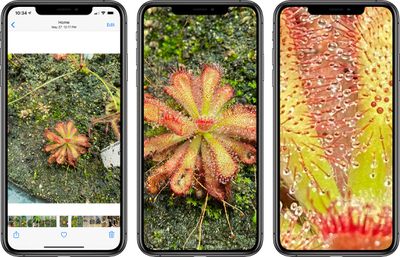
iOS 14 lets you pinch zoom much further into your photos in the Photos app, which is great if you have a photo where you want to see the detail up close.
Back Tap
Back Tap is an Accessibility feature that lets users double tap or triple tap on the back of the iPhone to perform various actions.
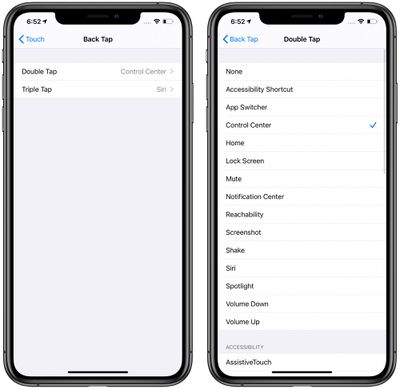
Back tap can be used to do things like access Control Center, Notification Center, the Lock screen, the Home screen, or the App Switcher, or it can change the volume, bring up Siri, mute the iPhone, take a screenshot, or access a Shortcut, and it can be set up to work with Accessibility features like Assistive Touch, Magnifier, or VoiceOver.
The Back Tap options can be accessed in the Settings app by tapping Accessibility > Touch > Back Tap. Tapping to trigger an action works well when the iPhone's back is tapped in any spot on the device with either the double tap or triple tap gesture.
Hide Photos Albums
The Photos app on the iPhone has long had a feature for hiding photos from the main library, but all of those hidden photos are easily accessible in the obviously named "Hidden" album.
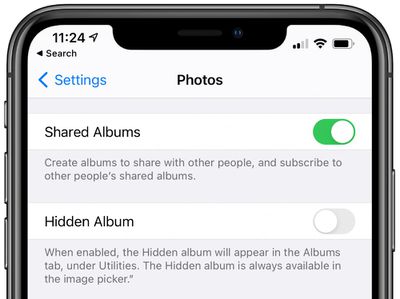
In iOS 14, there's a toggle in the Settings app that lets you hide the "Hidden" album so it doesn't show up in the albums list, making it harder to find hidden images. The Hidden album is, however, still available in the image picker in other apps.
More iOS 14 Info
For more on what's new in iOS 14, make sure to check out our iOS 14 roundup, which has a detailed rundown of all of the features that are included in the update.
We've also created in-depth guides on many of the iOS 14 features, and those are listed below.
- iOS 14 Privacy Features: Approximate Location, Clipboard Access Warnings, Limited Photos Access and More
- iOS 14 and watchOS 7 Sleep Features: Sleep Mode, Wind Down, Sleep Tracking and More
- Safari iOS 14 Guide: Privacy Report, Built-In Translation, Compromised Password Alerts and More
- What's New in iOS 14 Maps: Cycling Directions, Guides, Refine Location and More
- iOS 14's New AirPods Features: Spatial Audio, Better Automatic Device Switching, Battery Notifications and More
- iOS 14: Apple's Built-In Translate App That Works With 11 Languages
- iOS 14's Compact Interface: Phone Calls, FaceTime, Siri and More
- Magnifier in iOS 14 Gets Overhauled UI and New Features, Can Be Added to Home Screen
- iOS 14: How to Use Picture in Picture Mode on iPhone
- iOS 14 Home Screen Changes: App Library, Widgets, Hiding Apps and More
- iOS 14: Everything New in Messages
- Car Keys: A New Feature That Lets You Unlock a Car With Your iPhone or Apple Watch
- iPadOS 14 Features You Need to Know
- Top iOS 14 Features: Compact Phone Calls, Back Tap, Widgets, App Library and More
Have questions about iOS 14 and or want to offer feedback on this guide? Send us an email here.






















