Six Useful Tips for New AirPods Owners - GeekWebGuides
Skip to Content

Six Useful Tips for New AirPods Owners

Just get a new set of AirPods for Christmas? If so, we've rounded up a handy list of tips, tricks, and features that you might not know about to get you acquainted with your new earbuds.
airpods 3 blue holiday 2

First, if you are new to AirPods entirely, we have a long list of basic tips on how to use your AirPods.

AirPods Basics

6 Useful AirPods Tips for New Owners

Beyond the basics, here are 6 more useful tips about your new AirPods:

1. Keep Your AirPods Safe With Find My

Apple's latest AirPods, including the AirPods 3 and AirPods Pro, feature Find My integration, so if they're stolen or misplaced, you can locate them with the Find My app. AirPods can take advantage of the ‌Find My‌ network so you can leverage the iPhones, iPads, and Macs of other people to track down a lost set of AirPods wherever they end up, so long as the battery holds out.
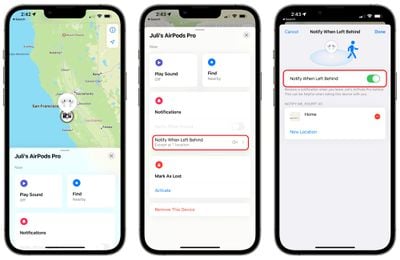
notify when left behind airpods
You'll also want to make sure you turn on "Notify When Left Behind" so you can get alerted right away if you're out and about and forget your AirPods somewhere. To turn it on, open up the ‌Find My‌ app, tap on your AirPods in the list, and toggle on the "Notify When Left Behind" option. These ‌Find My‌ features also work for the AirPods Max.

2. Activate or Deactivate Automatic Device Switching

Apple's AirPods have a feature that allows them to automatically connect to whatever device is in active use, so if you swap from your iPhone to your Mac, the AirPods connection is meant to transition from one device to another as you do.

Automatic Switching can be useful, but there are instances where you might not want it turned on if it's switching between devices inappropriately. You can manage it by following these steps:

  1. Connect your AirPods to your iPhone.
  2. Open up the Settings app.
  3. Tap on Bluetooth and then select the "i" next to your AirPods in the list. airpods bluetooth settings
  4. Tap on "Connect to This iPhone." automatic device switching airpods
  5. Choose "When Last Connected to This iPhone" to turn automatic switching off, and choose "Automatically" to turn it on.
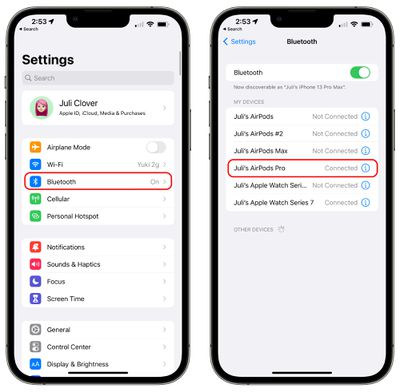
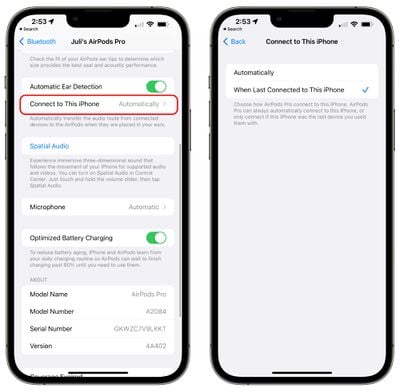
With "Automatically" turned on, your AirPods will connect to your iPhone when it's in active use and your AirPods are in your ears. With "When Last Connected to This iPhone" selected, AirPods will only connect to the last connected device rather than the device in active use. This feature also works with AirPods 2, AirPods 3, AirPods Pro, and AirPods Max.

Note that you will need to disable Automatic Switching for each device connected to your iCloud account if you're not a fan of the feature and want it off entirely. There's no master toggle, with Apple handling it on a per-device basis.

3. Turn on Announce Notifications

With Siri integration and the latest version of iOS (which is iOS 15), AirPods are able to announce all of your incoming notifications, including Messages.
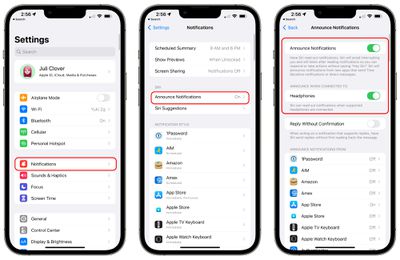
announce notifications airpods
Here's how to turn it on:

  1. Open up the Settings app.
  2. Tap on "Notifications."
  3. Tap on "Announce Notifications."
  4. Toggle on "Announce Notifications."
  5. Toggle on "Headphones."

With both Announce Notifications and Headphones toggled on, ‌Siri‌ will read out notifications from apps of your choice when you have the AirPods in, and will give you an opportunity to respond. So if you have an incoming text message, ‌Siri‌ will read it out and give you a chance to send out a reply, all hands-free.

You can select the apps that you want to use Announce Notifications with so you can get important readouts without having a deluge of notifications read to you by ‌Siri‌.

4. Check Your AirPods Battery Life

If you want to keep tabs on your AirPods battery life, there are multiple ways to do so. AirPods will tell you battery level when you connect them to a device, or you can use the "Battery" widget on an iPhone or an iPad.
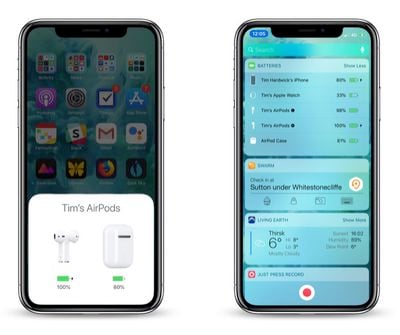
how to check AirPods battery life on iPhone
‌Siri‌ is also able to tell you your AirPods battery life, and if your AirPods are connected to your Apple Watch, the control center offers battery life information. For more on the different ways to check your AirPods battery life, we have a dedicated AirPods battery how-to.
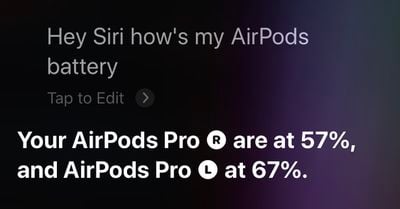
airpods pro ask siri battery

5. Use the Force Sensor to Control Playback

If you've upgraded to the AirPods 3 or AirPods Pro from the original AirPods or the AirPods 2, or if you're new to AirPods entirely, you might not be familiar with the physical controls.
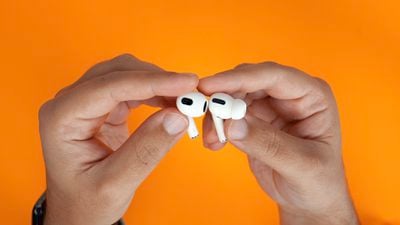
airpods 3 vs airpods pro 5
The AirPods 3 and AirPods Pro have a built-in force sensor in the stem. The force sensor can be used for controlling media playback with different presses.

  • Single press - Play/Pause audio
  • Double press - Skip forward
  • Triple press - Skip backward
  • Press when there's a call - Answer incoming call
  • Double press on a call - Hang up
  • Press and hold - Activate ‌Siri‌

On AirPods Pro, you can customize what the long press force sensor gesture does because it can be set to Noise Control or ‌Siri‌. The AirPods 3 do not have Active Noise Cancellation and are limited to ‌Siri‌ for the press-and-hold gesture.

6. Make Sure Spatial Audio is Activated

Spatial audio is a feature that offers immersive three-dimensional sound, and it is able to follow the movement of the iPhone with supported audio and video. Spatial audio can be toggled on or off using the Control Center, and it is available for AirPods 3, AirPods Pro, and AirPods Max.

  1. With your AirPods connected to your iPhone or ‌iPad‌, open up the Control Center. If you don't know how, we have a guide.
  2. On the volume slider, you should see a little icon that looks like the AirPods. If you don't see it, reconnect your AirPods.
  3. Long press on the volume slider.
  4. Tap on the "Spatial Audio" option. spatial audio activate
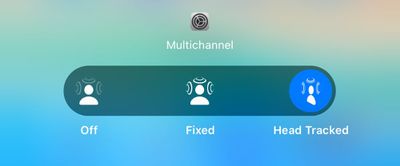
  5. Choose between Off, Fixed, or Head Tracked (on supported devices). spatial audio options
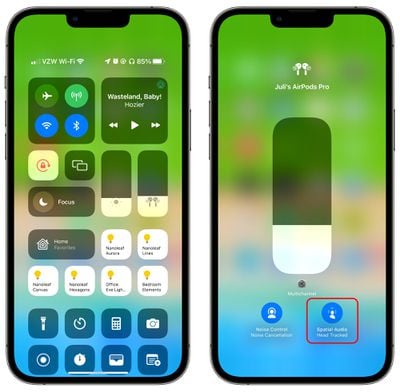
Off will turn spatial audio off entirely, while Fixed will allow spatial audio to be used, but without head-tracking functionality. Head Tracked enables the full spatial audio feature with head tracking included.

You can also preview what spatial audio sounds like by connecting your AirPods to your phone, selecting them in the Bluetooth section of the Settings app, and choosing the "Spatial Audio" option.
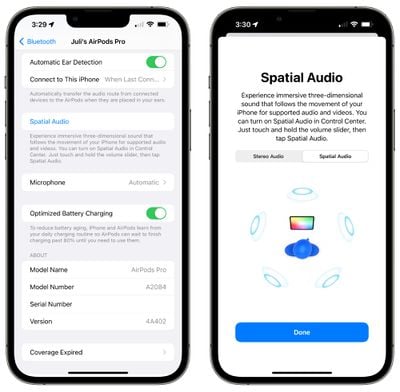
spatial audio test settings
Spatial audio works with the Apple TV app and Apple Music, but many third party apps also support it like Netflix, Disney+, HBO Max, YouTube, and more. We have a useful guide that outlines many popular third-party apps that support spatial audio.

Learn More

To learn more about your AirPods, we have a dedicated AirPods 3 roundup and a dedicated AirPods Pro roundup, both of which walk through all the different features and will come in handy as you learn to use your new earbuds.

Related Roundup: AirPods 5
Buyer's Guide: AirPods (Buy Now)
Related Forum: AirPods

Popular Stories

AirPods Pro Beta Firmware 2

Apple Releases New AirPods Beta Firmware

Tuesday September 29, 2026 11:38 am PDT by
Apple today released new beta firmware for the AirPods Pro 2, AirPods Pro 3, AirPods 4, AirPods 5, and AirPods Max 2. The firmware has a build number of 9B5042a and is rolling out for developers and public beta testers. There's no word on what's included in the firmware update because Apple doesn't offer notes for AirPods beta releases. When the AirPods are connected to an iPhone, iPad,...


AirPods Pro Beta Firmware 2

Apple Releases New AirPods Beta Firmware

Tuesday October 13, 2026 11:28 am PDT by
Apple today released new beta firmware for the AirPods Pro 2, AirPods Pro 3, AirPods 4, AirPods 5, and AirPods Max 2. The firmware has a build number of 9B5043a and is rolling out for developers and public beta testers. There's no word on what's included in the firmware update because Apple doesn't offer notes for AirPods beta releases. When the AirPods are connected to an iPhone, iPad,...
ifixit airpods 5

AirPods 5 Teardown: Batteries Removable, Case Still Tough

Tuesday September 29, 2026 2:38 pm PDT by
Repair site iFixit today took apart Apple's AirPods 5 for one of its traditional teardown videos. It turns out the new AirPods are slightly more repairable than prior models, but it's still not a simple home fix. The AirPods 5 use pronged batteries that Apple previously used in the AirPods 3, but not the AirPods 4. The battery can be removed with a "nifty pair of tongs," and iFixit says the...

Top Rated Comments

TheYayAreaLiving 🎗️ Avatar
63 months ago
Nice tips.

Tip #7: You can pair them with non-Apple products, too

To start pairing to anything new, put the AirPods in their case, then flip the lid up and press and hold the small button on the rear of the charging case until the little LED light starts pulsing white. They should then show up in any Bluetooth-pairing settings on an Android phone, or computer, or TV.
Score: 4 Votes (Like | Disagree)
63 months ago

Does notifying when left behind work with the first generation AirPods? It doesn't work for me.
I have the AirPods Pro and am not seeing the "Notify When Left Behind" option in Find My. Maybe you have the same issue I do? I'm on an iPhone 8, so maybe that's why? Dunno.
Score: 2 Votes (Like | Disagree)
63 months ago
Very nice and detailed article.
Score: 2 Votes (Like | Disagree)
Joz3d Avatar
63 months ago
Was unable to recover and pay attention to rest of the video once I saw that Julie Clover has AOL Instant Messenger installed.
Score: 1 Votes (Like | Disagree)
contacos Avatar
63 months ago
Most useful tip: get AppleCare+ because those things last about a year* such a throw away product.

*yet I keep using them
Score: 1 Votes (Like | Disagree)
63 months ago

Did you know you can also spy on people using leaving the iPhone behind accidentally? Can be used to easily eavesdrop 👂 🎧

Further details are below.

https://www.cultofmac.com/761827/how-to-use-iphone-and-airpods-spy-on-people/?utm_campaign=The%20Weekender&utm_medium=email&utm_source=Revue%20newsletter
It should go without saying that this is unethical and in some states, territories, etc, it may also be illegal.
Score: 1 Votes (Like | Disagree)
Latest Stories
Apple Will Label Apps 'Made for iPhone Duo' in App Store
25 minutes ago
Amazon Takes $49 Off iPad With Prices Starting at $399.99
1 hour ago
F1 on Apple TV Now Available in Dolby Atmos
2 hours ago
Apple Reveals More Than 50 Apps That Will Be Updated for iPhone Duo
2 hours ago
Apple Blocks Certificates That Could Help Attackers Fake Websites
3 hours ago
Giant iPhone Duo Installations Spotted at Apple Fifth Avenue
4 hours ago
iPhone Duo 2 Prototypes Include Under-Display Face ID
4 hours ago
Tesla App Gains iPad and iPhone Duo Support
8 hours ago
Apple Reportedly Boosts iPhone Duo Orders by 44%
9 hours ago
Fortnite Returning to Australian App Store After Court Ruling
9 hours ago
Apple Ordered to Open iPhone to Rival App Stores in Australia
9 hours ago
Apple Suppliers Face Hurdles Cutting Circuit Board Emissions
10 hours ago
Things Updated for iPhone Duo With Adaptive Layout
10 hours ago
Simplicity and Siri AI Are HomeView's Killer Features, Apple Says
11 hours ago
iPhone Duo Reviewers Really Miss Face ID
16 hours ago
Does the iPhone Duo Run Hot? Here's What Reviews Found
17 hours ago
Apple Music's New Look is Now Live on Apple's Website
18 hours ago
Anthropic Launches Claude Duet, a Proactive AI Agent
18 hours ago
What 32,000 Folds Did to the iPhone Duo's Hinge
19 hours ago
iPhone Duo's Hidden FaceTime Camera Takes 'Trash' Photos
20 hours ago
iPhone Duo Has 'Edge Light' Feature That Debuted on Macs Last Year
21 hours ago
Apple Support App Updated for iPhone Duo's Larger Display
21 hours ago
Amazon Sweetens the Deal on Entry-Level 16-Inch MacBook Pro With $570 Off
22 hours ago
iPhone Duo Tips Over on MagSafe Stands When Unfolded
22 hours ago
Apple Music's New Look Officially Announced
23 hours ago
iPhone Duo Supports Apple Pencil Starting With iOS 27.2
1 day ago
iPhone Duo Accessories Roundup: Cases and Screen Protectors From OtterBox, ZAGG, and More
1 day ago
Apple Stores Will Have 'Limited' Availability of iPhone Duo for Walk-In Customers
1 day ago
iPhone Duo Reviews Explain Why Device is Both 'Fun' and 'Frustrating'
1 day ago
Apple Says 'Reachability' Feature Coming to iPhone Duo Later This Year
1 day ago