iOS 17: How to Add Effects to Stickers in Messages - MacRumors
Skip to Content

iOS 17: How to Add Effects to Stickers in Messages

by

In iOS 17, Apple has added several new features to its Messages app to make communicating with other Apple users more creative and fun. One such feature is the ability to add effects to your stickers. Keep reading to learn how it works.
iOS 17 Messages Feature
iMessage stickers arrived way back in iOS 10, allowing users to resize stickers, put them on top of chat bubbles, add them in photos, and stick them on top of other stickers, with simple controls for dragging.

Stickers have come a long way since then. In ‌iOS 17‌, for example, users are now able to create their own stickers from photo subjects, and even add neat little effects to individual stickers to change up their look.

There are a number of effects that can be added to stylize your stickers, including a white outline, comic-like shading, a puffy 3D look, and a shiny, holographic finish. The sticker effects will animate and reflect the light appropriately, making your self-created stickers look professionally done.

The following steps show you how sticker effects are applied in iOS 17.

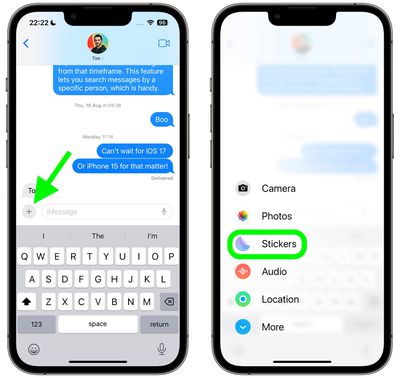
  1. In a Messages conversation, tap the + button next to the text input field.
  2. Tap the Stickers option in the vertical list that appears.
    2add effects stickers messages

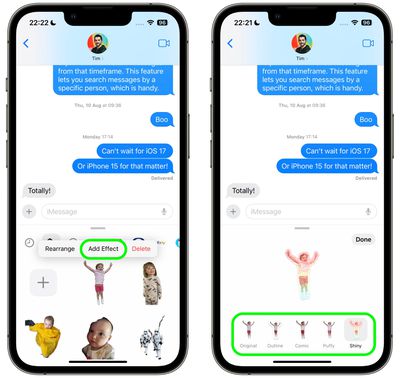
  3. Press and hold on an individual sticker until it "pops," then tap Add Effect in the popup menu.
  4. Tap one of the available effects options: Original, Outline, Comic, Puffy, or Shiny.
  5. Tap Done to finish.
    1add effects stickers messages

That's all there is to it – your stylized sticker is now ready to be shared with the world.

Did you know that another new Messages feature in iOS 17 is the ability to turn Live Photos into Live Stickers? Click the link to learn how it's done.


Popular Stories

imac video apple feature

Apple Released Yet Another New Product Today

Friday March 20, 2026 2:39 pm PDT by
Apple has unveiled a whopping nine new products so far this March, including an iPhone 17e, iPad Air models with the M4 chip, MacBook Air models with the M5 chip, MacBook Pro models with M5 Pro and M5 Max chips, the all-new MacBook Neo, an updated Studio Display, a higher-end Studio Display XDR, AirPods Max 2, and now the Nike Powerbeats Pro 2. iPhone 17e features the same overall design as...
HomePod mini and Apple TV Sage

New Apple TV and HomePod Mini Remain 'Ready' to Launch

Sunday March 22, 2026 6:33 am PDT by
Apple has unveiled nine new products this month, but the wait continues for the next-generation Apple TV 4K and HomePod mini models. In his Power On newsletter today, Bloomberg's Mark Gurman said new versions of the Apple TV and HomePod mini have been "ready" since last year, but he reiterated that Apple has held off on releasing them until the more personalized version of Siri and other...
iOS 26

iOS 26.4 Adds Two New Features to CarPlay

Tuesday March 24, 2026 1:55 pm PDT by
iOS 26.4 was released today, and it includes a couple of new features for CarPlay: an Ambient Music widget and support for voice-based chatbot apps. To update your iPhone 11 or newer to iOS 26.4, open the Settings app and tap on General → Software Update. CarPlay will automatically offer the new features so long as the iPhone connected to your vehicle is running iOS 26.4 or later....