Are you looking to personalize your iPhone's Home Screen beyond the standard layout? Changing app icons is a creative way to customize your device's appearance and make it uniquely yours. Whether you're aiming for a themed aesthetic or just want to refresh the look of your most-used apps, altering app icons on your iPhone is a simple yet effective way to revamp your Home Screen.
ios 15 home screen icons yellow
In this article, we'll guide you through the steps to change app icons on your iPhone, offering you the freedom to tailor your device to match your style and preferences. But before you read on, you will need to find or make an image for your new app icon. Fortunately, there are plenty of free icons available for download that you can find with a simple search online.

Once you have your icon image, it's time to make use of it. The following steps explain how you can add a custom icon for any app. The process effectively involves creating a Shortcut to open an app, and then adding an image to that Shortcut so that it appears the way you want it to look on the Home screen.

How to Change an App's Icon With Shortcuts

Shortcuts can be a complex app to use, as it allows users to create multi-step processes to run on their device, but when it comes to changing up app icons, it's a really simple procedure.

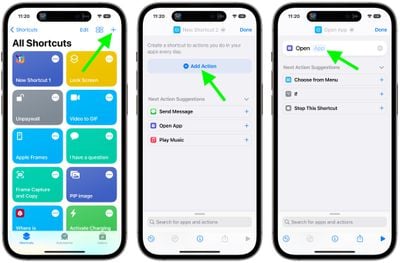
  1. Launch the Shortcuts app on your iPhone or iPad, then tap the + icon in the top-right corner of the screen.
  2. Tap Add Action, then use the text field to search for Open App.
  3. Select Open App.
  4. Tap App.

    shortcuts

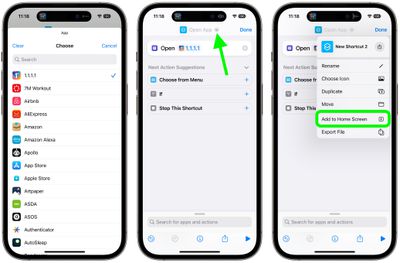
  5. Use the search field to find the app you want to change the icon of, then select it in the list.
  6. Tap the down facing chevron at the top next to "Open App".
  7. Tap Add to Home Screen.

    shortcuts

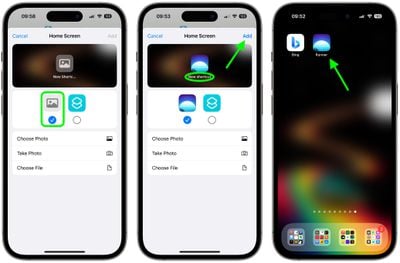
  8. Tap the placeholder picture icon on the left.
  9. From the drop-down menu that appears, select Take Photo, Choose Photo, or Choose File, depending on where your replacement app icon image is located.
  10. Select your replacement image.
  11. In the text field, rename the app as you want it to appear on the home screen.
  12. Finally, tap Add.
    shortcuts

Your Shortcut has now been created. You'll be returned to the home screen where you should see the shortcut in the next available space.

If you already had the app on your home screen, you will now have two different icons for it. In order to keep only your newly-created icon, simply move the old icon to the App Library. To do so, long press on the icon, tap Remove App, then choose Remove From Home Screen. Note: You must not delete the original app.

Since this process can be quite time-consuming, especially when it includes finding or making custom icons, you likely won't want to do it for every app. But if you have the time and patience, what's stopping you?


Top Rated Comments

motm95 Avatar
70 months ago
This really is a terrible workaround for what could be simple - iOS native ability to change app icons and icon packs in the app store.
Score: 25 Votes (Like | Disagree)
newyorksole Avatar
70 months ago
I’m all for options and customization, but to me a lot of what I’m seeing people post looks tacky Lol.

I’m very much a “default home screen / wallpaper” guy. I like the way things look as is.

But again, people seem to be loving it so that’s great.

EDIT: Also, this just seems like sooo many steps. ?
Score: 17 Votes (Like | Disagree)
Lucas284 Avatar
70 months ago
Thanks.


Attachment Image
Score: 16 Votes (Like | Disagree)
tkermit Avatar
70 months ago
Limitations


* Tapping Custom App Icons launch Shortcuts first, and then the App

that sounds incredibly annoying.
Score: 12 Votes (Like | Disagree)
tha_man Avatar
70 months ago

Sorry but this just looks awful. Apple shouldn’t allow it. Looks cheap and android.
Yes, it should also not allow to put the iPhones into cheap case, other than the Apple one. And while we're at it, government shouldn't allow us to dress into cheap clothing from H&M and only allow us to drive black premium limos from now on...

I think it's great to be able to customise the look of your device. Some people are more than just simple users, they are enthusiast and enjoy doing stuff like this. If you want the default look on your device, nothing is stopping you to not change absolutely anything.
Score: 12 Votes (Like | Disagree)
mattopotamus Avatar
70 months ago

This really is a terrible workaround for what could be simple - iOS native ability to change app icons and icon packs in the app store.
I wouldn't be shocked if 1 of two things happens:

1) Apple realizes this is popular and allows it with future updates

2) Apple kills of this feature in shortcuts.
Score: 9 Votes (Like | Disagree)

Popular Stories

Apple Logo Zoomed

Tim Cook Teases Plans for Apple's Upcoming 50th Anniversary

Thursday February 5, 2026 12:54 pm PST by
Apple turns 50 this year, and its CEO Tim Cook has promised to celebrate the milestone. The big day falls on April 1, 2026. "I've been unusually reflective lately about Apple because we have been working on what do we do to mark this moment," Cook told employees today, according to Bloomberg's Mark Gurman. "When you really stop and pause and think about the last 50 years, it makes your heart ...
wwdc sans text feature

Apple Rumored to Announce New Product on February 19

Thursday February 5, 2026 12:22 pm PST by
Apple plans to announce the iPhone 17e on Thursday, February 19, according to Macwelt, the German equivalent of Macworld. The report, citing industry sources, is available in English on Macworld. Apple announced the iPhone 16e on Wednesday, February 19 last year, so the iPhone 17e would be unveiled exactly one year later if this rumor is accurate. It is quite uncommon for Apple to unveil...
Finder Siri Feature

Why Apple's iOS 26.4 Siri Upgrade Will Be Bigger Than Originally Promised

Friday February 6, 2026 3:06 pm PST by
In the iOS 26.4 update that's coming this spring, Apple will introduce a new version of Siri that's going to overhaul how we interact with the personal assistant and what it's able to do. The iOS 26.4 version of Siri won't work like ChatGPT or Claude, but it will rely on large language models (LLMs) and has been updated from the ground up. Upgraded Architecture The next-generation...
iOS 26

iOS 26.3 and iOS 26.4 Will Add These New Features to Your iPhone

Tuesday February 3, 2026 7:47 am PST by
While the iOS 26.3 Release Candidate is now available ahead of a public release, the first iOS 26.4 beta is likely still at least a week away. Following beta testing, iOS 26.4 will likely be released to the general public in March or April. Below, we have recapped known or rumored iOS 26.3 and iOS 26.4 features so far. iOS 26.3 iPhone to Android Transfer Tool iOS 26.3 makes it easier...
maxresdefault

Apple Shows Off a Key Reason to Upgrade to the iPhone 17

Saturday February 7, 2026 9:26 am PST by
Apple today shared an ad that shows how the upgraded Center Stage front camera on the latest iPhones improves the process of taking a group selfie. "Watch how the new front facing camera on iPhone 17 Pro takes group selfies that automatically expand and rotate as more people come into frame," says Apple. While the ad is focused on the iPhone 17 Pro and iPhone 17 Pro Max, the regular iPhone...