iOS: How to Change the Picture in a Photo Widget - MacRumors
Skip to Content

iOS: How to Change the Picture in a Photo Widget

by

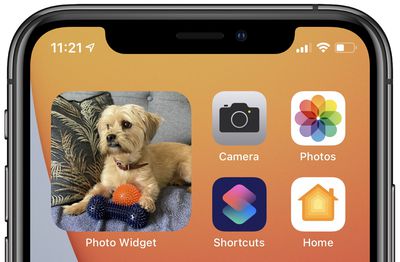
Since iOS 14, Apple has enabled new widgets to be used on the Home screens of iPhones and iPads. You can now customize the look of your Home screen, with hundreds of options to choose from. One popular widget is the Photos widget, used to display a photo from your library on your home screen.
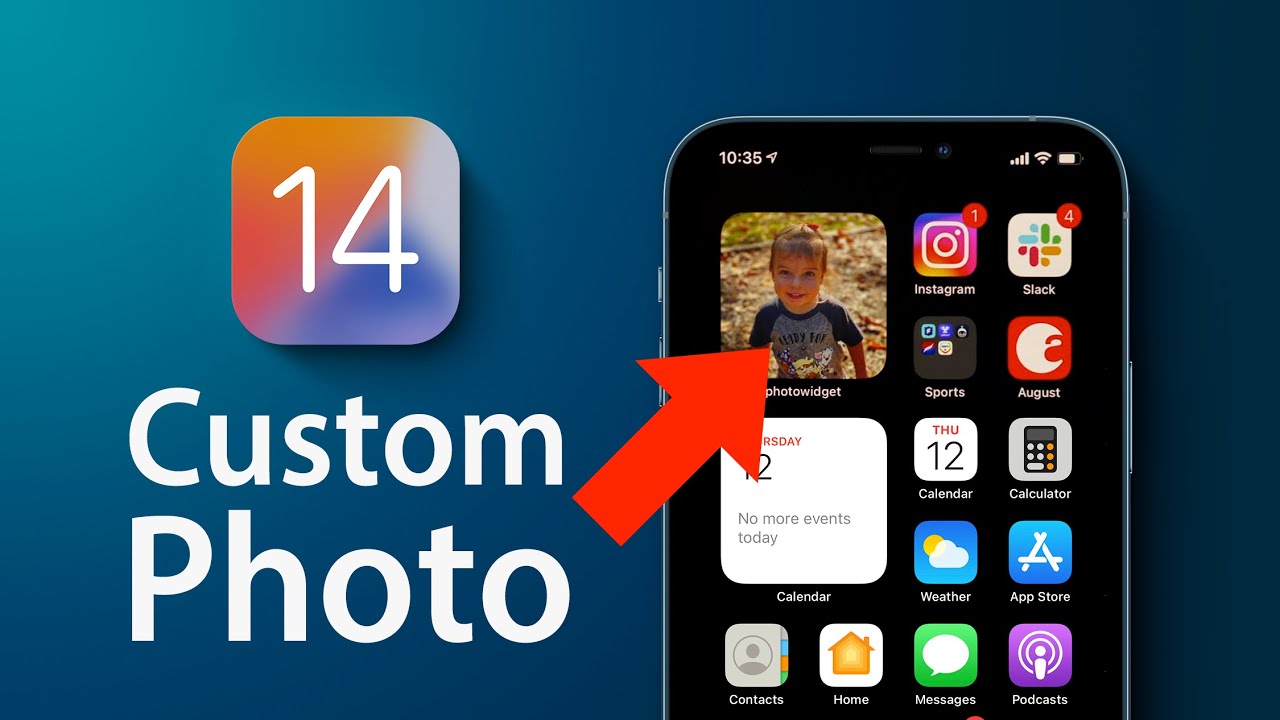
The ‌Photos‌ widget is from Apple's stock ‌Photos‌ app, and it is available in three sizes. The photo displayed changes every hour. However, you are not able to select what photo appears at any given time. Instead, the ‌Photos‌ app dynamically selects a photo to display on the widget for you, so you cannot select what image or images you want to appear.
photos widget main

Apple's ‌Photos‌ widget allows users to have a rotating photo from your photo library displayed with no additional effort required. However, if you only want to display a fixed photo, or rotate through a selection of specific photos, you will need to use a third-party app. There are many widget apps that allow you to select photos to display available on the App Store.

One of the more simple apps is called "Photo Widget : Simple." This app allows you to select up to 30 photos to display on a home screen widget. The app supports all three widget sizes, and you can even set an amount of time before images rotate if you have selected more than one.

The following steps explain how you can set a single photo to display on a widget using Photo Widget : Simple, but other equivalent apps are available.

  1. Download the Photo Widget : Simple app.
  2. Open the app.
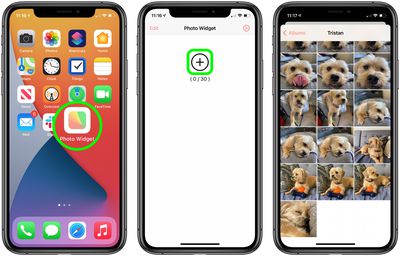
  3. Tap the + in the middle of the screen.
  4. Select the photo you want to display on your home screen.
  5. photos widget how to 1

  6. Return to the home screen.
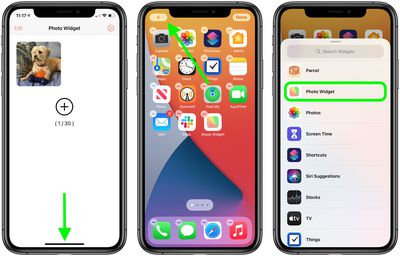
  7. Hold down on any empty space on the home screen to activate "jiggle mode."
  8. Tap the + in the top left corner.
  9. Navigate to the Photo Widget option and select it.
  10. photos widget how to 2

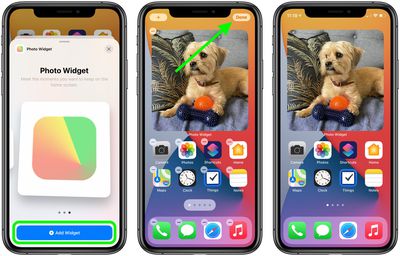
  11. See the three available widget sizes by swiping left and right. Select one of the widget sizes as per your preference by tapping Add Widget.
  12. You can now drag the widget around and place it wherever you choose.
  13. Tap Done.
  14. photos widget how to 3

To add more than one photo to rotate on the widget, simply repeat steps two to four. You may wish to hide the Photo Widget app in the App Library once you have finished creating your widget.

For more information about widgets in iOS, see our Home Screen Widgets How To or our full Home Screen Guide.

Popular Stories

Apple HomeView lineup feature5

Apple HomeView Has These 15 Apps, Some CarPlay Apps and Widgets Also Supported

Wednesday October 14, 2026 9:03 am PDT by
Apple's tech specs page for its all-new HomeView smart home hub contains a list of all of the built-in Apple apps available on the device. While it has no App Store, the HomeView can also display CarPlay-enabled audio and video apps from a paired iPhone. This includes Audiobooks, Apple Music Classical, Apple News, and Apple TV, along with third-party apps such as Spotify, according to WIRED. ...


M5 MacBook Pro

RIP, MacBook Ultra

Monday October 19, 2026 9:37 am PDT by
Apple today sent out invites for an experience in Los Angeles on Wednesday, October 28, and the "Pro and tell" tagline on the invitation likely means that the rumored MacBook models with touch-enabled OLED displays will stick with MacBook Pro branding instead of the once-rumored "MacBook Ultra" name. The long-rumored "iPhone Ultra" ended up being named iPhone Duo, so speculation that Apple...
iPhone Duo Trio

Here's What Apple's Apps Look Like on the iPhone Duo

Tuesday October 20, 2026 11:12 am PDT by
With just three days to go until the iPhone Duo is released, Apple is getting ready for the launch. Behind the scenes, the App Store now has screenshots of Apple's built-in apps running on the Duo. We've seen some apps in marketing materials, but images of the ones we haven't seen give us an idea of what it will be like using the iPhone Duo day to day. Many apps are shown in landscape...
Latest Stories
Apple Updates More Apps With iPhone Duo Support
13 minutes ago
Apple Will Label Apps 'Made for iPhone Duo' in App Store
3 hours ago
Amazon Takes $49 Off iPad With Prices Starting at $399.99
4 hours ago
F1 on Apple TV Now Available in Dolby Atmos
4 hours ago
Apple Reveals More Than 50 Apps That Will Be Updated for iPhone Duo
5 hours ago
Apple Blocks Certificates That Could Help Attackers Fake Websites
6 hours ago
Giant iPhone Duo Installations Spotted at Apple Fifth Avenue
7 hours ago
iPhone Duo 2 Prototypes Include Under-Display Face ID
7 hours ago
Tesla App Gains iPad and iPhone Duo Support
11 hours ago
Apple Reportedly Boosts iPhone Duo Orders by 44%
11 hours ago
Fortnite Returning to Australian App Store After Court Ruling
12 hours ago
Apple Ordered to Open iPhone to Rival App Stores in Australia
12 hours ago
Apple Suppliers Face Hurdles Cutting Circuit Board Emissions
12 hours ago
Things Updated for iPhone Duo With Adaptive Layout
13 hours ago
Simplicity and Siri AI Are HomeView's Killer Features, Apple Says
13 hours ago
iPhone Duo Reviewers Really Miss Face ID
18 hours ago
Does the iPhone Duo Run Hot? Here's What Reviews Found
20 hours ago
Apple Music's New Look is Now Live on Apple's Website
20 hours ago
Anthropic Launches Claude Duet, a Proactive AI Agent
21 hours ago
What 32,000 Folds Did to the iPhone Duo's Hinge
22 hours ago
iPhone Duo's Hidden FaceTime Camera Takes 'Trash' Photos
23 hours ago
iPhone Duo Has 'Edge Light' Feature That Debuted on Macs Last Year
1 day ago
Apple Support App Updated for iPhone Duo's Larger Display
1 day ago
Amazon Sweetens the Deal on Entry-Level 16-Inch MacBook Pro With $570 Off
1 day ago
iPhone Duo Tips Over on MagSafe Stands When Unfolded
1 day ago
Apple Music's New Look Officially Announced
1 day ago
iPhone Duo Supports Apple Pencil Starting With iOS 27.2
1 day ago
iPhone Duo Accessories Roundup: Cases and Screen Protectors From OtterBox, ZAGG, and More
1 day ago
Apple Stores Will Have 'Limited' Availability of iPhone Duo for Walk-In Customers
1 day ago
iPhone Duo Reviews Explain Why Device is Both 'Fun' and 'Frustrating'
1 day ago