

In iOS 17, Apple not only added several new Messages features, but it also tweaked the design of the Messages app to give it a cleaner look.
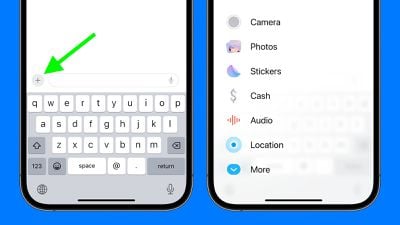
Now, all iMessage apps and tools like the camera and photo options can be accessed by tapping a "+" button above the keyboard and to the left of the text input field.
Tapping the "+" button brings up a menu column. From the top, the default order of options includes Camera, Photos, Stickers, Cash (where available), Audio, and Location. At the very bottom is a More button which when tapped reveals any other installed Messages apps (you can also swipe up to reveal this hidden list).
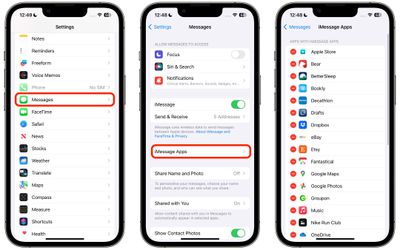
You can manually reorganize this list of iMessage apps, but you can't remove them directly from this screen. If you have no need for certain third-party apps in the list, you can delete them by following the steps below. Note that when you delete an iMessage app, it will also delete the associated app from your device's Home Screen.
- Open the Settings app.
- Scroll down and tap Messages.
- Tap iMessage Apps.
- Tap the red minus button next to an app, then tap the Delete button that appears.
Apple has added several new features to its Messages app in iOS 17 to make communicating with other Apple users more creative and fun. One of these new features is the ability to turn Live Photos into Live Stickers. Click the link to learn how it works.
























![Apple Pulls Keynote, Pages and Numbers From App Store [Update: Back]](https://images.macrumors.com/t/Okb7kitB_gNr6qe5Pex9nQIysD8=/112x112/article-new/2026/01/Apple-Creator-Studio-iWork-suite.jpg)



















