Apple introduced an additional layer of security for iPhone, iPad and Mac users in 2013 by rolling out two-step verification for Apple ID accounts. Two-step verification prevents anyone but you from accessing your Apple ID account, even if they know the password, by requiring a four-digit verification code sent via SMS or Find My iPhone on trusted devices. When you enable two-step verification, you must register at least one trusted device capable of receiving SMS text messages.
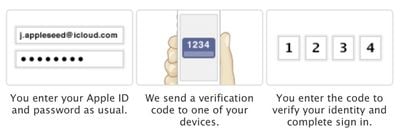
twostepverification
Once activated, two-step authentication is required when managing your Apple ID through My Apple ID, signing into iCloud, or making iTunes, iBooks or App Store purchases from a new device. Apple has also expanded two-step authentication to iMessage and FaceTime, requiring users to input an authentication code from a verified device on accounts that have two-factor verification enabled to prevent unauthorized entry attempts through both services.

Overview

Steps to Enable Two-Step Verification

  1. Sign in to your Apple ID.
    Apple-ID-sign-in
  2. Click on "Get Started…" under Security > Two-Step Verification.

    Two-Step-Verification-Apple-ID-1

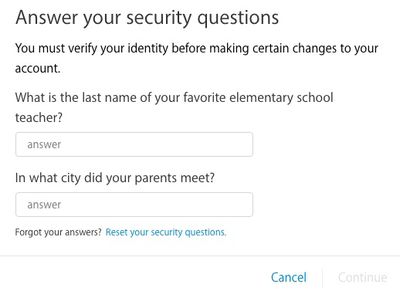
  3. Answer your Apple ID security questions if set and click Continue.
    Apple-ID-security-questions
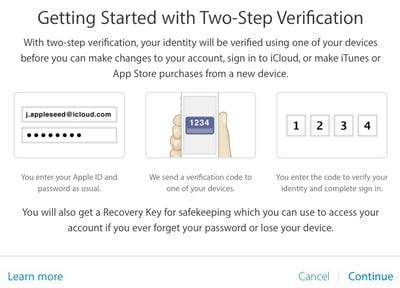
  4. Read "Getting Started with Two-Step Verification" and click Continue.
    Apple-ID-getting-started-two-step
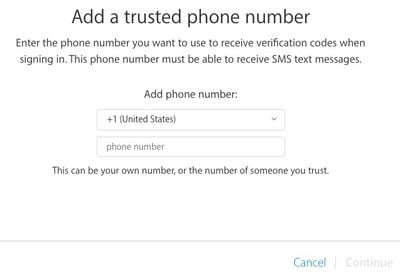
  5. Add a trusted phone number that can receive SMS text messages and click Continue.
    Apple-ID-two-step-phone-number
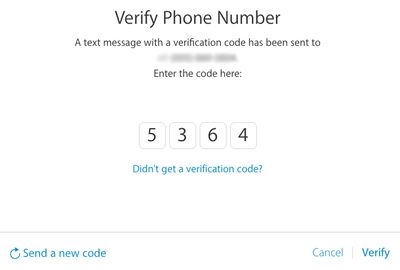
  6. A text message with a verification code will be sent to your trusted phone number. Enter the code and click Verify.
  7. Apple-ID-verify-phone
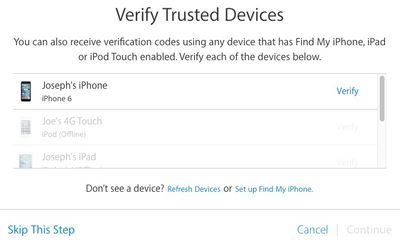
  8. Verify your trusted iPhone, iPad or iPod touch devices with Find My iPhone enabled and click Continue. Or click Skip This Step.
    verify-trusted-Apple-ID
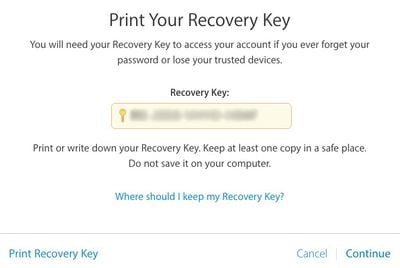
  9. Print or write down your Recovery Key to access your Apple ID account if you ever forget your password or lose your trusted devices.
    Apple-ID-recovery-key
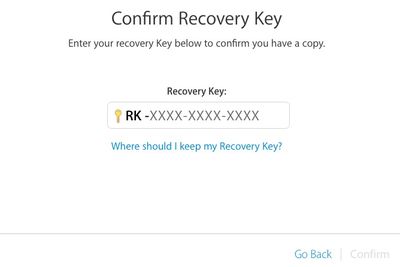
  10. Confirm your Recovery Key and click Confirm.
    Apple-ID-confirm-recovery-key
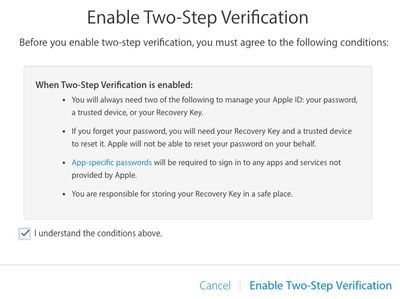
  11. Click on the checkbox if you agree to Apple's terms and conditions and click on Enable Two-Step Verification.
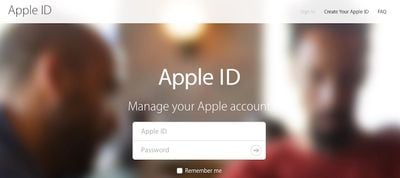
    Apple-ID-enable-two-step

Final Words

To ensure continued access to your Apple ID account after enabling two-step verification, it is essential that you record your recovery key in a safe place. Losing your two-factor recovery key could permanently lock you out of your Apple ID account, especially in the event you are being hacked. Without the recovery key, you will be forced to create a new Apple ID.

Two-step verification may provide an additional layer of security, but it is still highly recommended that you set a secure password for your Apple ID account. Avoid using common names, phrases or dictionary words in your password, and try to use as many lowercase and uppercase letters, numbers and symbols as possible.


Related Forum: Mac Apps

Top Rated Comments

thefourthpope Avatar
143 months ago
This security isn't worth the hassle for me. I'm constantly prompted to sign in to facetime and iMessages on my home mini, mb air, and work iMac. Then I get notifications on each plus iPhone and iPads that I signed in on one of those computers. And continuing the minor annoyance factor, iMessages still doesn't reliably sync read/deleted messages, so I get to delete Google or Evernote two-step verification texts four or five times.
This is just adding a new layer of notifications that I tend to think I don't want.

Please note: I have twice specified that this is my experience and my opinion. YMMV.
Score: 9 Votes (Like | Disagree)
macintologist Avatar
143 months ago
Protip, if you want to set this up for your elderly parents, add your personal cell phone as an additional second factor method, that way you can provide tech support much easier.

Also, have your significant other's cell phone be a 2nd factor for your account, and your cell be a 2nd factor for your SO's account. You can have multiple cell phone numbers as 2nd factors.
Score: 4 Votes (Like | Disagree)
street.cory Avatar
143 months ago
This is dumb.

Wasn't the iPhone's fingerprint scanner supposed to do away with passwords?

No.
Score: 4 Votes (Like | Disagree)
fardeenah Avatar
143 months ago
2 factor auth is not available in my country.
Score: 3 Votes (Like | Disagree)
iMerik Avatar
143 months ago
Basically, if you and your SO both have Apple IDs, add each others cell phone numbers to the list of 2nd factor devices.
Pretty straightforward what you are saying. I currently have two-step verification enabled with my phone as both my iOS verified device and my SMS verified device. It makes sense to add someone you trust, like a spouse, to the SMS verified device list in case your phone goes missing. It acts as sort of a backup to not needing to use the Recovery Key.

Speaking of the Recovery Key, take Apple seriously when they say you should keep it available but safe. Copy it into 1Password, LastPass, or similar software/service if you don't feel like keeping it on a piece of paper.
Score: 2 Votes (Like | Disagree)
taxiapple Avatar
143 months ago
Thought I would do it.....but before I could enable it, it wanted me to change my password.
My password is pretty good already and Apple has already made me change it at least once before.
I'm not interested.
Score: 2 Votes (Like | Disagree)

Popular Stories

Apple Logo Zoomed

Tim Cook Teases Plans for Apple's Upcoming 50th Anniversary

Thursday February 5, 2026 12:54 pm PST by
Apple turns 50 this year, and its CEO Tim Cook has promised to celebrate the milestone. The big day falls on April 1, 2026. "I've been unusually reflective lately about Apple because we have been working on what do we do to mark this moment," Cook told employees today, according to Bloomberg's Mark Gurman. "When you really stop and pause and think about the last 50 years, it makes your heart ...
wwdc sans text feature

Apple Rumored to Announce New Product on February 19

Thursday February 5, 2026 12:22 pm PST by
Apple plans to announce the iPhone 17e on Thursday, February 19, according to Macwelt, the German equivalent of Macworld. The report, citing industry sources, is available in English on Macworld. Apple announced the iPhone 16e on Wednesday, February 19 last year, so the iPhone 17e would be unveiled exactly one year later if this rumor is accurate. It is quite uncommon for Apple to unveil...
Finder Siri Feature

Why Apple's iOS 26.4 Siri Upgrade Will Be Bigger Than Originally Promised

Friday February 6, 2026 3:06 pm PST by
In the iOS 26.4 update that's coming this spring, Apple will introduce a new version of Siri that's going to overhaul how we interact with the personal assistant and what it's able to do. The iOS 26.4 version of Siri won't work like ChatGPT or Claude, but it will rely on large language models (LLMs) and has been updated from the ground up. Upgraded Architecture The next-generation...
iOS 26

iOS 26.3 and iOS 26.4 Will Add These New Features to Your iPhone

Tuesday February 3, 2026 7:47 am PST by
While the iOS 26.3 Release Candidate is now available ahead of a public release, the first iOS 26.4 beta is likely still at least a week away. Following beta testing, iOS 26.4 will likely be released to the general public in March or April. Below, we have recapped known or rumored iOS 26.3 and iOS 26.4 features so far. iOS 26.3 iPhone to Android Transfer Tool iOS 26.3 makes it easier...
iphone 17 pro dark blue 1

iPhone 18 Pro Max Rumored to Deliver Next-Level Battery Life

Friday February 6, 2026 5:14 am PST by
The iPhone 18 Pro Max will feature a bigger battery for continued best-in-class battery life, according to a known Weibo leaker. Citing supply chain information, the Weibo user known as "Digital Chat Station" said that the iPhone 18 Pro Max will have a battery capacity of 5,100 to 5,200 mAh. Combined with the efficiency improvements of the A20 Pro chip, made with TSMC's 2nm process, the...