
Generate Apple Music Playlists With ChatGPT - MacRumors
Skip to Content

Generate Apple Music Playlists With ChatGPT

by

Apple Music is now available as an extension within ChatGPT, meaning you can search for songs, create playlists, and discover new music through OpenAI's chatbot. Here's how to set it up and what makes it worth using.
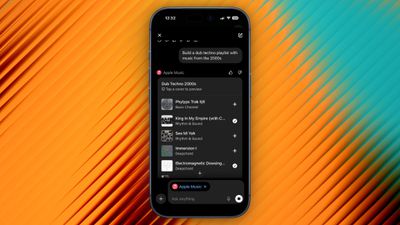
apple music chatgpt

What You Can Do With Apple Music in ChatGPT

ChatGPT's integration with Apple Music has the potential to change how you discover new music by letting you describe what you're looking for in natural language. Instead of typing specific search terms like you would in Apple Music, you can ask the chatbot for "upbeat 80s songs for a road trip" or "calm instrumental music for studying," and ChatGPT will understand the context and mood you're after.

You can even combine multiple criteria, like "jazz fusion tracks under five minutes with prominent saxophone," and ChatGPT will accurately unearth what you're looking for in ways that standard keyword searches simply aren't capable of achieving.
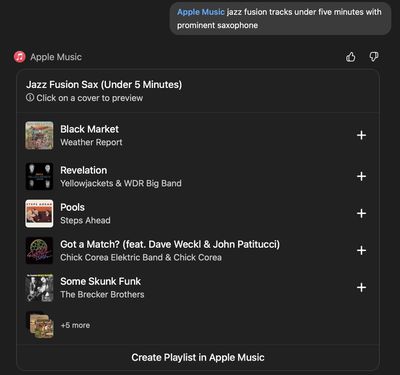
apple music playlist generation chatgpt
You can request custom playlists based on specific criteria, ask for song recommendations, or explore music by decade, genre, or artist. And once ChatGPT creates a playlist, you can preview each track, and save the playlist directly to your Apple Music library with the option "Create Playlist in Apple Music." You can also save individual tracks using the + buttons.

The Apple Music extension requires a ChatGPT account and works with both free and paid ChatGPT tiers. You don't need an Apple Music subscription to search the catalog, generate playlists, or listen to 30-second preview clips, but you will need an active subscription if you want to save content to your library.

How to Connect Apple Music to ChatGPT

Before you can start discovering new music with the help of AI, you'll need to connect Apple's streaming service using ChatGPT's extension. You only need to do it once.

  1. Open the ChatGPT app and tap your profile in the sidebar.
  2. Under "Account" settings, tap Apps.
  3. Tap Browse Apps, then choose Apple Music in the extensions library.
  4. Tap Connect, then choose Connect Apple Music.
  5. Follow the on-screen prompts to sign into your Apple Account and permit the access request.
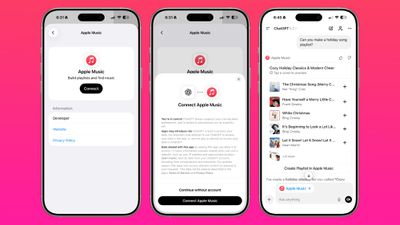
apple music chatgpt
If you're on desktop, you can perform the same steps in the ChatGPT app for Mac. Alternatively, go to https://chatgpt.com/apps in a browser and open the Apps section in ChatGPT – you'll find the Apple Music extension there. Once connected, the extension remains active across your devices signed into the same ChatGPT account.

One More Thing
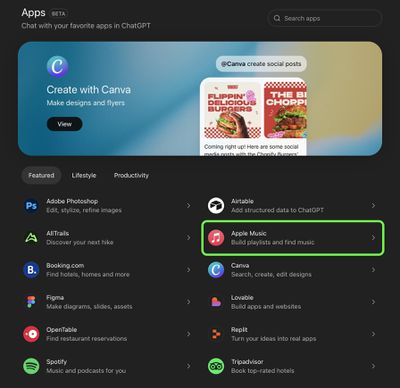
chatgpt apps list

Apple Music extension in ChatGPT's "Apps" section

ChatGPT can search Apple Music's catalog and create playlists, but it can't access your listening history or existing playlists. The integration only has permission to add songs to your library, so your personal data stays private.


Top Rated Comments

11 weeks ago
So it’s worth boiling the oceans for this very slight convenience? Seriously, all this AI stuff seems to do is introduce minuscule amounts of “improvement” that saves very little time at exceptionally high electricity costs and fresh water use.

I get using machine learning to solve complex scientific or engineering challenges, I get using it to assist in certain menial tasks, but unless you can do it on-device, without consuming vast resources, I want nothing to do with it
Score: 19 Votes (Like | Disagree)
WarmWinterHat Avatar
11 weeks ago

You're on a website, using resources like energy, compute power, and more, to complain about using energy, compute power and more.
AI uses astronomically more computer power, energy and resources, and it's not even close. It absolutely makes a difference by what you're doing.

It's like comparing the fuel mileage of a badly tuned carbureted v8 to a new Prius.
Score: 8 Votes (Like | Disagree)
macduke Avatar
11 weeks ago
But I actually want it to view my playlists. I want it to recommend songs I might like. Apple Music has never been very good at that. I still miss Rdio!!
Score: 8 Votes (Like | Disagree)
11 weeks ago

You're on a website, using resources like energy, compute power, and more, to complain about using energy, compute power and more.
Not at the same scale. It’s exponentially higher resource cost to use ChatGPT than other more efficient technologies. Look into it
Score: 7 Votes (Like | Disagree)
11 weeks ago
Can’t be worse than the iTunes/Apple Music algorithm.
Score: 4 Votes (Like | Disagree)
Ursadorable Avatar
11 weeks ago
As long as it's completely optional and can be fully disabled (like Apple Intelligence)

I refuse to allow Sam Altman's company to get a sniff of any of my data or preferences.
Score: 3 Votes (Like | Disagree)

Popular Stories

iOS 26

iOS 26.4 Adds Two New Features to CarPlay

Tuesday March 24, 2026 1:55 pm PDT by
iOS 26.4 was released today, and it includes a couple of new features for CarPlay: an Ambient Music widget and support for voice-based chatbot apps. To update your iPhone 11 or newer to iOS 26.4, open the Settings app and tap on General → Software Update. CarPlay will automatically offer the new features so long as the iPhone connected to your vehicle is running iOS 26.4 or later....
Apple Business hero

Apple Unveils 'Apple Business' All-in-One Platform

Tuesday March 24, 2026 8:53 am PDT by
Apple today announced Apple Business, a new all-in-one platform that unifies device management, productivity tools, and customer outreach features. The service is designed to be a consolidated replacement for several of Apple's existing business-focused offerings, including Apple Business Essentials, Apple Business Manager, and Apple Business Connect. It provides organizations with a single...
AirPods Pro Firmware Feature

Apple Releases New Firmware for AirPods Pro 3, AirPods Pro 2 and AirPods 4

Tuesday March 24, 2026 12:31 pm PDT by
Apple today released new firmware for the AirPods Pro 2, AirPods Pro 3, and the AirPods 4. The firmware has a version number of 8B39, up from 8B34 on the AirPods Pro 3, 8B28 on the AirPods Pro 2, and 8B21 on the AirPods 4. There is no word on what's included in the firmware, but Apple has a support document with limited notes. Most updates are limited to bug fixes and performance...















