How to Install iOS 13 Public Beta on iPhone - GeekWebGuides
Skip to Content

How to Install iOS 13 Public Beta on iPhone

by

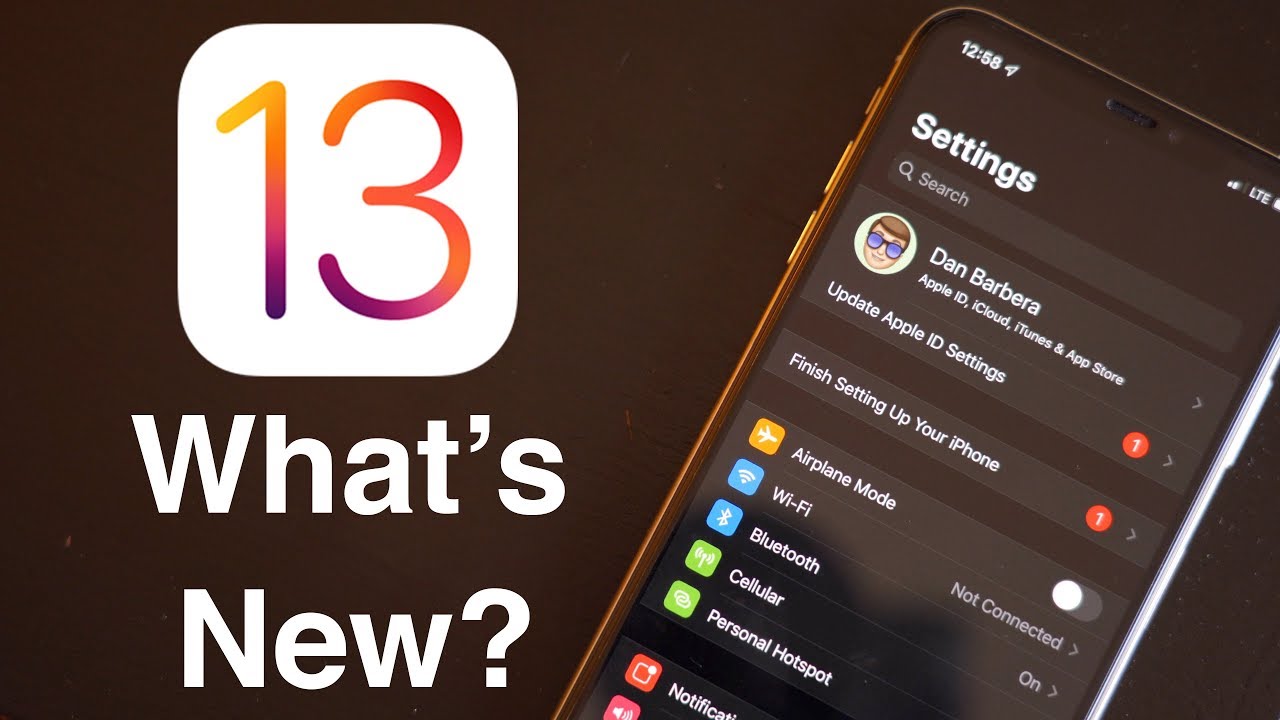
ios13iconApple has released the first public beta of iOS 13 for compatible iPhone and iPod touch models, enabling users who aren't signed up for the Apple Developer Program to test the software update ahead of its official release in the fall.

iOS 13 introduces a swathe of new features and improvements, including a systemwide Dark Mode, a Find My app, a revamped Photos app and new Camera capabilities, new Siri voice, updated privacy features, new street-level view for Maps, and more.

That said, iOS 13 is pre-release software, so installing the Public Beta on a secondary device is highly recommended. The stability of beta software cannot be guaranteed, as it often contains bugs and issues that have yet to be ironed out, so installing it on your day-to-day device isn't advised.

Is iOS 13 Compatible With My iPhone or iPod touch?

Apple's list of compatible devices confirms that iOS 13 is compatible with all of these iPhones:

  • iPhone XS
  • iPhone XS Max
  • iPhone XR
  • iPhone X
  • iPhone 8 and iPhone 8 Plus
  • iPhone 7 and 7 Plus
  • iPhone SE
  • iPhone 6s and 6s Plus
  • iPod touch (7th-generation)

Installing the Public Beta shouldn't take longer than half an hour, but first you should create a backup of your device's contents and settings. The following step-by-step instructions are given for iPhone, but apply to iPod touch just the same.

How to Create a Backup of Your Device in iTunes

  1. Connect your iOS device to a Mac or PC using a Lightning to USB cable.

  2. Open iTunes.

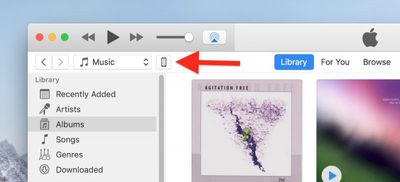
  3. Click the device's icon in the top-left menu.
    backup ios device 1

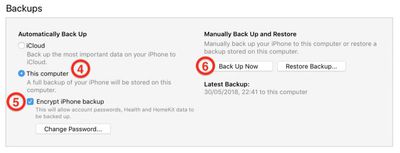
  4. Under Backups, click This computer.

  5. Tick the Encrypt iPhone backup checkbox if you want to back up your login credentials and any Health and HomeKit data.
    backup ios device 2

  6. Click Back Up Now.

  7. Click iTunes -> Preferences… in the macOS menu bar.

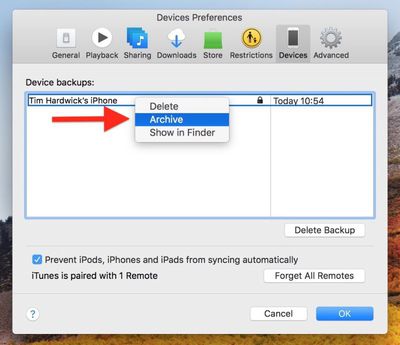
  8. Click the Devices tab.
    backup ios device 3

  9. Right-click (or Ctrl-click) the new backup, and select Archive from the contextual dropdown menu.
How to Enroll in the Apple Beta Software Program

Now that you've backed up your device, you're ready to download the iOS 13 Public Beta. To do so, you must enroll your iPhone or iPod touch in the free Apple Beta Software Program.

  1. Open Safari on your iOS device and navigate to the Apple Beta Software Program.

  2. Tap the Sign up button, or sign in if you're already a member.

  3. Enter your Apple ID credentials and tap the Sign in button.

  4. Agree to the Apple Beta Software Program terms and conditions if necessary.

  5. A Guide for Public Betas screen will appear. Select the iOS tab, scroll down to the Get Started section and tap enroll your iOS device.

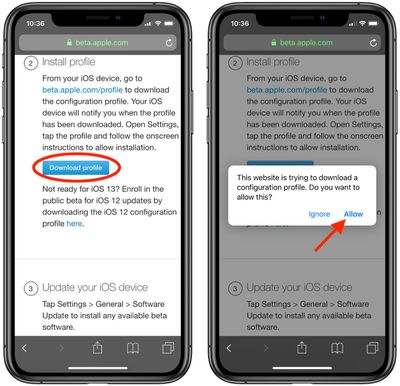
  6. On the Enroll Your Devices screen, with the iOS tab selected, scroll down and tap the Download profile button. how to install ios 13 public beta on iphone 2

  7. Tap "iPhone" when prompted to choose a device.

  8. Tap Allow.

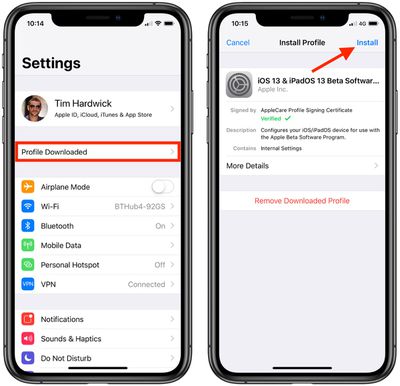
  9. Launch the Settings app on your iOS device and then tap Profile Downloaded below your ‌Apple ID‌ banner.
    how to install ios 13 public beta on iphone

  10. Tap Install and follow the prompts to install the iOS Beta Software Profile.
  11. Restart your device after installing the profile by tapping the restart popup.
How to Install the iOS 13 Public Beta

Once you're enrolled in the Apple Beta Software Program, you can install the iOS 13 Public Beta on your iOS device just as you would a regular software update.

  1. Launch the Settings app on your iPhone or iPod touch.

  2. Tap General.

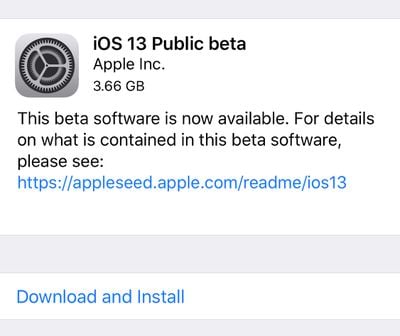
  3. Tap Software Update. ios 13 public beta download and install

  4. Tap Download and Install.
  5. Tap Install Now.


If you come across any issues installing the iOS 13 Public Beta, it may help to clear any previous profiles lingering on your device. You can find these in the Settings app under General -> Profile.


Related Forum: iOS 13

Top Rated Comments

Pepe4life Avatar
96 months ago
People who have no intention of filing bug reports should not install it.
Score: 5 Votes (Like | Disagree)
96 months ago
1. They are keeping iTunes on windows
2. Not everyone wants to install Catalina just to test out iOS 13
iTunes is NOT required to install iOS 13. I did mine OTA.
Score: 3 Votes (Like | Disagree)
decypher44 Avatar
96 months ago
And please, REPORT all bugs. Don’t just get this to use the latest iOS.
Score: 2 Votes (Like | Disagree)
96 months ago
Be aware that iOS 13 will currently break the data plan on any 4G Apple Watch you might own. I found out the hard way and downgraded straight away.
Score: 2 Votes (Like | Disagree)
decypher44 Avatar
96 months ago
How do you report that the Feedback app is crashing???
Score: 1 Votes (Like | Disagree)
one more Avatar
96 months ago
If Apple is discontinuing iTunes why are they still requiring it to install iOS 13?
Technically, you do not need iTunes to install iOS 13. You only need it if for some reason during your beta trial you want to revert back to iOS 12.
Score: 1 Votes (Like | Disagree)

Popular Stories

M5 MacBook Pro

RIP, MacBook Ultra

Monday October 19, 2026 9:37 am PDT by
Apple today sent out invites for an experience in Los Angeles on Wednesday, October 28, and the "Pro and tell" tagline on the invitation likely means that the rumored MacBook models with touch-enabled OLED displays will stick with MacBook Pro branding instead of the once-rumored "MacBook Ultra" name. The long-rumored "iPhone Ultra" ended up being named iPhone Duo, so speculation that Apple...


iPhone Duo Trio

Here's What Apple's Apps Look Like on the iPhone Duo

Tuesday October 20, 2026 11:12 am PDT by
With just three days to go until the iPhone Duo is released, Apple is getting ready for the launch. Behind the scenes, the App Store now has screenshots of Apple's built-in apps running on the Duo. We've seen some apps in marketing materials, but images of the ones we haven't seen give us an idea of what it will be like using the iPhone Duo day to day. Many apps are shown in landscape...
apple pro tell logo

Apple Announcing New Products Next Week: 'Pro and Tell'

Monday October 19, 2026 9:05 am PDT by
Apple's Greg Joswiak today hinted at new product announcements coming next week, sharing a social media post that says "Can't wait to pro and tell next week." Rumors suggest Apple is planning to debut the new MacBook Pro with an OLED touchscreen display, an M6 entry-level MacBook Pro, an M6 iMac, an iPad mini with an OLED display. Can't wait to pro and tell next week....
Latest Stories
Apple Will Label Apps 'Made for iPhone Duo' in App Store
1 hour ago
Amazon Takes $49 Off iPad With Prices Starting at $399.99
2 hours ago
F1 on Apple TV Now Available in Dolby Atmos
2 hours ago
Apple Reveals More Than 50 Apps That Will Be Updated for iPhone Duo
3 hours ago
Apple Blocks Certificates That Could Help Attackers Fake Websites
4 hours ago
Giant iPhone Duo Installations Spotted at Apple Fifth Avenue
5 hours ago
iPhone Duo 2 Prototypes Include Under-Display Face ID
5 hours ago
Tesla App Gains iPad and iPhone Duo Support
9 hours ago
Apple Reportedly Boosts iPhone Duo Orders by 44%
9 hours ago
Fortnite Returning to Australian App Store After Court Ruling
10 hours ago
Apple Ordered to Open iPhone to Rival App Stores in Australia
10 hours ago
Apple Suppliers Face Hurdles Cutting Circuit Board Emissions
11 hours ago
Things Updated for iPhone Duo With Adaptive Layout
11 hours ago
Simplicity and Siri AI Are HomeView's Killer Features, Apple Says
11 hours ago
iPhone Duo Reviewers Really Miss Face ID
16 hours ago
Does the iPhone Duo Run Hot? Here's What Reviews Found
18 hours ago
Apple Music's New Look is Now Live on Apple's Website
18 hours ago
Anthropic Launches Claude Duet, a Proactive AI Agent
19 hours ago
What 32,000 Folds Did to the iPhone Duo's Hinge
20 hours ago
iPhone Duo's Hidden FaceTime Camera Takes 'Trash' Photos
21 hours ago
iPhone Duo Has 'Edge Light' Feature That Debuted on Macs Last Year
22 hours ago
Apple Support App Updated for iPhone Duo's Larger Display
22 hours ago
Amazon Sweetens the Deal on Entry-Level 16-Inch MacBook Pro With $570 Off
22 hours ago
iPhone Duo Tips Over on MagSafe Stands When Unfolded
22 hours ago
Apple Music's New Look Officially Announced
1 day ago
iPhone Duo Supports Apple Pencil Starting With iOS 27.2
1 day ago
iPhone Duo Accessories Roundup: Cases and Screen Protectors From OtterBox, ZAGG, and More
1 day ago
Apple Stores Will Have 'Limited' Availability of iPhone Duo for Walk-In Customers
1 day ago
iPhone Duo Reviews Explain Why Device is Both 'Fun' and 'Frustrating'
1 day ago
Apple Says 'Reachability' Feature Coming to iPhone Duo Later This Year
1 day ago