
How to Use Apple Music Lyrics in iOS 10 - MacRumors
Skip to Content

How to Use Apple Music Lyrics in iOS 10

by

One of the newest features in iOS 10's redesigned Apple Music app is the ability to view lyrics for your favorite songs. While the ability to quickly access song lyrics to learn the lines is helpful, the new feature may get lost in the midst of Apple Music's new look. We've put together a how-to guide to show you how to view lyrics for your songs.

First, you'll need to start playing a song. Once a song is playing, click on the song's banner, just above the Apple Music menu bar at the bottom, to open the song's individual card. From here, there are two methods to view lyrics.

Method One:
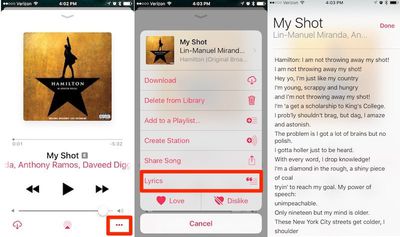
applemusiclyrics1

  1. Tap the "three dots" button in the bottom right corner. This brings up a menu overlay displaying options for the song, like adding it to a playlist or creating a station.
  2. Tap the "Lyrics" button below the "Share Song" option. Songs with available lyrics will have this option displayed, while songs without lyrics available will not.
  3. The lyrics will pop up in a separate translucent window that slides over the song window.

Method Two:
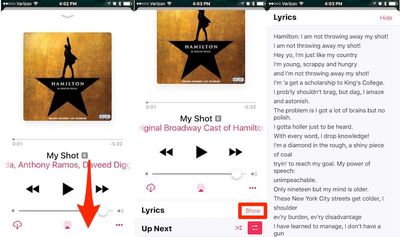
applemusiclyrics2

  1. Scroll down while in the song card.
  2. The lyrics toggle will be displayed directly beneath the song, right above the "Up Next" feature.
  3. Tap on "Show" to reveal the lyrics to your song.

Currently, lyrics are not available on all songs and albums, but Apple has been rapidly expanding the number of tracks with lyrics support throughout the beta testing period and coverage has become fairly broad in time for the public release.


Related Forum: iOS 10

Top Rated Comments

124 months ago
Deleted.
Score: 9 Votes (Like | Disagree)
124 months ago
This is literally the worst version of the Music app ever made by Apple. Bad usability and completely incoherent design choice.
Score: 8 Votes (Like | Disagree)
124 months ago
I've spent years putting lyrics manually onto each of my songs I have purchased. This update has removed the ability for me to see my lyrics. Why would Apple remove a feature like this?

Cash Grab for Apple Music?
Score: 4 Votes (Like | Disagree)
macfacts Avatar
124 months ago
Maybe Apple should improve the user interface for their music and messaging apps so tutorials aren't needed.
Score: 4 Votes (Like | Disagree)
124 months ago
Not to defend the UI/UX of the Music app in general I agree that it gets confusing. But I am curious what the better solution for this specific feature is? This is a non-critical feature and it's only hidden behind 1-2 taps. What's the issue? Where would you put this feature?

It's easy to quickly judge these things, but as a software developer who often helps with UI/UX design, I am failing see a better place for this.
In iOS 6 all you had to do was tap the artwork in the main player window. Simple, easy, direct.
Score: 3 Votes (Like | Disagree)
124 months ago
good old days...

Speaking of good old days, anybody remember the two step process to show lyrics in iOS6?

1. Play song
2. Tap artwork in main player window
Score: 3 Votes (Like | Disagree)

Popular Stories

iOS 26

iOS 26.4 Adds Two New Features to CarPlay

Tuesday March 24, 2026 1:55 pm PDT by
iOS 26.4 was released today, and it includes a couple of new features for CarPlay: an Ambient Music widget and support for voice-based chatbot apps. To update your iPhone 11 or newer to iOS 26.4, open the Settings app and tap on General → Software Update. CarPlay will automatically offer the new features so long as the iPhone connected to your vehicle is running iOS 26.4 or later....
Apple Business hero

Apple Unveils 'Apple Business' All-in-One Platform

Tuesday March 24, 2026 8:53 am PDT by
Apple today announced Apple Business, a new all-in-one platform that unifies device management, productivity tools, and customer outreach features. The service is designed to be a consolidated replacement for several of Apple's existing business-focused offerings, including Apple Business Essentials, Apple Business Manager, and Apple Business Connect. It provides organizations with a single...
AirPods Pro Firmware Feature

Apple Releases New Firmware for AirPods Pro 3, AirPods Pro 2 and AirPods 4

Tuesday March 24, 2026 12:31 pm PDT by
Apple today released new firmware for the AirPods Pro 2, AirPods Pro 3, and the AirPods 4. The firmware has a version number of 8B39, up from 8B34 on the AirPods Pro 3, 8B28 on the AirPods Pro 2, and 8B21 on the AirPods 4. There is no word on what's included in the firmware, but Apple has a support document with limited notes. Most updates are limited to bug fixes and performance...















