

 In Messages on iPhone and iPad, you can participate in group chats of up to 32 people, which is great for organizing something between friends, working with colleagues, or just joining in a conversation around a particular topic or theme.
Of course, you may find yourself in a group chat that eventually you want to leave, and that's fine. You can leave a group chat if you no longer want to participate in it, as long as there are at least three other people in the conversation.
Note that to leave a group chat, all users need to be using iMessage on an iOS device or Mac and not SMS on an Android phone. Here's how it's done.
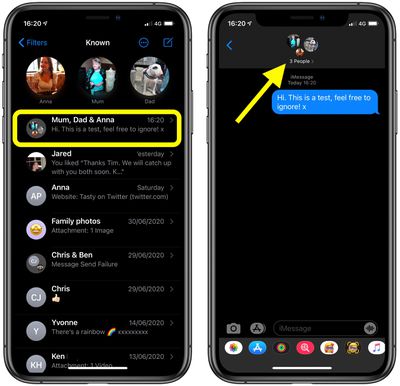
- In the Messages app, select the group chat that you want to leave.
- Tap the top of the conversation.

- Tap the information ("i") icon.
- Scroll down and select Leave this Conversation.
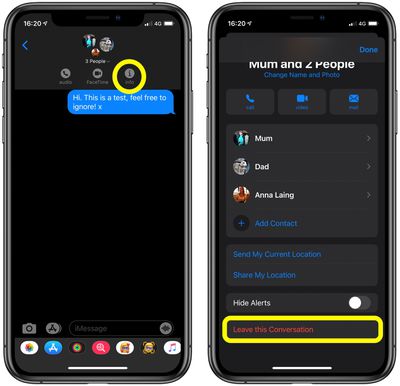
If you don't see the option to leave the group, it might mean one or more of the users isn't using a device with iMessage. You can't remove yourself from these group chats, but you can at least mute the conversation.




















![Apple Pulls Keynote, Pages and Numbers From App Store [Update: Back]](https://images.macrumors.com/t/Okb7kitB_gNr6qe5Pex9nQIysD8=/112x112/article-new/2026/01/Apple-Creator-Studio-iWork-suite.jpg)
























