How to Listen to Apple Music on the Web - MacRumors
Skip to Content

How to Listen to Apple Music on the Web

by

Apple still doesn't offer an official online web player for Apple Music, but if you want to enjoy the streaming service on a computer that doesn't have iTunes installed (your office PC, for example) there is another solution.
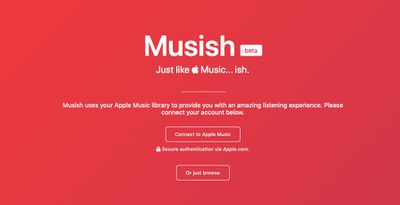
mushish web player for apple music
It's called "Musish," a free third-party web player for ‌Apple Music‌ subscribers, created by software engineer Brychan Bennett-Odlum and his team, Raphaël Vigée, James Jarvis, and Filip Grebowski.

To play ‌Apple Music‌ on the web through Musish, you need to sign in using your Apple ID. If you're concerned about account security, don't be -– sign-in is handled in a separate window under the Apple.com domain and Musish doesn't request, log, or gain access to user information.
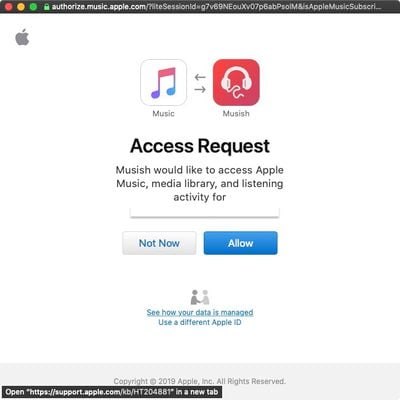
mushish web player for apple music sign in
Once you've signed in, you'll see the usual ‌Apple Music‌ tabs on the upper left corner of the Musish interface: For You, Browse, Radio, and My Library. Bear in mind, though, that some categories are slimmed down compared to what you'll find in the native iOS Music app or iTunes. Social features like friend profiles are currently unavailable, for example, and there are no radio features yet.
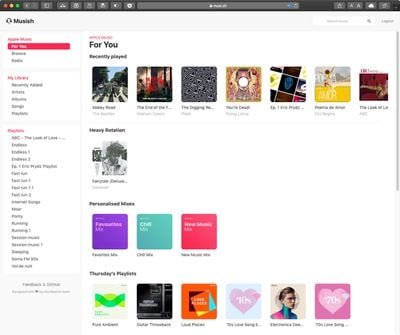
mushish web player for apple music interface 1
That said, the For You tab features plenty to keep you busy, including your recently played songs, albums in heavy rotation, and personalized mixes, as well as the day's playlists, albums, and new releases.
mushish web player for apple music interface 2
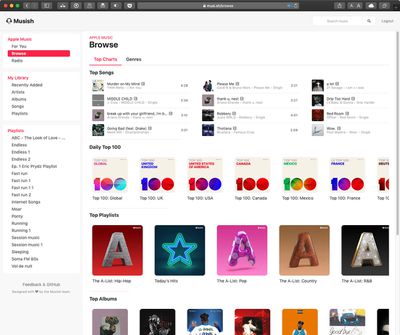
Likewise, the Browse section includes top songs, daily top 100 playlists, top playlists, top albums, and a genres tab. If you're searching for something specific, you can also use the site's upper-right search bar, which remains open on every tab.
mushish web player for apple music interface 3
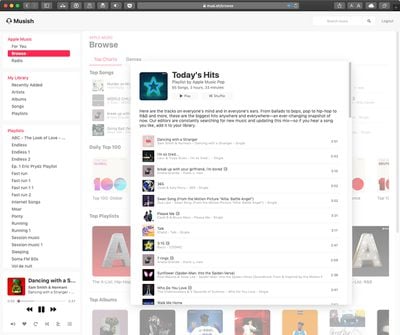
To play music, just click an album/playlist and then click Play, Shuffle, or select a specific song. playback controls will appear at the bottom left of the screen, where you can adjust volume, turn on repeat, turn on shuffle, check out lyrics, and select what's up next.

The team behind Musish is actively developing the web player and hopes to bring mobile compatibility, a dark mode, and a more populated Browse section soon. If you like Musish, consider offering feedback or feature suggestions on the project's GitHub page.


Top Rated Comments

92 months ago
Apple should buy the team developing this and make it an official first party solution.
Score: 5 Votes (Like | Disagree)
Eminemdrdre00 Avatar
92 months ago
Don't know http://playapplemusic.com/ now gives me
403 ERROR
The request could not be satisfied.
I liked that web player the best as it had the best sound quality lets me force 256kbps AAC and was easy to navigate. Musish sounds flatter no bitrate changing option most likely playing at 64kbps HE-AAC earache audio quality.
It’s still available here: https://naveedgol.github.io/apple-music-web-player/

Apple didn’t like them using “Apple Music” in their main domain.
Score: 4 Votes (Like | Disagree)
springsup Avatar
92 months ago
Anyone know how they’re doing it? I assume there is no API from Apple?
Yes, there is: https://developer.apple.com/musickit/

It's both a great thing that the APIs are full-fledged enough to build this, and embarrassing that Apple hasn't done it themselves.
Score: 4 Votes (Like | Disagree)
92 months ago
if be happy to be able to play it on my Echo, but of course only US citizens are allowed to do that
Score: 3 Votes (Like | Disagree)
TMRJIJ Avatar
92 months ago
Apple will find a way to shut this down in 3...2...1...
Why? It doesn’t look like these developers are breaking any guidelines.
Score: 2 Votes (Like | Disagree)
AppleFan91 Avatar
92 months ago
Now that iPhone sales seem to be stabilizing and growth is all in services for Apple, they need to adopt a Microsoft/Google, etc approach and Put their services on every available platform. I’d like to see Apple Music, Apple News, Apple Maps, etc all on the web. Not as many want to sign up for a service that can only be used on proprietary hardware.
Score: 2 Votes (Like | Disagree)

Popular Stories

iOS 26

iOS 26.4 Adds Two New Features to CarPlay

Tuesday March 24, 2026 1:55 pm PDT by
iOS 26.4 was released today, and it includes a couple of new features for CarPlay: an Ambient Music widget and support for voice-based chatbot apps. To update your iPhone 11 or newer to iOS 26.4, open the Settings app and tap on General → Software Update. CarPlay will automatically offer the new features so long as the iPhone connected to your vehicle is running iOS 26.4 or later....
Apple Business hero

Apple Unveils 'Apple Business' All-in-One Platform

Tuesday March 24, 2026 8:53 am PDT by
Apple today announced Apple Business, a new all-in-one platform that unifies device management, productivity tools, and customer outreach features. The service is designed to be a consolidated replacement for several of Apple's existing business-focused offerings, including Apple Business Essentials, Apple Business Manager, and Apple Business Connect. It provides organizations with a single...
AirPods Pro Firmware Feature

Apple Releases New Firmware for AirPods Pro 3, AirPods Pro 2 and AirPods 4

Tuesday March 24, 2026 12:31 pm PDT by
Apple today released new firmware for the AirPods Pro 2, AirPods Pro 3, and the AirPods 4. The firmware has a version number of 8B39, up from 8B34 on the AirPods Pro 3, 8B28 on the AirPods Pro 2, and 8B21 on the AirPods 4. There is no word on what's included in the firmware, but Apple has a support document with limited notes. Most updates are limited to bug fixes and performance...