

In iOS 17, Apple not only added several new Messages features, but also tweaked the interface design of the Messages app to give it a cleaner look. This means that the way you navigate and manage some aspects of the app – including iMessage sticker apps – has changed quite a bit. Keep reading to learn how it's done.
iMessage stickers arrived way back in iOS 10, allowing users to resize stickers, put them on top of chat bubbles, add them in photos, and stick them on top of other stickers, with simple controls for dragging.
Stickers have come a long way since then. In iOS 17, for example, users are now able to create their own animated stickers from photo subjects, and even apply stickers across the operating system. Despite these advances, standard sticker packs still feature in iOS 17, but the way you access and manage them has changed.
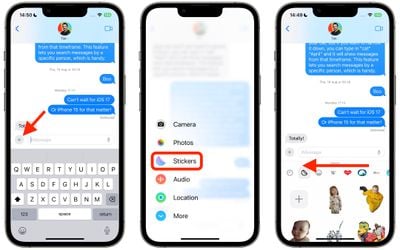
The following steps show you how to access, rearrange, and delete installed sticker apps in Apple's refreshed Messages app for iPhone and iPad.
- In a conversation thread, tap the + button to the left of the text input field.
- Tap Stickers in the vertical menu.
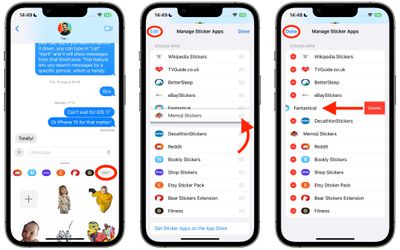
- Below the text input field, swipe left across the installed sticker apps all the way to the end of the row, then tap the Edit button.

- To rearrange the sticker apps as you want them to appear in the previous row, press the three lines beside an app and drag it up or down to your preferred to location.
- To delete a sticker app, tap Edit in the top left, then tap the red delete button next to the app in question.
- To finish, tap Done in the top right.
That's all you need to do. The way you organize vanilla iMessage apps has also changed in iOS 17 – check out our dedicated how-to if you want to learn more.
























![Apple Pulls Keynote, Pages and Numbers From App Store [Update: Back]](https://images.macrumors.com/t/Okb7kitB_gNr6qe5Pex9nQIysD8=/112x112/article-new/2026/01/Apple-Creator-Studio-iWork-suite.jpg)





















