

In iOS 18.1 and later, Apple makes it easier than ever to share Apple Music songs to TikTok [App Store]. Keep reading to learn how the app streamlines the process of making music-focused content on the social platform.
TikTok has become a leading venue for music discovery, with countless songs going viral through its short-form videos and trends. Recognizing the demand for sharing music on the platform, Apple in iOS 18.1 added a function that makes sharing songs from Apple Music to TikTok extremely simple.
The direct sharing feature automatically links the song to your TikTok post. This ensures proper attribution while making it easier for others to find and use the same track. So whether you want to create a mood-setting photo montage, or simply share a great song with your followers, this Apple Music integration helps you do it more efficiently. The following steps show you how it's done.
- Open the Apple Music app and find the song you want to share.
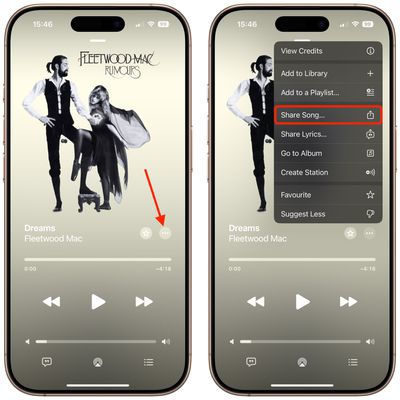
- Tap the More button (three dots), then tap Share Song... (the square with an upward arrow).

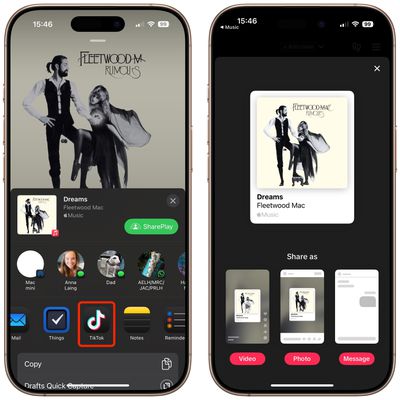
- Select TikTok from the second row of sharing options. (If you don't see it, tap More to manually add it to the row.)
- The TikTok app will open, giving you three different ways to share the song. You can create a video with the song as background music, or share it as a photo post with the song attached. Alternatively, you can send it as a private message to another TikTok user.
If you create a video, TikTok will automatically cue up the song and let you record your content with the music playing in the background. The song will also be properly linked to your post, allowing viewers to easily find the track on Apple Music and use it themselves.




















