
How to Use Siri on Apple Watch - MacRumors
Skip to Content

How to Use Siri on Apple Watch

by

Anyone with an iPhone 4S or newer knows how to use Siri. Even if you've never used the "Hey Siri" feature on iOS 8, you can probably figure it out fairly easily. However, on a completely different device, like Apple Watch, accessing Siri may need a little bit of extra training.
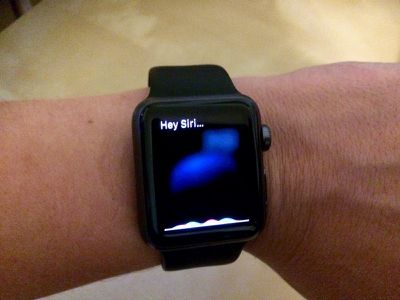
How to use Hey Siri Apple Watch 3
If you are having trouble getting Siri to activate, we've got a tutorial that may help shed some light on how to get her attention. Plus with one simple question, you can find out everything that your personal assistant can help you with on Apple Watch

Using "Hey Siri"

How to use Hey Siri Apple Watch 1You can get Siri's attention by raising your wrist and speaking the words "Hey Siri" within range of Apple Watch. You can also ask follow up questions the same way.

You can use Hey Siri while you are viewing an app, in the Notifications screen, or on the Home screen. But if you are having trouble getting her attention, try the steps above.

One other reason that you may be having trouble using Hey Siri is if the microphone is blocked. Apple Watch's microphone is on the side of the casing, so if you have a bulky jacket sleeve up against the side where the mic is, it may muffle your voice.

Using the Digital Crown

Just like long-pressing the Home button on the iPhone, you can long-press the Digital Crown on Apple Watch to activate Siri. This works in any screen at any time. Hold down the Digital Crown to ask Siri a question and then let go. To follow up with more questions, hold down the Digital Crown again, or say "Hey Siri."

What Can Siri Do?
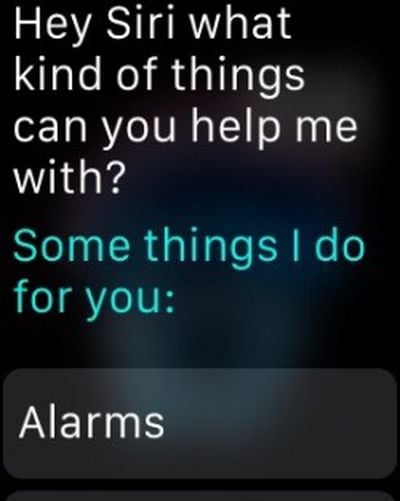
How to use Hey Siri Apple Watch 2Although the personal assistant can help you out on Apple Watch, it isn't quite as robust as it is on the iPhone and will offer to hand off some functions like restaurant reservations to the iPhone. If you'd like to see a list of things that Siri can do, say the words, "What kinds of things can you help me with?" Or, if you prefer brevity, just say, "help."

The long list includes the various functions that Siri can perform, like setting alarms, opening apps, making phone calls, and sending messages. Weather, maps, music controls, sports scores, stocks, basic Q&A facts, and Bing-powered web image searches are all supported through Siri. Plus, each item includes a list of example sentences you can say to activate a feature.

There are a few unique commands on the Apple Watch -- try asking Siri how many steps you've taken or how many calories you've burned during the day. Siri will open up the Activity app to the proper screen to let you know.

Siri on Apple Watch may seem a bit like a new employee at first, but just like the personal assistant on your iPhone, it will grow more robust with time and Apple will undoubtedly add more features as time goes by. With the watch's small display size prohibiting an onscreen keyboard, Siri is one of the key ways to interact with the Apple Watch, so Apple is clearly putting significant effort into making it work well.


Related Roundup: Apple Watch 12
Buyer's Guide: Apple Watch (Buy Now)
Related Forum: Apple Watch

Top Rated Comments

QuiteSure Avatar
149 months ago
A surprisingly great use for Siri on the Watch: setting appointments while sitting at my computer. It's great to just wake up my watch, say "Hey Siri, create an appointment for tomorrow at 10 am John Smith". Siri creates the appointment, the sync with my desktop computer is almost instantaneous and I've accomplished in just 5 seconds what took me somewhat longer to do using the Mac's Calendar app and the keyboard.

Score: 3 Votes (Like | Disagree)
Reason077 Avatar
149 months ago
Uh.. It's the same as it in on the iPhone. Tap and hold, or use Hey Siri. How is this complicated in comparison?

Didn't you read the article? The entire first half (about 8 paragraphs!) is explaining the various situations in which Siri may have problems or simply won't work.

If the watch UI is in the wrong state then there are multiple steps required to activate Siri. On an iPhone it's always available and always easy!
Score: 2 Votes (Like | Disagree)
larrylaffer Avatar
149 months ago
I don't understand why Apple had to go and make Siri so complicated on the Apple Watch that MacRumors has to explain to us how to use it.

Siri should be simple. Apple Watch engineers should hang their heads in shame. They bring dishonor upon their company. Shame on them! Shame on Apple!

Uh.. It's the same as it in on the iPhone. Tap and hold, or use Hey Siri. How is this complicated in comparison?
Score: 2 Votes (Like | Disagree)
149 months ago
I don't understand why Apple had to go and make Siri so complicated on the Apple Watch that MacRumors has to explain to us how to use it.

Siri should be simple. Apple Watch engineers should hang their heads in shame. They bring dishonor upon their company. Shame on them! Shame on Apple!

Is that sarcasm? Doesn't sound too hard to me. Over time things will be refined just like on the iPhone.
Score: 2 Votes (Like | Disagree)
Reason077 Avatar
149 months ago
I don't understand why Apple had to go and make Siri so complicated on the Apple Watch that MacRumors has to explain to us how to use it.

Siri should be simple. Apple Watch engineers should hang their heads in shame. They bring dishonor upon their company. Shame on them! Shame on Apple!
Score: 2 Votes (Like | Disagree)
WildCowboy Avatar
149 months ago
About Siri. Other than playing with it, I haven't used it much on the Watch.
Have any of you found compelling or more convenient applications of Siri on the Watch vs. the iPhone?

Without a keyboard for input, Siri is much more compelling/convenient on Watch compared to iPhone. Great for sending quick messages.

Just feels weird to talk into your watch in public. But it feels weird to talk to Siri on the iPhone in public too.
Score: 2 Votes (Like | Disagree)

Popular Stories

Apple TV 4K 4th Generation Top View5

New Apple TV 4K Announced With A19 Chip, Updated Siri Remote, More

Tuesday October 13, 2026 6:08 am PDT by
Apple today announced the fourth-generation Apple TV 4K, with key features including an A19 chip, Siri AI support, an updated Siri Remote that has Find My support with Precision Finding, built in far-field microphones, support for surround sound with four HomePods in front and rear pairs, and more. The A19 chip in the new Apple TV 4K delivers up to 50% faster CPU performance and up to twice...
homepod mini 2 feature6

Apple Announces $149 HomePod Mini 2 With Siri AI, 'Sound Glow', and Four-Speaker Surround Sound

Tuesday October 13, 2026 6:11 am PDT by
Apple today announced a new HomePod mini equipped with Siri AI, new colors, and improved audio experiences. The new HomePod mini has an S10 chip that supports advanced computational audio, and Apple says it optimizes dynamic range, loudness, and acoustic performance in real-time. A Sound Glow feature turns the HomePod mini's top into a "visual canvas" that glows and animates in sync with...
New Apple TV 4K and Siri Remote Have These 14 New Features Feature

New Apple TV 4K and Siri Remote Have These 14 New Features

Tuesday October 13, 2026 10:26 am PDT by
The new Apple TV 4K and updated Siri Remote unveiled today have quite a few new features, as outlined in our all-in-one summary below. Here are 11 changes coming with the new Apple TV: A19 chip, for up to 50% faster CPU performance and up to twice as fast graphics performance compared to the previous model with the A15 chip. 8GB of RAM is very likely, up from 4GB of RAM in the previous ...
Latest Stories
Apple Blocks Certificates That Could Help Attackers Fake Websites
7 minutes ago
Giant iPhone Duo Installations Spotted at Apple Fifth Avenue
47 minutes ago
iPhone Duo 2 Prototypes Include Under-Display Face ID
1 hour ago
Tesla App Gains iPad and iPhone Duo Support
5 hours ago
Apple Reportedly Boosts iPhone Duo Orders by 44%
5 hours ago
Fortnite Returning to Australian App Store After Court Ruling
6 hours ago
Apple Ordered to Open iPhone to Rival App Stores in Australia
6 hours ago
Apple Suppliers Face Hurdles Cutting Circuit Board Emissions
7 hours ago
Things Updated for iPhone Duo With Adaptive Layout
7 hours ago
Simplicity and Siri AI Are HomeView's Killer Features, Apple Says
7 hours ago
iPhone Duo Reviewers Really Miss Face ID
12 hours ago
Does the iPhone Duo Run Hot? Here's What Reviews Found
14 hours ago
Apple Music's New Look is Now Live on Apple's Website
14 hours ago
Anthropic Launches Claude Duet, a Proactive AI Agent
15 hours ago
What 32,000 Folds Did to the iPhone Duo's Hinge
16 hours ago
iPhone Duo's Hidden FaceTime Camera Takes 'Trash' Photos
17 hours ago
iPhone Duo Has 'Edge Light' Feature That Debuted on Macs Last Year
18 hours ago
Apple Support App Updated for iPhone Duo's Larger Display
18 hours ago
Amazon Sweetens the Deal on Entry-Level 16-Inch MacBook Pro With $570 Off
18 hours ago
iPhone Duo Tips Over on MagSafe Stands When Unfolded
18 hours ago
Apple Music's New Look Officially Announced
20 hours ago
iPhone Duo Supports Apple Pencil Starting With iOS 27.2
21 hours ago
iPhone Duo Accessories Roundup: Cases and Screen Protectors From OtterBox, ZAGG, and More
21 hours ago
Apple Stores Will Have 'Limited' Availability of iPhone Duo for Walk-In Customers
22 hours ago
iPhone Duo Reviews Explain Why Device is Both 'Fun' and 'Frustrating'
22 hours ago
Apple Says 'Reachability' Feature Coming to iPhone Duo Later This Year
23 hours ago
Loop Capital Cuts Apple Rating Over iPhone Sales Outlook
1 day ago
Apple Stores in Bordeaux and Lille Looted During French Protests
1 day ago
Bluesound Adds Native Apple Music Support
1 day ago
Apple CEO John Ternus Explains What Makes Good Product Design
1 day ago








































