

Apple in iOS 16 introduced a Remove Subject From Background option for photos on your iPhone, and in iOS 17, you can also use the feature to create and save your own stickers. Keep reading to learn how it works.
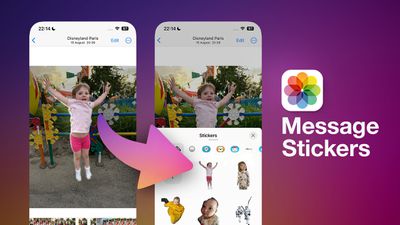
In iOS 16, Apple enhanced its Visual Look Up capability for photos by making it possible to isolate the subject of a picture from its background so that you can copy it to the clipboard for use elsewhere or share it in another app.
With iOS 17, Apple has taken the feature further by allowing you to export isolated photo subjects as stickers that you can use in Messages. And if the subject is in a Live Photo, the sticker will even animate.
There are a number of effects that can be added to make your digital stickers look more like real stickers, including a white outline, comic-like shading, a puffy 3D look, and a shiny, holographic finish. The sticker effects will animate and reflect the light appropriately, making your self-created stickers look professionally done.
The following steps show you how to create your first photo-sourced sticker in iOS 17.
- Launch the Photos app and select an image from your library containing a well-defined subject.
- Press and hold on the subject until it ripples and a white glow flows around its outline.
- In the popup menu that appears, tap Add Sticker.
- To change the look of your sticker, tap Add Effect, and you'll be given several options including Original, Outline, Comic, Puffy, and Shiny.
- Tap Done to finish.
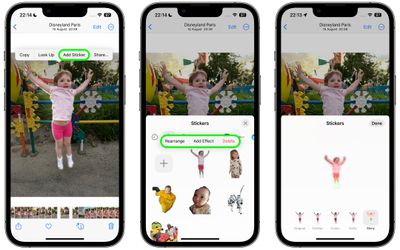
That's all you need to do. The next time you open Messages, you'll find it in your personal stickers collection, ready to send to friends and family. To use it in a Messages conversation thread, simply tap the + button next to the compose field, then tap Stickers.
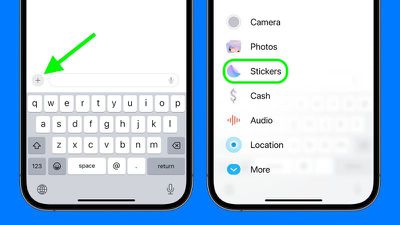
Tap the sticker in question, then tap the Send button. Alternatively, you can long-press the sticker and drag it into the conversation, or even onto a specific message bubble, just like a tapback reaction.
In iOS 17, Apple has added several new features to its Messages app to make communicating with other Apple users more creative and fun. Check out our dedicated Messages roundup to learn else is in store when iOS 17 is publicly released next month.
























![Apple Pulls Keynote, Pages and Numbers From App Store [Update: Back]](https://images.macrumors.com/t/Okb7kitB_gNr6qe5Pex9nQIysD8=/112x112/article-new/2026/01/Apple-Creator-Studio-iWork-suite.jpg)




















Top Rated Comments