
How to Use the Siri Raise to Speak Feature in watchOS 5 - GeekWebGuides
Skip to Content

How to Use the Siri Raise to Speak Feature in watchOS 5

by

Apple's watchOS 5 update includes a new Siri feature that eliminates the need to say "Hey ‌Siri‌" or push the Digital Crown to activate the personal assistant.

Instead, you can raise your wrist and speak right to ‌Siri‌, with the Apple Watch able to detect your movements and your desire to relay a ‌Siri‌ command. It's simple to enable, and it works well once you know a few tricks.

Enabling Raise to Speak
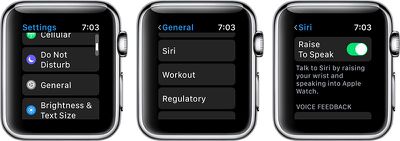
siriraisetospeak

  1. Open the Settings app.
  2. Choose "General."
  3. Scroll down to "‌Siri‌" and Tap it.
  4. Make sure "Raise to Speak" is toggled on.

You can leave "Hey ‌Siri‌" enabled right alongside "Raise to Speak," and use whichever ‌Siri‌ activation method is most convenient.

Using Raise to Speak

Using Raise to Speak is as simple as raising up your wrist and speaking into your Apple Watch.

Lift your wrist as you would to view the time or do any other Apple Watch activity, and then speak a command. Most people will find that they need to bring the watch a little closer to their face than they would just to view it, so if you can't get Raise to Speak to work, hold your wrist closer to your mouth.

Raise to Speak is a slightly different gesture than just raising your arm to look at the time, and the Apple Watch can tell the difference in intent.

Raise to Speak Tips

  • Raise to Speak needs to be fairly close to your face to interpret a ‌Siri‌ voice command, which prevents it from automatically activating for the most part. If it's not working, bring your wrist closer to the speaker of the Apple Watch before trying a command.
  • Raise to Speak works both at the watch face and when an app is open. It does need to be activated with the wrist raising gesture, though.
  • You need to speak at a normal speaking volume for the watch to detect a Raise to Speak command. Whispering will not work.
  • Because Raise to Speak seems to rely on proximity to the Apple Watch's speaker, ‌Siri‌ is not going to trigger when other people are speaking.

Other Siri Options

In the ‌Siri‌ section of the Settings app, accessible by following the steps above, you can also choose your Voice Feedback settings for whenever ‌Siri‌ is activated if you have an Apple Watch Series 3.
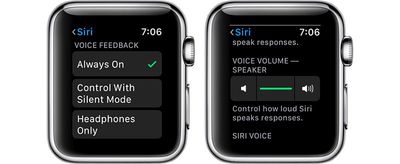
sirioptionsapplewatch
This isn't a new setting, but it's worth revisiting alongside Raise to Speak. You can choose to set Voice Feedback (aka vocal replies) to "Always On," "Control With Silent Mode," which will silence ‌Siri‌ if Silent Mode is turned on, or Headphones Only, which will cause ‌Siri‌ to provide vocal replies if you're wearing AirPods or other Bluetooth enabled headphones.

You can also set ‌Siri‌'s voice volume in the same section of the Settings app by tapping the volume icons or using the Digital Crown. This sets ‌Siri‌'s overall response volume when the personal assistant responds to queries aloud.

Raise to Speak is a useful feature on Apple Watch for everyone, but especially for HomePod owners. If you want to activate ‌Siri‌ on your watch, you can now do so without accidentally triggering a ‌HomePod‌ that might be in the room with the "Hey ‌Siri‌" command.

Related Roundup: Apple Watch 12
Buyer's Guide: Apple Watch (Buy Now)
Related Forum: Apple Watch

Top Rated Comments

DocMultimedia Avatar
108 months ago
Couldn't we wait until watchOS 5 is past beta for these instructional videos? It doesn't even mention the word beta in the entire article.

Not everyone lives in the beta world. Of course I do. Just not on my watch. ;)


Score: 7 Votes (Like | Disagree)
Craiger Avatar
108 months ago
Is this for series 3 only? I’m not seeing this on series 2.
Score: 6 Votes (Like | Disagree)
HiVolt Avatar
108 months ago
I would hope they would get raise to wake working properly first. So many times when i want to look at my watch it doesnt wake. This was with the Series 0 and Series 3.
Score: 4 Votes (Like | Disagree)
chrisdazzo Avatar
108 months ago
Is this for series 3 only? I’m not seeing this on series 2.
Same. Pretty sure it’s a Series 3 only feature. Good ol’ Apple.
Score: 3 Votes (Like | Disagree)
108 months ago
I turned this feature off 12 hours in. I’m a hand talker and it kept activating every few minutes. Very annoying.
Score: 2 Votes (Like | Disagree)
FelixDerKater Avatar
108 months ago
1st - Raise
2nd - Speak
...
Score: 2 Votes (Like | Disagree)

Popular Stories

Apple TV 4K 4th Generation Top View5

New Apple TV 4K Announced With A19 Chip, Updated Siri Remote, More

Tuesday October 13, 2026 6:08 am PDT by
Apple today announced the fourth-generation Apple TV 4K, with key features including an A19 chip, Siri AI support, an updated Siri Remote that has Find My support with Precision Finding, built in far-field microphones, support for surround sound with four HomePods in front and rear pairs, and more. The A19 chip in the new Apple TV 4K delivers up to 50% faster CPU performance and up to twice...
homepod mini 2 feature6

Apple Announces $149 HomePod Mini 2 With Siri AI, 'Sound Glow', and Four-Speaker Surround Sound

Tuesday October 13, 2026 6:11 am PDT by
Apple today announced a new HomePod mini equipped with Siri AI, new colors, and improved audio experiences. The new HomePod mini has an S10 chip that supports advanced computational audio, and Apple says it optimizes dynamic range, loudness, and acoustic performance in real-time. A Sound Glow feature turns the HomePod mini's top into a "visual canvas" that glows and animates in sync with...
New Apple TV 4K and Siri Remote Have These 14 New Features Feature

New Apple TV 4K and Siri Remote Have These 14 New Features

Tuesday October 13, 2026 10:26 am PDT by
The new Apple TV 4K and updated Siri Remote unveiled today have quite a few new features, as outlined in our all-in-one summary below. Here are 11 changes coming with the new Apple TV: A19 chip, for up to 50% faster CPU performance and up to twice as fast graphics performance compared to the previous model with the A15 chip. 8GB of RAM is very likely, up from 4GB of RAM in the previous ...
Latest Stories
Giant iPhone Duo Installations Spotted at Apple Fifth Avenue
11 minutes ago
iPhone Duo 2 Prototypes Include Under-Display Face ID
27 minutes ago
Tesla App Gains iPad and iPhone Duo Support
4 hours ago
Apple Reportedly Boosts iPhone Duo Orders by 44%
5 hours ago
Fortnite Returning to Australian App Store After Court Ruling
5 hours ago
Apple Ordered to Open iPhone to Rival App Stores in Australia
6 hours ago
Apple Suppliers Face Hurdles Cutting Circuit Board Emissions
6 hours ago
Things Updated for iPhone Duo With Adaptive Layout
6 hours ago
Simplicity and Siri AI Are HomeView's Killer Features, Apple Says
7 hours ago
iPhone Duo Reviewers Really Miss Face ID
12 hours ago
Does the iPhone Duo Run Hot? Here's What Reviews Found
13 hours ago
Apple Music's New Look is Now Live on Apple's Website
14 hours ago
Anthropic Launches Claude Duet, a Proactive AI Agent
14 hours ago
What 32,000 Folds Did to the iPhone Duo's Hinge
15 hours ago
iPhone Duo's Hidden FaceTime Camera Takes 'Trash' Photos
17 hours ago
iPhone Duo Has 'Edge Light' Feature That Debuted on Macs Last Year
17 hours ago
Apple Support App Updated for iPhone Duo's Larger Display
17 hours ago
Amazon Sweetens the Deal on Entry-Level 16-Inch MacBook Pro With $570 Off
18 hours ago
iPhone Duo Tips Over on MagSafe Stands When Unfolded
18 hours ago
Apple Music's New Look Officially Announced
19 hours ago
iPhone Duo Supports Apple Pencil Starting With iOS 27.2
20 hours ago
iPhone Duo Accessories Roundup: Cases and Screen Protectors From OtterBox, ZAGG, and More
21 hours ago
Apple Stores Will Have 'Limited' Availability of iPhone Duo for Walk-In Customers
21 hours ago
iPhone Duo Reviews Explain Why Device is Both 'Fun' and 'Frustrating'
21 hours ago
Apple Says 'Reachability' Feature Coming to iPhone Duo Later This Year
23 hours ago
Loop Capital Cuts Apple Rating Over iPhone Sales Outlook
1 day ago
Apple Stores in Bordeaux and Lille Looted During French Protests
1 day ago
Bluesound Adds Native Apple Music Support
1 day ago
Apple CEO John Ternus Explains What Makes Good Product Design
1 day ago
UK Proposes New Ways to Help Apple Pay Rivals
1 day ago








































