

 Apple overhauled several features in its stock Messages app in iOS 13, introducing an enhanced search function, new Memoji customization options, and more.
Apple also improved the conversation information screen available to you in individual message threads, allowing you to find shared media quickly and easily. Keep reading to learn how to access this information section on your iPhone or iPad.
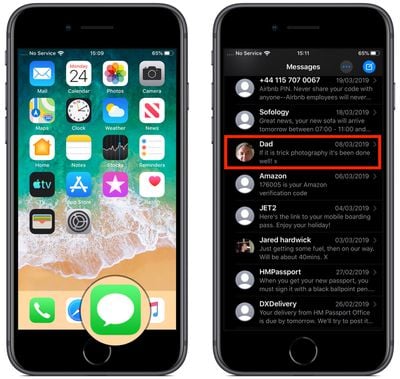
- Launch the Messages app on your iOS device.
- Tap on an existing message thread in the Messages list.

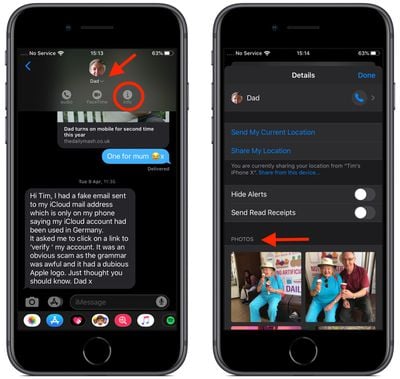
- Tap the chevron beside the contact's name at the top of the screen to reveal additional options.
- Tap the Info icon (the circled "I").
- You should see the Info or "Details" panel, which includes options at the top to send or share your current location with the contact, as well as a toggle to Hide Alerts for new messages in this thread.
- The section below these options has been overhauled in iOS 13, offering a more organized look at the kind of media that has been shared in the thread. Subsection previews appear for photos, videos, links, attachments, and locations, any of which you can tap to access further sharing options via the Share Sheet icon (the square with an arrow pointing out).
- Tap Show All below a media kind preview to reveal the complete collection for the thread.
Did you know that iOS 13 also includes new Animoji and Memoji stickers for use in Messages?
Tag: Messages
Related Forum: iOS 13

























![Apple Pulls Keynote, Pages and Numbers From App Store [Update: Back]](https://images.macrumors.com/t/Okb7kitB_gNr6qe5Pex9nQIysD8=/112x112/article-new/2026/01/Apple-Creator-Studio-iWork-suite.jpg)



















