

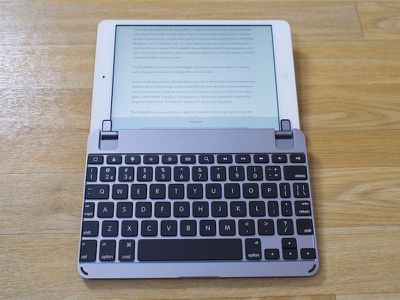
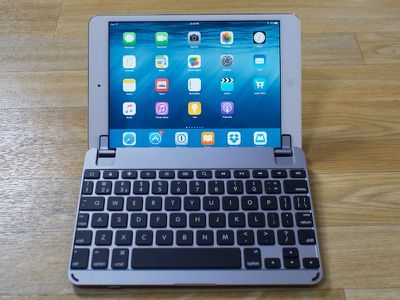
Brydge, a company that sells high-quality keyboards for the iPad, has expanded its keyboard lineup with a new BrydgeMini model designed to work with the iPad mini 1, 2, and 3. With the BrydgeMini, which has been modeled after a MacBook keyboard, the iPad mini turns into a miniature MacBook - albeit with a much more cramped typing surface.
Like all Brydge keyboards, the BrydgeMini is made from aluminum that matches the finish of the iPad. It's available in Silver, Space Gray, and Gold, and the build quality is excellent. Brydge charges a lot for its keyboards, but they're almost always worth the cost. The BrydgeMini isn't a keyboard case - it's just a keyboard, with two silicone-lined tabs that hold the iPad mini in place. The BrydgeMini has a limited number of viewing angles as the tabs can be angled forwards or backwards slightly, but due to the design, it can't be used with the iPad in portrait mode.
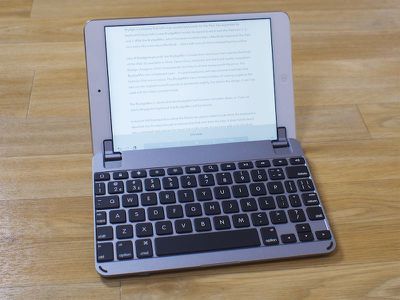
The BrydgeMini is identical to the BrydgeAir but has been shrunk down, so if you've used a BrydgeAir keyboard, the BrydgeMini will be familiar.
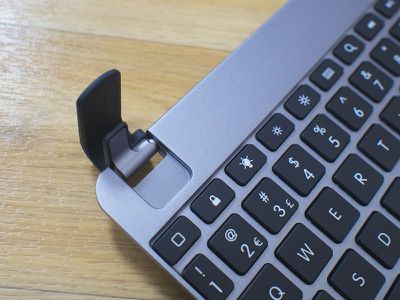
It doesn't fold backwards to allow the iPad to be used in tablet mode while the keyboard is attached, but it's easy enough to remove the iPad mini from the tabs. It does fold forward into a clamshell-style design for travel, but in this mode, it's going to add a lot of bulk to Apple's littlest tablet. It weighs in at 300 grams or .66 pounds, essentially doubling the weight of the iPad mini. The iPad mini weighs 331 grams or 0.73 pounds.
The BrydgeMini is also quite thick, so when in clamshell mode, it's going to double the thickness of the iPad mini. It'll still fit comfortably in a bag or backpack, but it's definitely negating the slim profile of the iPad.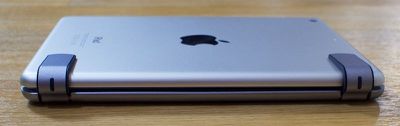
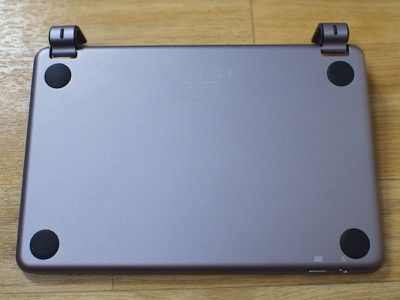
At the bottom there are four silicone feet to keep it stable on a flat surface, and because of its rigid design and the way the iPad mini fits into it, the BrydgeMini can also be used in a lap. That's not always possible with other keyboards, so it's a nice perk.
Setup is simple enough. Turn it on, hold down the keyboard button at the bottom edge, and go to the Bluetooth section of the Settings app on the iPad mini to connect. I had no trouble getting it paired and it also stayed paired while in use.
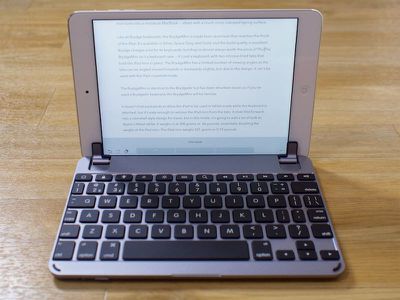
The entirety of the BrydgeMini's length is dedicated to the keyboard, but the iPad mini is only 7.87 inches long, so the keyboard keys are cramped. It takes time to adjust to the smaller size of the iPad mini keys going from a bigger keyboard, but I can type at a reasonable pace. I'm not matching the speeds that I get on a full-size keyboard and I wouldn't want to use the BrydgeMini for an entire term paper or anything lengthy, but it works for emails and shorter pieces of writing.
On the keyboard, the biggest issue is shrunken shift, return, and punctuation keys. They're tiny, so it's easy to hit the wrong key if you're not looking down at the keyboard. As for the keys themselves, there's a good amount of force and travel when pressing them, but there was an issue that I just couldn't get over - they squeak. There's a distinctive squeaking sound when hitting some of the keys, which I found distracting. It doesn't happen all of the time or with all of the keys (it's primarily a space bar problem), and I'm not sure if it's something that would go away with time, but it didn't lessen during my week of testing the keyboard (UPDATE: It turns out I had a defective unit -- a second unit did not squeak. See the end of the review for more info).
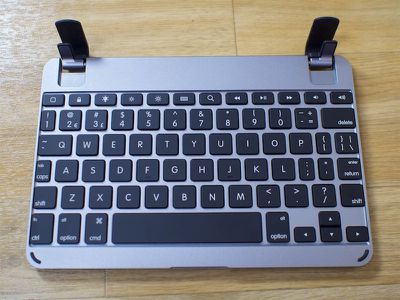
At the top of the keyboard, there are several quick action keys that go to the home screen of the iPad, lock it, bring up search, turn on the on-screen keyboard, and control media playback and screen brightness. Most iPad keyboards have these features, but they're worth highlighting. The BrydgeMini also includes backlighting underneath the keys, a feature that's not quite as common. Backlighting is nice for typing in a darker room, and there are three adjustable levels of brightness.
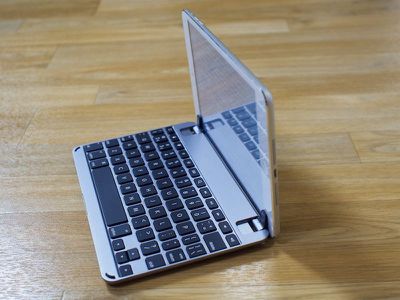
While the Brydge keyboard I tested for the iPad Air 2 holds my iPad tightly in place, the BrydgeMini is a much looser fit with the iPad mini 2 I used it with. Held upside down, it falls out, and it also has a tendency to shift around just a bit while I type when not on a flat surface. This is a problem because of those aforementioned tabs that hold the iPad mini in place - they often shift to cover just a bit of the screen at the sides. It only obscures the tiniest portion of the screen, but it's a distraction, even when using the clear silicone shims inside.
Update: Brydge has advised me that squeezing the tabs that hold the iPad mini make them fit tighter. This worked and alleviated the problem that I had with the iPad mini slipping out of the keyboard case. My iPad mini no longer shifts around, but the tabs that hold the iPad in place still cover just a tiny bit of the screen even when lined up properly. This is less noticeable with the clear silicone tab liners.
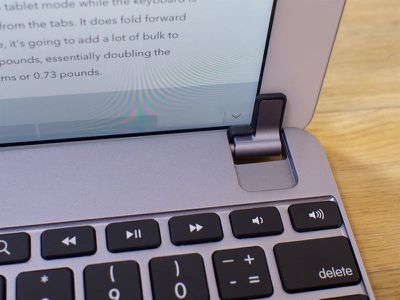
I also had some problems with the hinge that lets the iPad mini be angled slightly forwards or backwards. When angling backwards, it has a tendency to snap flat, so the limited viewing angles I get with the BrydgeMini are further limited.
The BrydgeMini charges via micro-USB and according to Brydge, it's only going to need a charge once every few months depending on your usage level. I didn't need to charge it during my testing period and didn't notice any significant battery drain problems.
Bottom Line
The BrydgeMini is a nice keyboard, but as with any keyboard for the iPad mini, it's tiny and can be difficult to type on. My first recommendation for iPad mini users is a larger standalone keyboard that gives more space for comfortable typing, but if you want something more compact that turns the iPad mini into a tiny MacBook, the BrydgeMini is a solid choice.
It has a solid key feel, there's built-in backlighting for use at night, it's made of the same quality aluminum as the iPad mini, and it has adjustable viewing angles, so you're getting a lot of bells and whistles with this keyboard.
If you're planning on updating your iPad in the next year or so, I don't recommend getting the BrydgeMini. It's $130, which is a pricy add-on to an iPad that starts at $399, and it doesn't work with the newest iPad mini 4, so it's also not going to work with subsequent iPad models.
This is a product that's late to market, coming right on the heels of the iPad mini 4, even though the iPad mini has been available for several years. Brydge is also taking pre-orders for a version for the iPad mini 4, which will ship in January.
I did a more in-depth review of the BrydgeAir keyboard for the iPad Air 2, which is worth checking out to get a few more details on the BrydgeMini. The two keyboards are similar in design, with the BrydgeMini being a smaller version of the BrydgeAir. The only significant difference is the BrydgeMini's lack of a built-in speaker.
Pros:
- Backlighting
- Keys feel great
- Good build quality
Cons:
- Expensive
- Adds a lot of bulk to iPad mini
- Tabs cover a tiny bit of the screen
- Tendency to snap backwards makes it hard to adjust angle
How to Buy
The BrydgeMini is available from the Brydge website for $129.99.
Update: Based on the premise that the first BrydgeMini iPad mini keyboad I received was defective, Brydge sent me a second unit to test. On the second unit, I did not run into the squeaky keys the first unit had, so that unit was likely damaged in shipping. BrydgeMini buyers should be aware that squeaking is not normal on the BrydgeMini keyboard, so if you begin experiencing that problem, make sure to contact Brydge for a replacement unit as it is abnormal behavior.
















































Top Rated Comments