

How to Change Who Sees Your Messages Profile in iOS 13 - MacRumors
Skip to Content

How to Change Who Sees Your Messages Profile in iOS 13

by

ios 7 messages iconIn iOS 13, Apple allows you to create a standardized iMessage profile that includes your name and photo – or an Animoji/Memoji – to accompany the messages you send to friends so that they know who you are.

The idea behind the new feature is that contacts in the Messages app become more easily identifiable, similar to the way WhatsApp and Facebook Messenger contacts have recognizable profile pictures.

The difference in iOS 13 is that, thanks to Apple's privacy-minded approach, you can control who sees your Messages profile. The steps below show you how.

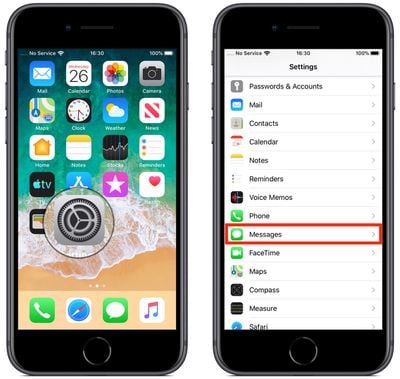
  1. Launch the Settings app on your iPhone or iPad.
  2. Scroll down and tap Messages.
    messages app in iOs 13

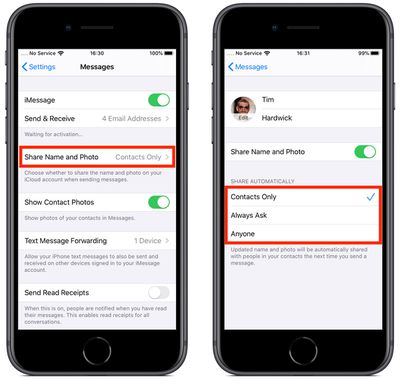
  3. Tap Share Name and Photo.
  4. Toggle the switch next to Share Name and Photo to the green ON position if it isn't already enabled.
    messages profile options in iOS 13

  5. To automatically share your updated name and photo with people in your contacts the next time you send a message, tap Contacts Only; to be prompted before your updated name and photo are shared, tap Always Ask; or to automatically share your updated profile with everyone, select Anyone and then tap Yes to confirm.
Want to use a custom Memoji as your profile picture in Messages but don't know where to start? Click here to learn how to create your own Memoji in iOS 13.

Popular Stories

iOS 26

iOS 26.4 Adds Two New Features to CarPlay

Tuesday March 24, 2026 1:55 pm PDT by
iOS 26.4 was released today, and it includes a couple of new features for CarPlay: an Ambient Music widget and support for voice-based chatbot apps. To update your iPhone 11 or newer to iOS 26.4, open the Settings app and tap on General → Software Update. CarPlay will automatically offer the new features so long as the iPhone connected to your vehicle is running iOS 26.4 or later....
Apple Business hero

Apple Unveils 'Apple Business' All-in-One Platform

Tuesday March 24, 2026 8:53 am PDT by
Apple today announced Apple Business, a new all-in-one platform that unifies device management, productivity tools, and customer outreach features. The service is designed to be a consolidated replacement for several of Apple's existing business-focused offerings, including Apple Business Essentials, Apple Business Manager, and Apple Business Connect. It provides organizations with a single...
AirPods Pro Firmware Feature

Apple Releases New Firmware for AirPods Pro 3, AirPods Pro 2 and AirPods 4

Tuesday March 24, 2026 12:31 pm PDT by
Apple today released new firmware for the AirPods Pro 2, AirPods Pro 3, and the AirPods 4. The firmware has a version number of 8B39, up from 8B34 on the AirPods Pro 3, 8B28 on the AirPods Pro 2, and 8B21 on the AirPods 4. There is no word on what's included in the firmware, but Apple has a support document with limited notes. Most updates are limited to bug fixes and performance...

















