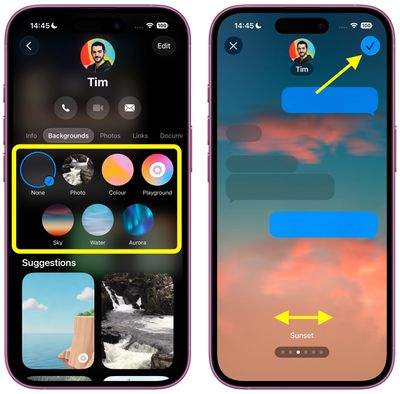
Apple's iOS 26 finally brings custom conversation backgrounds to the Messages app, letting you personalize your chats with photos, colors, or images generated by Image Playground. Third-party messaging apps like WhatsApp have offered this kind of feature for years, so finally iPhone owners can now also add their own visual flair to text conversations in Apple's stock messaging app.
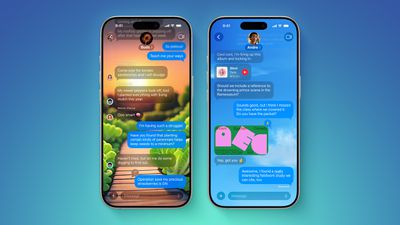
ten messages features
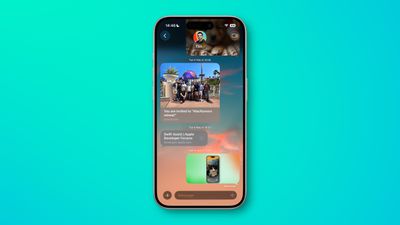
Custom backgrounds can help you organize conversations at a glance and add a personal touch to your most important chats. You might choose a sunset photo for family group chats, a solid color for work messages, or a fun AI-generated image for conversations with friends. Just note that when you change the background, everyone in the conversation will also see it.

Bear in mind that iOS 26 is currently in beta testing and will see a general release this fall.

How to Change a Messages Background

The following steps show you how to customize any conversation background in iOS 26:

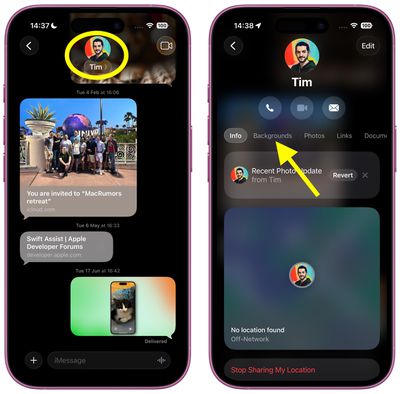
  1. Open Messages on your iPhone, then tap the conversation you want to customize.
  2. Tap the contact name or group name at the top of the conversation, then tap Backgrounds.
    messages

  3. Choose from the available options: Photo (select an image from your photo library), Color (pick from preset solid colors), or Playground (describe an image for Image Playground to generate it). Alternatively, choose from Sky, Water, Aurora, or one of the Suggestions.
  4. Swipe left and right to preview the available Styles.
  5. Tap the top-right check button to apply your selection.
    messages

How to Reset to Default Background

If you want to return to the standard Messages background:

  1. Open the conversation with the custom background, then tap the contact name or group name at the top.
  2. Tap Backgrounds.
  3. Tap the None option, foremost in the selection screen, then tap the back arrow to confirm.

Tips for Better Backgrounds

Choose backgrounds that don't interfere with text readability. Dark photos work well with light text bubbles, while lighter backgrounds pair better with dark text. iOS 26 automatically adjusts text contrast, but some combinations work better than others.
messages
Custom backgrounds sync across all your devices signed in with the same Apple Account, so changes you make on your iPhone will appear on your iPad and Mac as well, provided they are updated to iPadOS 26 and macOS Tahoe, respectively.


Top Rated Comments

adrianlondon Avatar
8 months ago
Looks great! Legibility is overrated. (MacOS 26)


Attachment Image
Score: 16 Votes (Like | Disagree)
Attirex Avatar
8 months ago
Why you would want to make your text thread look like a geocities web page ca. 1996 is beyond me.
Score: 12 Votes (Like | Disagree)
jdawgnoonan Avatar
8 months ago
To me this should never be an operating system level major feature. It is on par with new emojis.
Score: 10 Votes (Like | Disagree)
Diopter Avatar
8 months ago
It is kind of ridiculous that you can’t set a background just for yourself, without having to force it on the other person/people in the conversation.

Other apps like LINE allow you to set a background that only you see.
Score: 9 Votes (Like | Disagree)
miamialley Avatar
8 months ago

It is kind of ridiculous that you can’t set a background just for yourself, without having to force it on the other person/people in the conversation.

Other apps like LINE allow you to set a background that only you see.
Completely agree. Apple really baffling lately with a lot of things.
Score: 8 Votes (Like | Disagree)
Jackbequickly Avatar
8 months ago
Great for the kids. Where are the real advances in technology. Hope it is not just a “new look”!

Hopefully this can be turned off!
Score: 6 Votes (Like | Disagree)

Popular Stories

Apple Logo Zoomed

Tim Cook Teases Plans for Apple's Upcoming 50th Anniversary

Thursday February 5, 2026 12:54 pm PST by
Apple turns 50 this year, and its CEO Tim Cook has promised to celebrate the milestone. The big day falls on April 1, 2026. "I've been unusually reflective lately about Apple because we have been working on what do we do to mark this moment," Cook told employees today, according to Bloomberg's Mark Gurman. "When you really stop and pause and think about the last 50 years, it makes your heart ...
iOS 26

iOS 26.3 and iOS 26.4 Will Add These New Features to Your iPhone

Tuesday February 3, 2026 7:47 am PST by
While the iOS 26.3 Release Candidate is now available ahead of a public release, the first iOS 26.4 beta is likely still at least a week away. Following beta testing, iOS 26.4 will likely be released to the general public in March or April. Below, we have recapped known or rumored iOS 26.3 and iOS 26.4 features so far. iOS 26.3 iPhone to Android Transfer Tool iOS 26.3 makes it easier...
imac video apple feature

Apple Makes Its Second-Biggest Acquisition Ever

Tuesday February 3, 2026 12:45 pm PST by
Apple recently acquired Israeli startup Q.ai for close to $2 billion, according to Financial Times sources. That would make this Apple's second-biggest acquisition ever, after it paid $3 billion for the popular headphone maker Beats in 2014. This is also the largest known Apple acquisition since the company purchased Intel's smartphone modem business and patents for $1 billion in 2019....
wwdc sans text feature

Apple Rumored to Announce New Product on February 19

Thursday February 5, 2026 12:22 pm PST by
Apple plans to announce the iPhone 17e on Thursday, February 19, according to Macwelt, the German equivalent of Macworld. The report, citing industry sources, is available in English on Macworld. Apple announced the iPhone 16e on Wednesday, February 19 last year, so the iPhone 17e would be unveiled exactly one year later if this rumor is accurate. It is quite uncommon for Apple to unveil...
Finder Siri Feature

Why Apple's iOS 26.4 Siri Upgrade Will Be Bigger Than Originally Promised

Friday February 6, 2026 3:06 pm PST by
In the iOS 26.4 update that's coming this spring, Apple will introduce a new version of Siri that's going to overhaul how we interact with the personal assistant and what it's able to do. The iOS 26.4 version of Siri won't work like ChatGPT or Claude, but it will rely on large language models (LLMs) and has been updated from the ground up. Upgraded Architecture The next-generation...