In macOS Ventura, Apple has added major updates to the Messages app, introducing some features that rival third-party messaging platforms have had for years. One of these changes is the ability to edit iMessages‌. Keep reading to learn how it works.

General Apps Messages
Almost all mobile users can relate to the situation where you send a text message only to immediately realize that the meaning of the message is unintended because of an innocent typo. In earlier versions of macOS and iOS, Apple's iMessage service functioned just like regular texts in this way. In other words, once the message was sent, there was nothing you could do about it.

Fortunately, that's not the case in ‌iOS 16‌ and macOS Ventura. For the first time, Apple lets you edit a message up to a maximum of 15 minutes after it was sent. But before you use the edit function outlined below, there are some caveats to the feature that you should be aware of. First, it only works with iMessages, not SMS messages, so both people need to have an Apple device for it to work effectively.

Second, using the message editing feature requires participants to be using Apple's latest software updates, including ‌‌iOS 16‌‌, ‌iPadOS 16‌, ‌macOS Ventura‌, and watchOS 9. People on an earlier version of iOS or those on Android will see text that says "Edited to [text]" when receiving an edited iMessage.

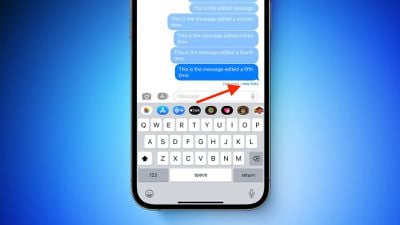
Third, and perhaps most importantly for some, when you edit a message, the edit history is sent to the recipient along with the edit, so the original content is visible. Recipients of an edited message can tap on the small blue "Edited" label to see the edit history, and hide it again by tapping Hide Edits.
iMessage

How to Edit a Sent iMessage

With all that in mind, here's how you edit a sent iMessage on a Mac running macOS Ventura. (They are similar to the equivalent steps for iOS 16.)

  1. With the Messages app open, select the conversation thread containing the sent message that you want to edit.
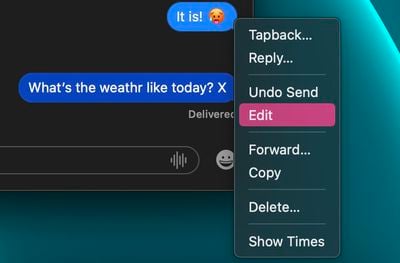
  2. Right-click (or Ctrl-click) the sent message that you want to fix. (If you don't see the option, the message was sent over 15 minutes ago and you cannot edit it.)
  3. Select Edit from the contextual menu.
    messages

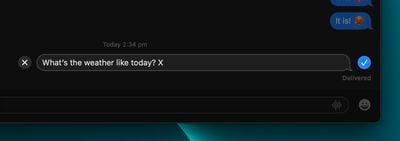
  4. Make the desired changes in the input field, then click the blue tick on the right to confirm. If you decide you don't want to edit the message, tap the grey X on the left.
    messages

That's all there is to it. Did you know that you can also unsend iMessages in macOS Ventura? Check out our dedicated how-to to learn how.


Popular Stories

Apple Logo Zoomed

Tim Cook Teases Plans for Apple's Upcoming 50th Anniversary

Thursday February 5, 2026 12:54 pm PST by
Apple turns 50 this year, and its CEO Tim Cook has promised to celebrate the milestone. The big day falls on April 1, 2026. "I've been unusually reflective lately about Apple because we have been working on what do we do to mark this moment," Cook told employees today, according to Bloomberg's Mark Gurman. "When you really stop and pause and think about the last 50 years, it makes your heart ...
wwdc sans text feature

Apple Rumored to Announce New Product on February 19

Thursday February 5, 2026 12:22 pm PST by
Apple plans to announce the iPhone 17e on Thursday, February 19, according to Macwelt, the German equivalent of Macworld. The report, citing industry sources, is available in English on Macworld. Apple announced the iPhone 16e on Wednesday, February 19 last year, so the iPhone 17e would be unveiled exactly one year later if this rumor is accurate. It is quite uncommon for Apple to unveil...
Finder Siri Feature

Why Apple's iOS 26.4 Siri Upgrade Will Be Bigger Than Originally Promised

Friday February 6, 2026 3:06 pm PST by
In the iOS 26.4 update that's coming this spring, Apple will introduce a new version of Siri that's going to overhaul how we interact with the personal assistant and what it's able to do. The iOS 26.4 version of Siri won't work like ChatGPT or Claude, but it will rely on large language models (LLMs) and has been updated from the ground up. Upgraded Architecture The next-generation...
iOS 26

iOS 26.3 and iOS 26.4 Will Add These New Features to Your iPhone

Tuesday February 3, 2026 7:47 am PST by
While the iOS 26.3 Release Candidate is now available ahead of a public release, the first iOS 26.4 beta is likely still at least a week away. Following beta testing, iOS 26.4 will likely be released to the general public in March or April. Below, we have recapped known or rumored iOS 26.3 and iOS 26.4 features so far. iOS 26.3 iPhone to Android Transfer Tool iOS 26.3 makes it easier...
iphone 17 pro dark blue 1

iPhone 18 Pro Max Rumored to Deliver Next-Level Battery Life

Friday February 6, 2026 5:14 am PST by
The iPhone 18 Pro Max will feature a bigger battery for continued best-in-class battery life, according to a known Weibo leaker. Citing supply chain information, the Weibo user known as "Digital Chat Station" said that the iPhone 18 Pro Max will have a battery capacity of 5,100 to 5,200 mAh. Combined with the efficiency improvements of the A20 Pro chip, made with TSMC's 2nm process, the...