
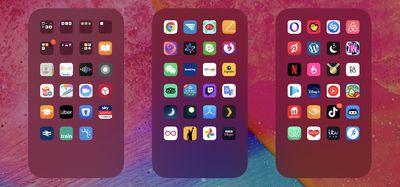
With so many apps available for iPhone on the App Store, it doesn't take long before you download so many that managing them can start to get a bit tiresome and unwieldy. Having multiple pages of apps extending off the initial Home Screen can be a burden, especially if you like to organize what you can see on the screen into any sort of meaningful order.
apps
Fortunately, in iOS 14 and later, Apple allows you to hide individual pages of apps from sight. This not only gives your ‌iPhone‌ a tidier look and feel, but it also serves to bring the App Library closer to your initial ‌Home Screen‌, making it that much easier to access using fewer swipes.

How to Hide iPhone App Pages on the Home Screen

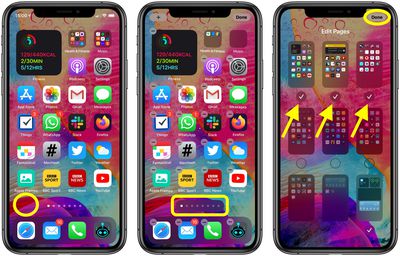
  1. Long press on a blank area of the ‌Home Screen‌ or any additional page of apps.
  2. Once in jiggle mode, tap the app page dot icons just above the Dock at the bottom of the screen.
  3. Tap to uncheck any app pages that you want to hide.
  4. Tap Done in the top-right corner of the screen to finish.
  5. Tap Done in the top-right corner to exit out of jiggle mode.
home screen apps

To reinstate any app pages you hid using this method, simply follow the steps again, but in step 3, check the app pages you want to unhide instead.


Related Forum: iOS 14

Top Rated Comments

H3boy Avatar
73 months ago
Am I the only person that has everything not on the home page in a folder?
Score: 10 Votes (Like | Disagree)
itsmilo Avatar
73 months ago

Am I the only person that has everything not on the home page in a folder?
yeah. Home Page has my most frequently used apps and the 2nd page is just apps put into categorized folders. Same reason I have no use for the new App Library screen
Score: 8 Votes (Like | Disagree)
jclo Avatar
73 months ago

Is 'jiggle mode' official terminology? :D
Sure is. https://support.apple.com/guide/iphone/move-and-organize-apps-iph822ece7dd/ios

Bonus:
Score: 6 Votes (Like | Disagree)
mannyvel Avatar
73 months ago
My wife needs this article. She has like 12 pages of apps, which drives me crazy when I have to use her phone.
Score: 6 Votes (Like | Disagree)
alexandr Avatar
73 months ago

My wife needs this article. She has like 12 pages of apps, which drives me crazy when I have to use her phone.
so really it's you who needs this article ;)
Score: 4 Votes (Like | Disagree)
adrianlondon Avatar
73 months ago
Answers to some questions asked:

Can you remove/disable the App Library? No, just don't keep swiping right.

Can you hide every homescreen? No, you have to have one selected.

Can the homescreens be re-arranged? No. Shame.

Why is this thing a thing? Dunno; maybe for people who have a page full of work apps they want to hide at home, or a page full of dating apps and porn links they want to hide at work.
Score: 4 Votes (Like | Disagree)

Popular Stories

maxresdefault

Apple Shows Off a Key Reason to Upgrade to the iPhone 17

Saturday February 7, 2026 9:26 am PST by
Apple today shared an ad that shows how the upgraded Center Stage front camera on the latest iPhones improves the process of taking a group selfie. "Watch how the new front facing camera on iPhone 17 Pro takes group selfies that automatically expand and rotate as more people come into frame," says Apple. While the ad is focused on the iPhone 17 Pro and iPhone 17 Pro Max, the regular iPhone...
Finder Siri Feature

Why Apple's iOS 26.4 Siri Upgrade Will Be Bigger Than Originally Promised

Friday February 6, 2026 3:06 pm PST by
In the iOS 26.4 update that's coming this spring, Apple will introduce a new version of Siri that's going to overhaul how we interact with the personal assistant and what it's able to do. The iOS 26.4 version of Siri won't work like ChatGPT or Claude, but it will rely on large language models (LLMs) and has been updated from the ground up. Upgraded Architecture The next-generation...
wwdc sans text feature

Apple Rumored to Announce New Product on February 19

Thursday February 5, 2026 12:22 pm PST by
Apple plans to announce the iPhone 17e on Thursday, February 19, according to Macwelt, the German equivalent of Macworld. The report, citing industry sources, is available in English on Macworld. Apple announced the iPhone 16e on Wednesday, February 19 last year, so the iPhone 17e would be unveiled exactly one year later if this rumor is accurate. It is quite uncommon for Apple to unveil...
apple wallet drivers license feature iPhone 15 pro

Apple Says These 7 U.S. States Plan to Offer iPhone Driver's Licenses

Monday February 9, 2026 6:24 am PST by
In select U.S. states, residents can add their driver's license or state ID to the Apple Wallet app on the iPhone and Apple Watch, and then use it to display proof of identity or age at select airports and businesses, and in select apps. The feature is currently available in 13 U.S. states and Puerto Rico, and it is expected to launch in at least seven more in the future. To set up the...
14 inch MacBook Pro Keyboard

New MacBook Pros Could Now Arrive in March

Sunday February 8, 2026 6:02 am PST by
New MacBook Pro models with the M5 Pro and M5 Max chips could arrive as soon as Monday, March 2, according to Bloomberg's Mark Gurman. In today's "Power On" newsletter, Gurman said that the release of new MacBook Pro models is tied to the release of macOS Tahoe 26.3. The launch is said to be slated for as early as the week of March 2. He added that the M4 Pro and M4 Max models on sale today...















