
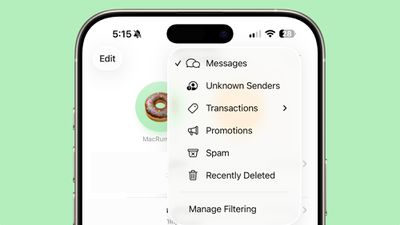
In iOS 26, Apple has introduced enhanced message filtering that gives you more control over unwanted texts, separating spam messages from unknown senders into distinct categories. Here's how to set up and use these new filtering options to keep your Messages app clutter-free.
ios 26 messages filtering

Enable Message Filtering Settings

Before you can filter messages from unknown senders in iOS 26, you need to enable the filtering options in your Messages settings.

  1. Open the Messages app on your iPhone.
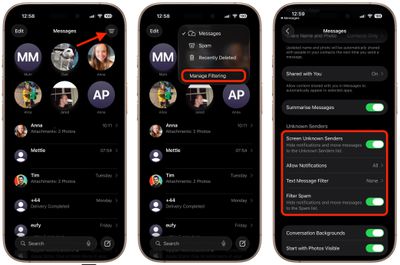
  2. Tap the filter menu icon (three horizontal lines) in the top-right corner.
  3. Select Manage Filtering. This takes you directly to the Messages section in Settings.
  4. Toggle on Screen Unknown Senders to enable filtering.
messages

Once activated, "Unknown Senders" will appear as an option in the Messages app's filter menu.

Configure Additional Filtering Options

While you're in the message filtering settings, you'll find several other options worth configuring:

  • Allow Notifications lets you choose whether to receive alerts for certain messages from unknown senders, such as verification codes.
  • Text Message Filter provides additional screening options (this setting may not appear unless you have a third-party app with message filtering extensions installed, depending on your region and carrier).
  • Filter Spam is enabled by default and automatically routes suspected spam to a separate folder.
messages filter menu full ios

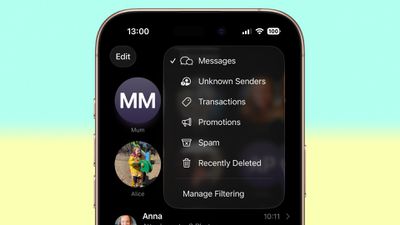
If the Text Message Filter option appears, selecting it will add "Transactions" and "Promotions" to your filter menu, giving you even more granular control over business-related messages.

Review Messages From Unknown Senders

Once filtering is active, messages from contacts not saved in your address book automatically go to the Unknown Senders section. You'll see a number in brackets next to Unknown Senders in the filter menu indicating new messages, but you won't receive disruptive alerts.

To access these filtered messages, tap the filter menu icon and select Unknown Senders. From here, you can review messages and take action on legitimate senders.
unknown message sender mark as known
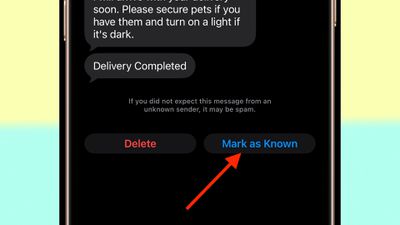
Tap any message thread to view its contents. At the bottom of the conversation, you'll see a blue Mark as Known button. Tapping this ensures future messages from that number appear in your main Messages list.

Alternatively, tap the phone number at the top of the conversation to add the sender directly to your Contacts app. Both approaches prevent future messages from this sender being filtered to Unknown Senders.

Recover Spam Messages

By default, messages that iOS 26 classifies as spam are automatically moved to the Spam folder.

To recover a legitimate message that was incorrectly filtered, open the Spam section from the filter menu, tap the message you want to recover, then tap Not Spam. The message will move back to your main Messages list, and future messages from that sender won't be filtered as spam.

If spam filtering isn't working for you as intended, you can turn off the Filter Spam toggle in the Messages app's Settings menu.


Top Rated Comments

Fynd Avatar
20 weeks ago
Too bad it doesn't work like this with the Apple Watch, defeating the purpose.... My phone hides these like I want but the notifications still fly into my wrist.0
Score: 3 Votes (Like | Disagree)
gatorvet96 Avatar
20 weeks ago

Too bad it doesn't work like this with the Apple Watch, defeating the purpose.... My phone hides these like I want but the notifications still fly into my wrist.0
Agreed. If I’m wearing my Apple Watch I get spam phone calls and texts but not on the phone. I turned off all messages and calls on watch for now as I rarely use my watch for texts or calls anyway. The check box that says mirror phone doesn’t help either.
Score: 2 Votes (Like | Disagree)
WarmWinterHat Avatar
20 weeks ago
Thanks for the article.. I was a bit confused with the changes in iOS 26.

Question for anyone, what are the Transaction and Promotion categories? I have never seen anything be put in either of the groups. Do they actually do anything?
Score: 1 Votes (Like | Disagree)
nepalisherpa Avatar
20 weeks ago
I love this feature. I do have to check the filtered list every once in a while and mark numbers as "known" but it has worked great so far.
Score: 1 Votes (Like | Disagree)
MNWildFan Avatar
20 weeks ago

Thanks for the article.. I was a bit confused with the changes in iOS 26.

Question for anyone, what are the Transaction and Promotion categories? I have never seen anything be put in either of the groups. Do they actually do anything?
They do

If it's some promotional text I get, instead of just coming into my main incoming messages folder, it will get filtered into there

For the most part, they're just spam so I'll just go to there and hit the report spam button and then choose the delete and report spam option that appears after that

Oddly enough, though I don't get most of them on my primary number, on my secondary number I have for T-Mobile's satellite plan I have alongside my regular service (though with another carrier) I get a ton of them
Score: 1 Votes (Like | Disagree)
svish Avatar
19 weeks ago
Think it will be very useful for me especially taking control of notifications from unknown senders. Will have to try it out after updating.
Score: 1 Votes (Like | Disagree)

Popular Stories

Apple Logo Zoomed

Tim Cook Teases Plans for Apple's Upcoming 50th Anniversary

Thursday February 5, 2026 12:54 pm PST by
Apple turns 50 this year, and its CEO Tim Cook has promised to celebrate the milestone. The big day falls on April 1, 2026. "I've been unusually reflective lately about Apple because we have been working on what do we do to mark this moment," Cook told employees today, according to Bloomberg's Mark Gurman. "When you really stop and pause and think about the last 50 years, it makes your heart ...
wwdc sans text feature

Apple Rumored to Announce New Product on February 19

Thursday February 5, 2026 12:22 pm PST by
Apple plans to announce the iPhone 17e on Thursday, February 19, according to Macwelt, the German equivalent of Macworld. The report, citing industry sources, is available in English on Macworld. Apple announced the iPhone 16e on Wednesday, February 19 last year, so the iPhone 17e would be unveiled exactly one year later if this rumor is accurate. It is quite uncommon for Apple to unveil...
Finder Siri Feature

Why Apple's iOS 26.4 Siri Upgrade Will Be Bigger Than Originally Promised

Friday February 6, 2026 3:06 pm PST by
In the iOS 26.4 update that's coming this spring, Apple will introduce a new version of Siri that's going to overhaul how we interact with the personal assistant and what it's able to do. The iOS 26.4 version of Siri won't work like ChatGPT or Claude, but it will rely on large language models (LLMs) and has been updated from the ground up. Upgraded Architecture The next-generation...
iOS 26

iOS 26.3 and iOS 26.4 Will Add These New Features to Your iPhone

Tuesday February 3, 2026 7:47 am PST by
While the iOS 26.3 Release Candidate is now available ahead of a public release, the first iOS 26.4 beta is likely still at least a week away. Following beta testing, iOS 26.4 will likely be released to the general public in March or April. Below, we have recapped known or rumored iOS 26.3 and iOS 26.4 features so far. iOS 26.3 iPhone to Android Transfer Tool iOS 26.3 makes it easier...
iphone 17 pro dark blue 1

iPhone 18 Pro Max Rumored to Deliver Next-Level Battery Life

Friday February 6, 2026 5:14 am PST by
The iPhone 18 Pro Max will feature a bigger battery for continued best-in-class battery life, according to a known Weibo leaker. Citing supply chain information, the Weibo user known as "Digital Chat Station" said that the iPhone 18 Pro Max will have a battery capacity of 5,100 to 5,200 mAh. Combined with the efficiency improvements of the A20 Pro chip, made with TSMC's 2nm process, the...















