Apple's HomePod speaker is best enjoyed when linked to an Apple Music subscription, since this allows you to make the most of Siri's enhanced music smarts and its DJ-like role as a personal music curator, or "mixologist", as Apple calls it.
homepod apple music image
As ‌Apple Music‌ subscribers will know, the streaming service learns your music preferences based on what you say and play, which helps it populate the app's "For You" section with new songs that you might like, and enables ‌Siri‌ to generate new playlists on the fly at your request.

But what if you frequently command ‌Siri‌ to play music for other people in your household, such as your children? Using ‌HomePod‌ to play songs that don't align with your own tastes can quickly skew your ‌Apple Music‌ recommendations. Fortunately, you can avoid your recommendations being inundated with Encanto or Frozen tracks by disabling a simple setting. It's called "Use Listening History", and here's how to find it.

How to Disable Your HomePod's Listening History

  1. Open the Home app on your iPhone or iPad.

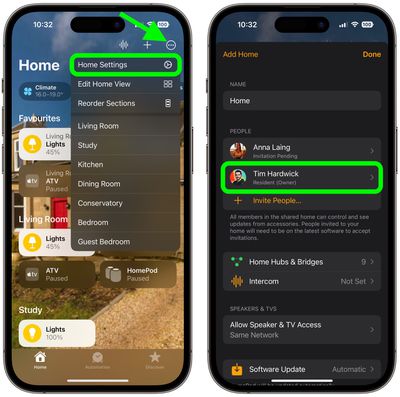
  2. Tap the ellipsis button (three encircled dots) in the top-right corner of the main Home screen.

  3. Tap Home Settings in the dropdown menu.
  4. Under "People," tap your name.
    home

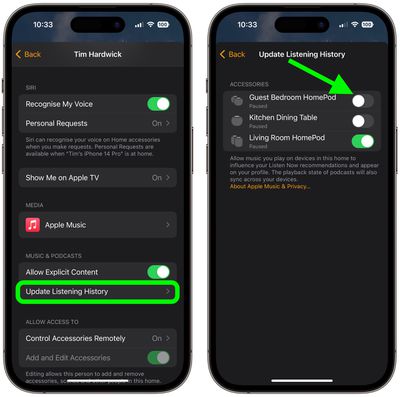
  5. Under the "Music & Podcasts" section, tap Update Listening History.
  6. Toggle off the switches next to the ‌HomePod‌ devices that you want to disable listening history updates on.
    home

That's all there is to it. By turning off the setting, ‌HomePod‌ will happily continue to play songs from Apple's vast music catalog for you on behalf of others in your home, but the songs will be excluded from its personal curation algorithms and they will no longer appear in your recommendations. You can easily revert this setting by turning the switches back on in the last step.


Related Roundups: HomePod, HomePod mini

Top Rated Comments

TwoLivesLeft Avatar
104 months ago
So I need to take out my phone to control a voice activated speaker?
I just tried "Hey Siri turn use listening history off" and "Hey Siri turn use listening history on" — this works just fine. The HomePod says "I turned on/off use listening history."

It also works if you say it more naturally, e.g., "Hey Siri start using listening history" or "Hey Siri stop using listening history."

Edit: You can also ask "Hey Siri are you using listening history?" or "Hey Siri is use listening history on?" and it will tell you if it's on or off.
Score: 12 Votes (Like | Disagree)
mcdspncr Avatar
104 months ago
Man this thing really needs multiuser/multiaccount support
Score: 6 Votes (Like | Disagree)
nheilweil Avatar
104 months ago
So I need to take out my phone to control a voice activated speaker?
It’s a one-time setting they are recommending.
[doublepost=1518189472][/doublepost]They totally fail to mention the downside of this workaround that turning off that setting not only prevents your Music from being affected by other users — it also prevents the system from recommending music based on what you listen to!

So because the system can’t recognize multiple users (as can similar Amazon or Google units), one is left reducing the functionality of the experience in order to safe guard it from others in the family that use it as well.

I’m a total Apple fan boy but this unit is a real fail and Apple needs to figure this out!
Score: 5 Votes (Like | Disagree)
HobeSoundDarryl Avatar
104 months ago
So I need to take out my phone to control a voice activated speaker?
The alternative you seem to favor could accidentally start a nuclear war, shut down power in 6 states and/or initiate the HP self-destruct sequence countdown

"Hey Siri toggle my use listening history off"
Siri: I don't know what use listening history means.

"Hey Siri toggle my use listening history off"
Siri: I found this on the web about the history of Listerine.

"Hey Siri toggle my use listening history off"
Siri: I can't find any stores that sell used Listerine near you.

"Hey Siri..."
Siri interrupts: RandyHudson, maybe you should try asking Alexa?

All ;)
Score: 3 Votes (Like | Disagree)
cknibbs Avatar
104 months ago
Man this thing really needs multiuser/multiaccount support
I have no sources and this is just my gut speaking, but I have full confidence that multi-user support is in the pipeline. First and foremost it always seems that privacy and security are the most important to Apple and that’s why up front some of the features are limited (like not being able to start a call from the HomePod) I wouldn’t be surprised if in HomeOS 2.0 or whatever they call it, that many of the requested features will be arriving, and that as developers take advantage of SiriKit that the HomePod will compete with Alexa and Google Assistant in third party support. But again, that’s just my gut feeling (or perhaps wishful thinking)
Score: 2 Votes (Like | Disagree)
randyhudson Avatar
104 months ago
So I need to take out my phone to control a voice activated speaker?
Score: 2 Votes (Like | Disagree)

Popular Stories

Apple Logo Zoomed

Tim Cook Teases Plans for Apple's Upcoming 50th Anniversary

Thursday February 5, 2026 12:54 pm PST by
Apple turns 50 this year, and its CEO Tim Cook has promised to celebrate the milestone. The big day falls on April 1, 2026. "I've been unusually reflective lately about Apple because we have been working on what do we do to mark this moment," Cook told employees today, according to Bloomberg's Mark Gurman. "When you really stop and pause and think about the last 50 years, it makes your heart ...
wwdc sans text feature

Apple Rumored to Announce New Product on February 19

Thursday February 5, 2026 12:22 pm PST by
Apple plans to announce the iPhone 17e on Thursday, February 19, according to Macwelt, the German equivalent of Macworld. The report, citing industry sources, is available in English on Macworld. Apple announced the iPhone 16e on Wednesday, February 19 last year, so the iPhone 17e would be unveiled exactly one year later if this rumor is accurate. It is quite uncommon for Apple to unveil...
Finder Siri Feature

Why Apple's iOS 26.4 Siri Upgrade Will Be Bigger Than Originally Promised

Friday February 6, 2026 3:06 pm PST by
In the iOS 26.4 update that's coming this spring, Apple will introduce a new version of Siri that's going to overhaul how we interact with the personal assistant and what it's able to do. The iOS 26.4 version of Siri won't work like ChatGPT or Claude, but it will rely on large language models (LLMs) and has been updated from the ground up. Upgraded Architecture The next-generation...
iOS 26

iOS 26.3 and iOS 26.4 Will Add These New Features to Your iPhone

Tuesday February 3, 2026 7:47 am PST by
While the iOS 26.3 Release Candidate is now available ahead of a public release, the first iOS 26.4 beta is likely still at least a week away. Following beta testing, iOS 26.4 will likely be released to the general public in March or April. Below, we have recapped known or rumored iOS 26.3 and iOS 26.4 features so far. iOS 26.3 iPhone to Android Transfer Tool iOS 26.3 makes it easier...
iphone 17 pro dark blue 1

iPhone 18 Pro Max Rumored to Deliver Next-Level Battery Life

Friday February 6, 2026 5:14 am PST by
The iPhone 18 Pro Max will feature a bigger battery for continued best-in-class battery life, according to a known Weibo leaker. Citing supply chain information, the Weibo user known as "Digital Chat Station" said that the iPhone 18 Pro Max will have a battery capacity of 5,100 to 5,200 mAh. Combined with the efficiency improvements of the A20 Pro chip, made with TSMC's 2nm process, the...