

Messages in iCloud, as the name suggests, stores your iMessages in Apple's cloud servers rather than on each of your individual devices, which has a number of benefits.
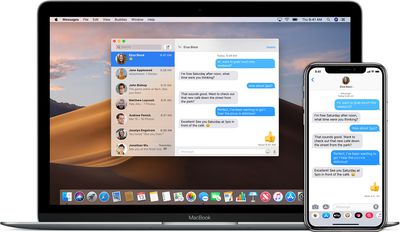
When you receive a message on one device, it shows up on all devices logged into the same iCloud account. Likewise, when you delete messages and conversations they are instantly removed from all your devices.
Another advantage of the feature is that your messages, photos, and other message attachments are stored in iCloud, which frees up space on your devices. In addition, all your messages appear when you sign into a new device with the same iCloud account.
To make sure that Messages in iCloud is turned on for you, follow these steps.
How to Enable Messages in iCloud on iOS
Bear in mind that iOS 11.4 or later must be running on your device for the feature to work.
- If you haven't already, enable two-factor authentication on your Apple account.
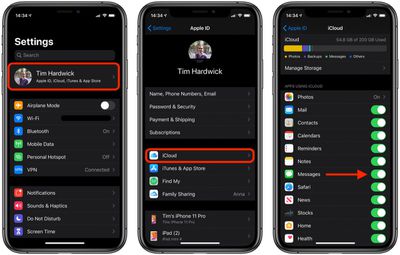
- Launch the Settings app on your iPhone or iPad.
- Tap your name in the banner at the top.

- Tap iCloud.
- Make sure the switch next to Messages is toggled to its green ON position.
How to Enable Messages in iCloud on Mac
Note that Messages in iCloud only works on Macs running macOS High Sierra (10.13.5) or later.
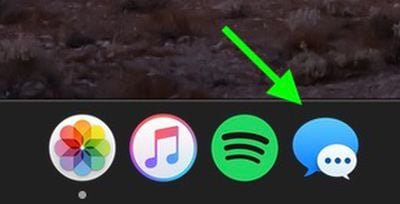
- Launch the Messages app on your Mac – you can find it in the Applications folder. It can also be found in the Dock on new Macs.
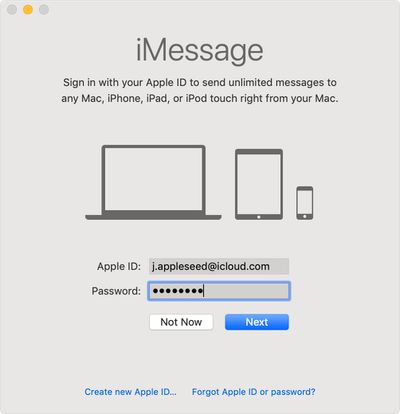
- If this is your first time using Messages on Mac, you'll be asked to sign in. Enter the same Apple ID that you use with Messages on your iPhone and other Apple devices.
- If you have two-step or two-factor authentication turned on for your Apple ID, enter your verification code.
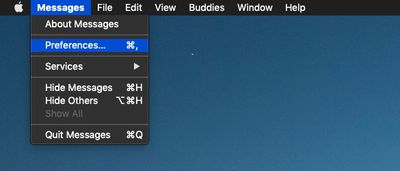
- Select Messages -> Preferences... in the menu bar.
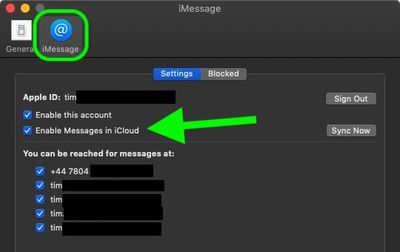
- Select the iMessage tab.
- Tick the box next to Enable Messages in iCloud.
What to Do if Downloading Messages From iCloud Gets Stuck

When you enable Messages in iCloud, your device will start downloading messages from other devices. This should only take a few minutes, but some users have reported that it can take hours, or otherwise go on indefinitely as if it's stuck. If you encounter this problem, here are a few things you can try to resolve it.
- Check that Apple's iCloud servers are operating normally. You can find out the status of Apple's services by going to the System Status website.
- Double-check that all your devices are logged into the same Apple ID / iCloud account.
- Disable Messages in iCloud, then re-enable it.
- Restart your devices.
- On your devices, sign out of iCloud, wait a minute or two, then sign back in again. To log out on iOS, open the Settings app, tap the banner with your name at the top, scroll down and tap Sign Out. On Mac, open System Preferences, click the iCloud pane, then select Sign Out.
With Messages in iCloud enabled, you'll probably want to be more careful when it comes to deleting messages, as once they're gone on one device, they're gone on all your devices. You'll get a confirmation prompt when deleting entire threads of messages, but individual messages don't offer this prompt, so that's just something to keep in mind.




















